
hfeabhahdlpcanbapenbpipdaolljddm


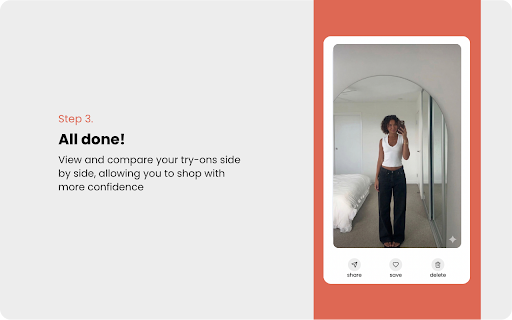


Free virtual try-on for any store — see how clothes look on you before buying. Try on any outfit before you buy — works on every online store, powered by Google. Fitly is the AI virtual try-on Chrome extension that works on any retailer. Shop SHEIN, H&M, ASOS, Amazon, Zara, or any store you love — upload your photo once, then drag and drop any clothing image to see exactly how it looks on you in seconds. No more guessing your size. No more unwanted returns. Just confident shopping. Install Fitly and open any online store. Upload one full-body photo — encrypted and stored securely. Drag any clothing item from the page into the Fitly side panel. See your AI-generated virtual try-on result in seconds. Start with 10 free try-ons every day — no credit card required. Works on every retailer — H&M, ASOS, Amazon, Zara, and thousands more. No store lock-in, no app switching. If the store has product images, Fitly works. Powered by Google Vertex AI — the same model powering Google Shopping's virtual try-on feature. Accurate draping, realistic colors, true-to-life fit visualization. Privacy-first — your photo is encrypted in transit and processed through private, token-protected Google AI endpoints. Fitly never sells, shares, or stores your image beyond your active session. Body measurement estimates — Fitly analyzes your photo to suggest your size for each item, so you order the right size the first time. Style comparison — save your favorite try-ons and compare outfits side by side before checkout. WORKS EVERYWHERE YOU SHOP Whether you're browsing H&M, scrolling ASOS, or finding a deal on Amazon, Fitly gives you a fitting room right in your browser. No jumping between apps. No returning clothes that don't fit. Try everything on before you click Buy. FOR SHOPPERS WHO HATE RETURNS Online shopping means clothes that arrive looking nothing like you expected. Fitly solves this. Upload your photo once, and every shopping session becomes a personal fitting room — instantly, on any site, for free. Does Fitly work on my favorite store? If the store has product images, Fitly works. H&M, ASOS, Amazon, Zara — and thousands of other retailers are all supported out of the box. How do I try something on? Right-click any product image and select "Try on with Fitly," or drag the image directly into the side panel. Results appear in seconds. Is it really free? Yes — 1 free every day + 30 try-on for 30 Days free trails. no credit card required. How is my photo kept private? Your image is encrypted and processed via Google's private Vertex AI endpoints using secure, token-protected links. Fitly never stores or sells your photo. What stores does it work with? Any online store with product images. H&M, ASOS, Amazon, Zara, and thousands more. ABOUT FITLY Fitly is built for fashion-forward online shoppers who are tired of ordering clothes that don't fit. Rated 5 stars. Version 3.0.

DAPPA Clip — Try On Clothes Online. Instantly.
The #1 way to see any outfit on yourself—while you shop. No more guessing. No more returns. Just real-time try-ons. 👀 See it. Click it. Try it on. Tired of clothes showing up and not fitting your vibe? DAPPA Clip lets you see how any garment looks on you before you buy—right from your browser. With just one click, you can: ✅ Virtually try on clothes from any website ✅ Use Tailor, DAPPA’s cutting-edge AI model, to visualise outfits on you ✅ Browse as usual—Pinterest, Instagram, your go-to brands... it works everywhere ✅ Turn inspiration into confidence, right when it matters most 💡 How it works 1. Spot an outfit you like 2. Right Click the image and select ‘Try On with DAPPA’ 3. See it on yourself—in seconds 🛍️ Try Before You Buy Shop smarter with zero guesswork. 🌐 Works Across the Web From Zara to Pinterest to that random boutique—DAPPA’s got you. ⚡ Powered by AI. Built for You. Tailor, our in-house AI, makes sure you see the real fit. What are you waiting for? Join the next generation of fashion shoppers. Try on any outfit. Anywhere. Right now. 👉 Install DAPPA Clip — and never shop the old way again. By installing this extension, you agree to DAPPA’s terms and conditions. Disclaimer: This extension uses Google Analytics to collect extension usage statistics to help improve user experience. If you want to opt out of Google Analytics tracking, please visit http://tools.google.com/dlpage/gaoptout or you can set up a filter in Adblock Plus or similar ad blocker tools like AdBlock, uBlock or Adblock Pro.

YouTube Study Mode
A cleaner YouTube experience for students. Hide distractions, set study hours, and allow only approved learning channels. YouTube Study Mode keeps YouTube useful for homework without the rabbit holes. FREE — Study Mode toggle Turn on Study Mode to instantly hide Shorts, recommendations, comments, trending, and other distractions. YouTube stays functional for learning without the addictive parts. PRO — $8/month or $62/year - Settings Lock — protect your controls with a 4-digit PIN so students can't undo them - Weekday Schedule — automatically activate Study Mode during school or homework hours - Approved Channels — restrict YouTube to only the channels you choose Perfect for parents setting up a focused homework environment, and teachers who need YouTube to stay on-curriculum during class. How to use: 1. Install the extension 2. Visit YouTube and click the YouTube Study Mode icon 3. Turn on Study Mode — distractions disappear instantly 4. Upgrade to Pro to add PIN protection, scheduling, and channel restrictions

Outfit Check
Add one full-body photo (or use a quick demo photo). Add product images from the current shop page with one click, or choose manually. Build a full outfit with multiple items (for example top, pants, shoes). Generate one realistic try-on preview image. Open the result in a clean page modal for easy viewing. Key features: One-click product image detection from the active page Manual on-page image selection for precise control Multi-item outfit builder across product pages Saved photo for faster repeat use Optional style instructions Simple side panel workflow for shopping Free plan: Includes a daily generation allowance. The extension shows remaining generations in real time. When the daily limit is reached, users can continue via “Support & unlock”. Privacy: Product images, photo input, and style text are only sent when the user clicks Generate. No background generation runs automatically. What's new in Version 0.1.104: - Refined the full extension UI with improved spacing, typography, and hierarchy. - Updated the header with smoother behavior and automatic minimize. - Improved the tutorial to reflect the latest features and workflow. - Polished the Try on button design and product-grid behavior. - Improved controls, spacing, and readability across Photo, Products, and Generate.

Stylar: Free Virtual Try Ons
Use Stylar to virtually try clothes on while online shopping. Upload a full-body photo of yourself and Stylar will show how you look wearing the product you are browsing. Save and share your outfits with Stylar! 💰 Save time and money Save on return shipping fees and become a more eco-friendly shopper by trying before buying. 😎 Shop online with maximum confidence Try things on from your favorite brands from the comfort of your own home. 👑 Discover new styles Mix & match items from different brands and retailers. Discover new ways to style items you already own, and make sure items on your wishlist match well with your existing closet! 🌎 Works with 25,000+ fashion sites See yourself in items from all your favorite brands and retailers Privacy Policy Privacy matters to us. Stylar will never share or sell your data without your permission. You can read more about our Privacy Policy here: https://stylar.notion.site/Stylar-Privacy-Policy-76059cd35f504c3a94ee397708737aec?pvs=4 Thank you for using Stylar! We really appreciate you being here early. Our team is always on the lookout for ways to improve the product to better serve our community. If you have feedback, feel free to shoot our founder Vincent an email at vince@stylar.com! 😊
