
hfcfehbfjekalinadmfnmejpheififec
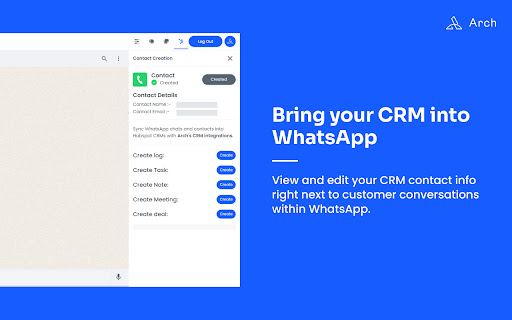
Arch is the integration between WhatsApp and Hubspot to sync the data into CRM and make it easy for a use. Arch is the integration between WhatsApp and HubSpot to sync the data into CRM and make it easy for a use. It's a bridge for two system to meet and open ways to flow the data from one to another.

IKiPop by IKiBlast
IKiPop by IKiBlast brings a touch of IkimerIA into your browser and let you access to all your favorite AI IKiPop is a versatile free Chrome extension designed to use ArtificiaI Intelligence while browsing. This multilingual add-on enhances your browsing by providing numerous features, whether for customers connecting to IKiBox, our private solution, or anyone wanting to tap into their preferred models like Bing, ChatGPT and Google Bard into your browser. It can be used freely by anyone looking to connect with their own public or private AI models. The plugin enables you to literally chat with your browser page content: • Pose questions and receive responses based on the webpage context. • Create concise summaries of online content to grasp key points swiftly. • Translate web pages into other languages, expanding your global reach. • Generate unique phrasing for selected text. • Extract crucial points from videos. • Clarify complex terms or concepts. • Segment extensive text into more digestible parts. • Decipher the purpose and functionality and review changes of code. These functionalities are effortlessly available through a user-friendly menu and enhance your web exploration experience. IKiPop seamlessly integrates with popular platforms, enabling direct assistance. Its floating chat boxes facilitate complex discussions, supporting multiple conversation threads with ease. A distinctive feature of the tool is the capacity to swiftly connect with various AI providers, allowing immediate access to your favorite services, with the ability to switch between them conveniently. Here's how to set up and use IKiPop: • Install the extension and pin it for immediate accessibility. • Click on it to access its settings panel and select the API mode you wish to interact with (you can add or remove model from your default list in the 'Modules' tab). • Once set, you just need to refresh the tab or open a new one to see a context menu appear when you select a piece of text, providing shortcuts to the main tools. • An immersive chat interface can be accessed via settings or right-clicking a selection. • Open settings for configuration, adjusting according to your needs, such as language or model selection. • Personalize available tools and theme in the menu and tweak the response length and its sensibility through the “Advanced” tab. If the menu doesn't appear post-installation, refresh the page or restart your browser. In case a model doesn't function as anticipated, you have the flexibility to switch. Note that we prioritize your privacy and don't collect or transmit any data beyond what you share during your conversations. Please exercise caution and avoid sharing sensitive information when using public AI services.

WhatsWey
Access your HubSpot CRM information from WhatsApp Web and log all conversations in the HubSpot contact timeline WhatsApp is your best audience engagement channel - for marketing, sales, and customer service. But what if you could make it even more powerful? With WhatsWey, you can combine the CRM capabilities of HubSpot, and add it to the immediacy and engagement of WhatsApp. With this extension, your WhatsApp Web application and HubSpot can work together to deliver powerful results: > Send 1:1 messages to your contacts from WhatsApp Web and from HubSpot Sync your customer journey across WhatsApp and HubSpot. > Manage your contacts and all associated conversations, deals, tickets, and tasks seamlessly between the two platforms. > Deliver a phenomenal customer experience because you can view all contact information, including all contact properties stored in HubSpot, right in WhatsApp Web.

SummarAI
Introducing SummarAI, the cutting-edge Chrome extension that empowers you to quickly and accurately summarize PDFs, text, and videos using advanced AI technology. With just a click, SummarAI extracts the most important information from your content, helping you save time and stay focused in the age of information overload. Swiftly summarize PDFs, text, and videos with a single click Utilize AI-powered algorithms for precise and accurate summaries Customize summary length to suit your needs Compatible with a wide range of content types and sources Ideal for students, researchers, professionals, and anyone who values brevity How it works: Install the SummarAI Chrome extension Navigate to the content you wish to summarize Click the SummarAI icon in your browser toolbar Choose your desired summary length and let the AI work its magic Read, share, or save your concise, AI-generated summary With SummarAI, you'll never again feel overwhelmed by endless streams of content. Whether you're a student trying to digest lengthy articles, a professional seeking to stay informed, or simply someone who values their time, SummarAI is the perfect tool to help you cut through the clutter and focus on what truly matters. Join the SummarAI community today and experience the future of content summarization! Note: SummarAI requires an internet connection to function, as it utilizes AI models hosted in the cloud. The extension respects user privacy and does not store any personal data or browsing history.

Asana Multi Filter
Allows multiple filters to be used on an Asana List page Asana task lists are wonderful, but only allow one filter at a time. This plugin reads data from an Asana list and allows you to keep only tasks that fulfill the filter criteria. Run it multiple times to filter all the way down. How it works: Reads Asana Spreadsheet data columns and deletes HTML rows on the front end. This does not change Asana data in any way. Refreshing the page brings everything back. Known Issues: Version 0.2.0 - Shift clicking remaining tasks will select hidden tasks. Ctrl + Click works fine. - Only works on List view. I will eventually get it working on Board view, but my current needs are satisfied. - Sometimes "Column" dropdown doesn't populate. Click "Refresh Lists" to have plugin pull data from Asana. - Custom columns are fully supported. Assignee, Due Date, and other Asana native column names operate differently than custom columns and I don't necessarily need them to work at the moment.
