
heppboaeahpojkecgadicmigabjonjma
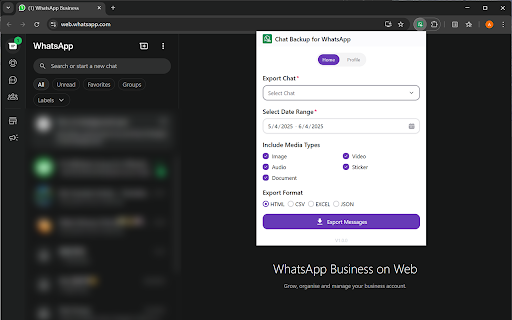


✨ Features 🔒 Secure Backup – Safely back up your WhatsApp chat messages, videos, images, audio, and documents 📅 Date Filter – Export messages from specific dates with precision 📁 Multi-format Export – Save your data in HTML, CSV, XLSX, or JSON formats 🚀 Get Started 1️⃣ Log in to WhatsApp Web 2️⃣ Open the extension and click “Export Messages” 📢 Disclaimer WA Keeper is an independent extension and is not affiliated with WhatsApp, Meta (Facebook Inc.), or any of their subsidiaries. All trademarks, logos, and brand names are the property of their respective owners.

Privacy Extension for WhatsApp web
Privacy extension for WhatsApp web. Hides messages, media, profile pics until hover. Control privacy settings and protect your data. WhatsApp Privacy Extension 🔒 | Privacy WhatsApp | Privacy Extension for WhatsApp Web Stay fully protected with the best Privacy Extension for WhatsApp Web! Whether you're screen sharing, working in a public place, or simply want extra security, the WhatsApp Privacy Extension gives you total control over your WhatsApp privacy — hiding sensitive chats, names, images, and more with customizable blur options. 🔑 Core Features: ✅ Toggle All Privacy Features Instantly • Blur all supported elements on WhatsApp Web with one click. • Instantly activate complete privacy WhatsApp settings without manual selection. • Ideal for meetings, recordings, public use, or streamers. ✅ Adjustable Blur Intensity • Control how strong the blur effect appears with a simple slider. • From light to heavy blur — customize your WhatsApp privacy experience to your needs. ✅ Blur Messages • Hide message texts inside chats to keep your conversations private. • Messages remain hidden until you choose to unblur them manually. ✅ Blur Last Message Preview • Prevent chat previews from leaking recent conversations in your chat list view. • Great for professional screen sharing and content creators. ✅ Blur User and Group Names • Conceal contact names and group titles from prying eyes. • Stay anonymous while sharing your WhatsApp Web screen. ✅ Blur Profile Pictures • Automatically hide all profile images across WhatsApp Web. • Safeguard personal photos and identity during public work or live sessions. ✅ Blur Images and Videos • Blur all media content like images, GIFs, and videos by default. • Keep media private until you decide to reveal them. ✅ Blur Entire WhatsApp Interface • Instantly blur the entire WhatsApp Web — chats, sidebars, and headers. • Perfect for emergency privacy control during unexpected moments. ✅ Blur Media Gallery 🖼️ • Blur the entire Media Gallery section on WhatsApp Web. • Prevent exposure of all shared images, videos, and documents stored in chats. • Ideal for professionals and privacy-conscious users who often share screens or record tutorials. Why Choose WhatsApp Privacy Extension? ✔️ Full privacy WhatsApp solution for web users. ✔️ One-click total screen privacy for instant protection. ✔️ Easily customizable blur strength and settings. ✔️ Designed for professionals, streamers, students, and anyone valuing online privacy. ✔️ Lightweight, fast, and effortless to use. Disclaimer: This extension is an independent tool and is not affiliated with, endorsed, or sponsored by WhatsApp™ or Meta Platforms, Inc. Usage must comply with WhatsApp’s terms and conditions. If you're looking for a secure, flexible, and easy-to-use Privacy Extension for WhatsApp Web, WhatsApp Privacy Extension is your perfect choice! Keep your chats, contacts, and media safe and private — always.

WA Chat Backup
WA Chat Backup is the fastest and easiest way to back up WhatsApp messages securely to your laptop or desktop. Whether you want to save your WhatsApp chat history, export WhatsApp messages, or store important conversations in PDF or Excel format, WA Chat Backup has you covered. 🔐 Protect Your Data & Keep a Permanent Record of All Important Conversations. 💡 Core Features of WA Chat Backup: ✅ Backup Chats by Message Count & Date Range • Choose how many messages you want to back up- 5, 20, 50, or more. • Export chats based on specific date ranges directly from WhatsApp Web. • Get flexibility and control with custom chat export options. ✅ Export as PDF, TXT, CSV (Multiple Format Support) • Choose your preferred format to download chats • Great for reporting, documentation, or legal use ✅ Back Up Individual or Group Chats • Export one-on-one conversations or entire WhatsApp groups • Perfect for professionals, teams, or customer communication tracking ✅ Download Media with Chat (Optional) • Optionally include images, videos, and documents with the chat backup • Organize everything neatly in folders ✅ Works Smoothly on WhatsApp Web • No need for mobile access to export chats. • Fully functional via WhatsApp Web in your browser. • Ideal for professionals, researchers, legal teams, and more. ✅ In-Built Support & Tutorial • Stuck somewhere? Access step-by-step video tutorials directly inside the extension. • Chat with the support team from the extension interface. ✅ User-Friendly Interface • Simple and intuitive design- no technical skills required. • Export WhatsApp chats in just 3 clicks. ✅ Secure & Private • Your chat data is processed on your device- nothing is stored on external servers. • 100% privacy guaranteed. 🚀 Why Choose WA Chat Backup? ✔️ Best tool to download WhatsApp chat history ✔️ Multiple format options (PDF, CSV, TXT) ✔️ Easy-to-use Chrome extension – no software required ✔️ Ideal for professionals, freelancers, and legal advisors ✔️ Secure – data saved only on your device ✔️ Perfect for users who need permanent WhatsApp chat records ✔️ Lightweight – doesn’t slow down your browser ✔️ No sign-up required 🎯 Use Cases ✅ Lawyers & Legal Teams – Export chats for evidence or case filing ✅ Freelancers & Coaches – Save client communications for invoicing or future reference ✅ HR & Recruiters – Back up candidate conversations ✅ Customer Support Teams – Archive WhatsApp interactions with customers ✅ Event Planners – Document group discussions and RSVPs 🔧 How to Install the Extension Step 1: Visit https://wa-chat-backup.com Step 2: Click "Add to Chrome" and pin the extension Step 3: Open web.whatsapp.com and log in Step 4: Open any individual or group chat Step 5: Click the WA Chat Backup extension → Select format → Export & download ⚠️ Disclaimer This extension is not endorsed by WhatsApp™ or Meta™. It is an independent tool developed to help users export their chat history from WhatsApp Web. Users must comply with WhatsApp’s terms of service. LEGAL WhatsApp™ is a trademark of WhatsApp Inc., registered in the U.S. and other countries. WA Chat Backup is not affiliated with WhatsApp™ or Meta™.

WA Chat Backup Exporter | WASBB.COM
Backup and export WhatsApp chats to HTML, CSV, JSON, or Excel, saving conversations and media files for flexible access and use. 🔥 Looking to safeguard essential conversations, photos, and videos? WhatsApp Chat Backup Exporter | WASBB.COM is the ideal solution! Effortlessly backup your chat history, images, and videos, while choosing specific date ranges to save exactly what matters. From recent conversations to cherished memories, WASBB.COM lets you keep it all securely stored. Protect critical work messages and precious personal moments with ease and efficiency. ✅ Complete Chat Backup: Backup all chat history in four formats—HTML, Excel, JSON, and CSV—ensuring essential conversations are always safe. ✅ Media Backup: Supports backup of photos and videos, allowing you to save valuable memories and important files without hassle. ✅ Date Range Filtering: Flexibly select specific date ranges for backup, making it easy to manage and retrieve content from particular periods. ✅ Group Data Selection: Choose to backup data from specific groups, ensuring that key group information remains protected. ✅ Contact-Specific Backup: Optionally backup chats and media from selected contacts, offering a personalized data protection solution. - User-Friendly Interface: Simple to use, even for beginners, with an intuitive interface that lets you complete backups effortlessly. - Customizable Date Selection: Allows users to specify date ranges, helping to organize and access particular periods of chats while avoiding unnecessary data redundancy. - Personalized Data Protection: Offers a flexible and targeted backup solution, increasing backup efficiency and relevance to your needs. This is an independent tool with no official association with WhatsApp LLC.

WA Chat & Message Backup and Export | WPPME.COM
Backup and export WhatsApp chat history and media to HTML, JSON, or Excel, perfect for easy access, storage, or data recovery. WhatsApp Chat & Message Backup and Export | WPPME.COM is the ultimate solution for preserving WhatsApp chat history, images, and videos! Effortlessly backup WhatsApp messages, important conversations, and multimedia content with just a few clicks. Keep your digital life secure and organized by preventing data loss and ensuring easy access to your data anytime. 【Main Features】 🔺Media Backup: Save all photos and videos from your WhatsApp account, ensuring valuable media files are never lost. 🔺Group Chat Backup: Select specific group chats for targeted backup of messages and media, making it easy to protect important group conversations. 🔺Contact-Specific Backup: Backup chats and media from chosen contacts, allowing for a customized data protection solution. 🔺Complete Message History: Archive all WhatsApp messages in your account to HTML, CSV, JSON, or Excel, giving you flexible formats for data recovery or storage. 🔺 Date Range Filtering: Backup messages from specific timeframes, simplifying management of chat history and retrieval of past messages. 【FAQs】 - How to backup WhatsApp chat? 1 Open the extension and select the chat window you want to back up in WhatsApp, then choose any media files or specific date range if needed. 2 Choose your preferred format (HTML, CSV, JSON, Excel) and click to initiate the backup. WhatsApp Chat & Message Backup and Export | WPPME.COM makes it simple to backup WhatsApp chat history, recover WhatsApp messages, and organize data on your terms, with formats for every need! WhatsApp Contact Manager is an independent tool not affiliated with WhatsApp LLC. The tool complies with legal standards and respects all applicable terms of service. 【Home】 https://wppme.com/whatsapp-chat-message-backup-and-export
