
henhldbgljkagjabmpjnlphncpnfggcd


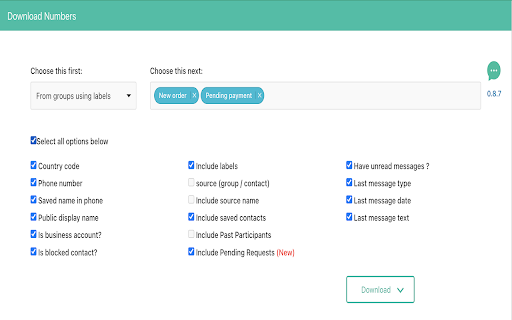
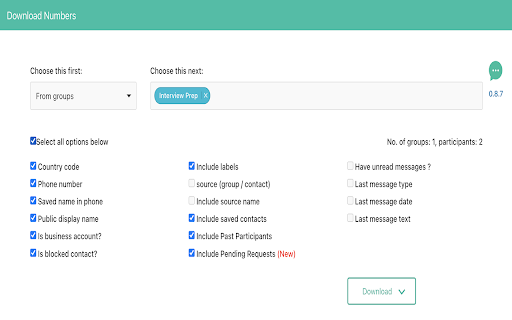
Download phone numbers from your favorite messenger 0.9.3.0 – WA updated their APIs; we’ve updated the extension to ensure seamless compatibility. Note: This is a free-mium plugin. The free version offer limited functionality and the subscribed version provide full functionality. If it's not working, please disable other WhatsApp extensions and try, then it will work. And make sure you always have latest version of the extension. It downloads numbers from various sections. Please note, it can only download the numbers that are visible on web.whatsapp.com. 1. After payment, if it's asking for subscription again, please follow below steps. If it's resolved at any step, stop and continue with your work. a) Try clicking "Already paid, login" button which appear after you click "Download" button. Enter your email which you used during subscription. You will received an email with link to login. Click it. This has to happen in same browser. b) Uninstall the extension and Install again. Now try to login same like step 1. c) Disable other extensions and try step 2 and step 1. d) If none of the above works, please record the problem (while you are trying step 1) and send it to direct.whatsapp@gmail.com. Or click, help button in the footer and WhatsApp to us. 2. If you are not able to see the "Download" button? Your screen resolution could be high, please reduce it and you should be able to see it. 3. You want to un-subscribe. Please click, "Cancel Subscription" button from the footer and cancel your subscription. Or WhatsApp us Or email us. Please remember once you cancel your subscription, your extension won't work. So, please be careful while cancelling your subscription and always choose the subscription end date as cancel date. This is an unofficial enhancement for WhatsApp Web. This extension is not related to WhatsApp of WhatsApp Inc. Being in a global marketing and sales company, we always have a need to save the phone numbers from a WA group to an excel file. So that, the excel file can later be imported into our CRM as prospective leads or contacts. This wonderful tool helped us in downloading the phone numbers from a WA group and save it to excel file. We have developed this tool in our internal labs to use within organization. But as it can benefit many people and on request from many customers or friends, we are relasing this to public. You are not allowed to use or leverage or copy any of the resource for a commercial purpose, unless it is open source. If you like, please feel free to rate and comment any feedback. We would love to hear from you. ------------------------------------------ LEGAL ------------------------------------------ WhatsApp is a trademark of WhatsApp Inc., registered in the U.S. and other countries. This is an independent project developed by SV developers and has no relationship to WhatsApp or WhatsApp Inc.

Wiza - Phone Number & Email Finder
Find anyone's email and phone number Find real-time verified email addresses from professional social networks for free. Wiza’s free email finder allows you to view accurate work and personal email addresses in seconds. Using the Wiza email finder, you’ll be able to pull up real-time verified email addresses (both business and personal) on any professional social media profile that you view—in a matter of seconds. Wiza’s email finder enables you to export your searches and saved lead lists with real-time verified email addresses (and phone numbers). ✔ Save emails to lists and export to CSV Download your saved lists and exports to CSV in a single click, including contact name, employer, job title, email addresses, phone numbers, and 30+ other data points. ✔ Sync emails directly to your CRM and sales tools in one click Connect Wiza to your CRM (HubSpot, Salesforce, and more) and then instantly sync contacts with email addresses to your platform with one click. Sales teams to prospect and build pipeline Founders to find their first and next customers Agency owners to perform lead generation for clients Marketers to reach out about collaboration and link builder Recruiters to source candidates and acquire talent Join Wiza today and get 25 free credits every month: https://wiza.co/auth/signup We appreciate your support and please feel free to reach out to us with any questions or needs via our live website chat or at hello@wiza.com

WADownload - Groups export
Instantly export contacts from your groups to a file of your choice. Simplify your WhatsApp™ contact management work with the WADownload - Groups Export extension. This incredible tool allows you to export the contacts of your WhatsApp™ groups quickly and efficiently, all at the click of a button. Install the extension on your Chrome browser Open the desired group on WhatsApp™ Click on the icon of the WADownload - Groups Export extension On the extension screen, choose the desired file type and the format of the phone numbers Click the 'Export' button to save the file on your device. Open the Chrome browser menu Select 'Extensions' Look for "WADownload - Groups export" in the list of extensions Uncheck the activation box to disable the extension. Click again to reactivate. Your privacy is our top priority. We would like to emphasize that: The extension is NOT able to export contacts already saved in your phonebook. We DO NOT have access to the phone numbers used We DO NOT have access to the messages sent We DO NOT have any access to your account on WhatsApp™ Contacts are saved locally on your browser until you decide to export them Ready to simplify the management of your WhatsApp™ contacts? Install the WhatsDownload - Groups Export extension today and experience the difference!

WA Contacts Extractor & Group Number Download | wa-contacts-extractor.com
Easily extract and export your WhatsApp contacts with this professional browser extension. WA Contacts Extractor is a straightforward browser extension designed to help you save your contacts efficiently. Export data directly from WhatsApp Web to your computer in just a few clicks. Key Features ✨ - 👥 Export Group Members: Extract the complete contact list from any of your WhatsApp groups. It even captures numbers that are not saved in your address book. - 💬 Export from Chat List: Quickly save contacts from your main chat list, perfect for grabbing recent contacts. - 👤 Export All Saved Contacts: Download your entire WhatsApp contact list in one operation. - 🔄 Smart & Reliable: Our tool is built to be stable and is regularly updated to stay compatible with the latest version of WhatsApp Web. Supported Export Formats 📁 Choose the format that fits your needs: - 📄 CSV: Perfect for opening in Microsoft Excel, Google Sheets, or importing into a CRM system. - 💻 JSON: A structured format ideal for developers or for use in other applications. - 📱 vCard (.vcf): The standard for contacts. Use this file to import contacts directly to your phone (Android & iOS), Google Contacts, or Outlook. How It Works in 3 Simple Steps 🚀 1. Open WhatsApp Web and navigate to the group or contact list you want to export. 2. Click the WA Contacts Extractor icon in your browser's toolbar. 3. Choose your desired options, select a format (CSV, JSON, or vCard), and click Download. Your file is generated and saved instantly. 🔒 Your Privacy is Our Priority - We take your privacy seriously. WA Contacts Extractor processes everything locally on your computer. - We do not see, collect, store, or transmit your contact data. - No information ever reaches our servers. - The extension only requires minimum permissions to function. Disclaimer: This is an independent tool and is not an official WhatsApp product. This extension is not affiliated with, endorsed by, or sponsored by WhatsApp Inc.

Contact Saver For WA & Download Group Phone Numbers | WPPME.COM
Download WhatsApp group phone numbers and extract, save, and export WhatsApp contacts from chats and labeled contacts to files. Our WhatsApp Contact Manager provides an efficient way to extract and save contacts from various sources, such as your added contacts, chats, groups, labeled conversations, and even by country. This tool ensures flexibility and reliability for managing and backing up your contacts. 🔺Extract contacts from multiple sources, including chat lists, groups, labeled contacts, and country-based filtering. 🔺Export contacts in multiple formats, such as CSV, Excel, JSON, and VCard, giving you the freedom to choose the format that best fits your needs. 🔺Save contacts directly to your device or have them emailed to you for convenience. 🔺Manage both saved and unsaved contacts, ensuring you never lose important information. 🔺Intuitive interface designed for quick and easy extraction of contact details, even for large datasets. 🔺Save time by effortlessly extracting contact details from various WhatsApp data sources. 🔺Organize your contacts efficiently, whether they are saved or unsaved. 🔺Keep a secure backup of all your important contacts, making it easy to transfer data when changing devices or in case of data loss. 🔺Simplify integration with your CRM or other systems through the flexible export options. Our tool is designed to provide a streamlined experience for managing contacts, without compromising on security or compliance. Whether you need to extract contacts from your groups, chat lists, or labeled conversations, Contact Manager offers the flexibility and control you need to keep your contacts organized and backed up. WhatsApp Contact Manager is an independent tool not affiliated with WhatsApp LLC. The tool complies with legal standards and respects all applicable terms of service.
