
hengddlmmobpckpmaalbmdlofpiljnon
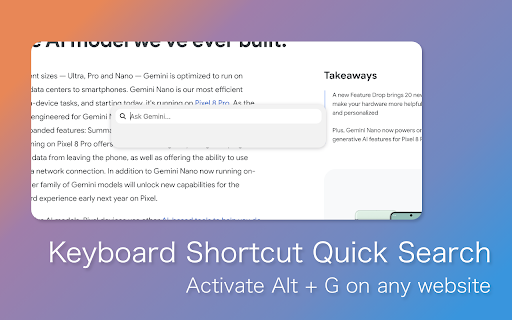
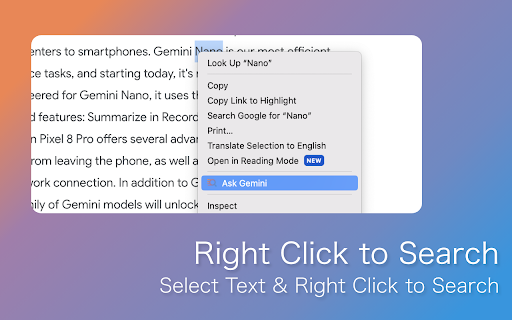
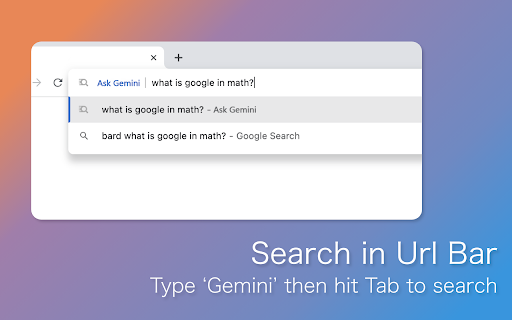

Enhance Chrome's integration with Gemini. Quick Search, Context Menus, And more! Dive into the world of streamlined search and effortless information retrieval with Enhance Gemini, a cutting-edge Chrome extension tailored for users who desire seamless integration with the Gemini chatbot. Designed to cater to both the efficiency seekers and the curious minds, this extension brings the power of Gemini's conversational search capabilities directly into your Chrome browser, allowing for an enriched browsing experience that's both fast and intuitive. Instant Gemini Search from Anywhere: Activate the extension to open a new tab where Gemini awaits your queries. Whether it's a quick question or a deep dive into a topic, Gemini is ready to assist with the knowledge you seek. Right-Click to Search with Gemini: Discover the convenience of context-sensitive searches. Simply highlight text on any webpage, right-click, and select "Search with Gemini" to feed your curiosity without skipping a beat. This integration bridges the gap between discovery and knowledge, making every right-click a gateway to instant answers. Omni Bar Search Integration: Streamline your search experience with direct Omni bar integration. Type "Gemini" followed by your query into Chrome's address bar to launch a Gemini search in a new tab. It's quick, easy, and eliminates the need for extra steps, putting information at your fingertips. Keyword-Driven Searches: Customize your search experience with keyword shortcuts. Set up personalized keywords to trigger specific types of searches on Gemini, making your research faster and more targeted than ever. Seamless Gemini Interaction: Enjoy a seamless integration that feels like an extension of your natural browsing habits. With Enhance Assistant, switching between web browsing and conversational search is smoother and more intuitive. User-Centric Design and Updates: Developed with user feedback at its core, Enhance Gemini is continually evolving. Regular updates bring new features, user interface improvements, and enhancements to ensure a top-notch experience. Transform your Chrome browser into a powerful knowledge discovery tool with Enhance Gemini. This extension not only simplifies how you search but also enriches your overall browsing experience by integrating the intelligence and versatility of Gemini directly into your daily web interactions. Say goodbye to conventional searches and hello to a smarter, more connected way of finding information online.

Extensions Syncer
Sync and manage your Chrome extensions 1. Purpose of the Plugin In daily work, many people use multiple Google accounts for different projects and often face the following problem: If you want to install all the extensions from your main account into a new account on the same browser, you have to search and install them one by one, which is time-consuming and inconvenient. That’s why Extensions Syncer was created. It can quickly export all the extensions installed under your main account as a JSON file and then let you import that file into a new account in one click—no more repetitive searching and installing. With this extension, you can: - Quickly view and export all Chrome extensions installed under your current account. - Share or back up the exported extensions list as a JSON file. - Restore and install the needed extensions from the same JSON file in any new account. As a result, when switching among or collaborating with multiple Google accounts, you won't have to repeatedly search the Chrome Web Store for the same extensions. Everything can be done with a single click, significantly saving time and effort. 2. Feature Description This plugin provides the following core features: 2.1. Export Button When clicked, it automatically collects information on all extensions installed under the current account and generates a JSON file. This file contains essential details such as the extension name, description, and installation link. You can save the JSON file locally, share it with colleagues/friends, or keep it as a backup. 2.2. Import Button When clicked, you can select the previously exported JSON file. The plugin will read the list of extensions from the file and display them in the interface, one by one. Each extension will show its name and brief information, and the plugin will automatically distinguish whether it is already installed: - Installed: Displays “Installed” to indicate that this extension is already in your current account. - Not Installed: Displays a “Go Install” button. Clicking this button will redirect you to the corresponding Chrome Web Store page for installation. By combining these two core features, Extensions Syncer offers a convenient way to bulk install and sync extensions across multiple accounts. 3.1. Export the Extension List from the Main Account - In the Chrome browser of your main account, click on the Extensions Syncer icon. - In the plugin interface, click Export, and once the JSON file is generated, save it locally. 3.2. Switch to the New Account and Import the Extension List - In the Chrome browser of your new account, install and open Extensions Syncer as well. - Click Import and select the JSON file you saved from the main account. 3.3. View and Install Missing Extensions - Extensions Syncer will automatically read the file and list all extensions in the interface: - Extensions that are already installed will directly show Installed. - Extensions that are not installed will show a Go Install button. - For any extensions you need to install, click Go Install to jump to the respective installation page. Complete the installation as usual. 3.4. Complete the Bulk Synchronization - Repeat step 3.3 as needed to install all missing extensions. - This quickly allows your new account to have all the same extensions as your main account. 4. Frequently Asked Questions (FAQ) 4.1. Can I use the same JSON file across multiple different accounts? Yes. Simply save the exported JSON file, install Extensions Syncer in any Chrome account environment, and import that file. 4.2. What information is included in the exported file? Are there any privacy concerns? It only contains public extension information—such as the name, short description, and Chrome Web Store links. It does not include any login credentials or other sensitive data, so there is no privacy risk. 4.3. What happens if an extension has been removed from the store? If the extension is no longer available in the store, the import list will indicate that it cannot be installed, or the link won’t open after clicking Go Install. In this scenario, you would have to find an alternative extension or install it from another source if available. 5. Precautions and Recommendations - Ensure Extensions Syncer is installed in both accounts’ browser environments; otherwise, you won’t be able to perform import or export. - Make it a habit to regularly back up your extension list—especially if you frequently add or remove extensions in one account—so you can keep everything up to date when syncing with another account. - For extensions requiring payment or login authorization, be aware that you may need to pay again or reauthorize. Different extensions handle authorization in different ways.

Gemini Folders, Bookmarks & Search - Gemfolders: Chat Organizer
A chrome extension to organize your Gemini chats Declutter your Google Gemini sidebar. Stop mindlessly scrolling to find old chats. Organize your AI workflow with Gemfolders. Gemfolders is the ultimate productivity tool designed specifically for Google Gemini. Create folders, organize your conversations, search your history, and keep your workspace clean—all with a native look and feel. 🔒 Privacy Focused: Your data is stored on your local machine. We do not collect or share your chat history. 🌚 Seamless Integration: -Fully compatible with Gemini's dark and light theme settings. 🗂️ Chat Management: -Create Custom Folders: Group your chats by project, topic, or client (5 free folders included). -Drag & Drop: Easily move chats into folders with a simple drag-and-drop interface. -Color Coded Organization: Assign colors to folders to recognize them at a glance. -Edit & Rename: Full control over your folder names. 🔍 Search & Bookmarks: -Search Chat History: Instantly find old chats by title or keywords. No more endless scrolling. -Bookmark Chats: Pin your most important conversations to access them quickly. 💎 Tiered Features -Guest Mode (No Sign-In Required): Get started instantly with 5 folders, 5 bookmarks, and 1 level of nested folders. -Signed-In (Free): Sync your organization across devices. Unlock 10 folders, 10 bookmarks, and 2 levels of nested folders just by logging in. -Premium Tier (Pro): Break down all the walls. Gain unlimited folders, unlimited bookmarks, and infinite nesting depth. If you can imagine the structure, you can build it—no caps, no limits, just pure productivity. 🔁 Sync & Export: -Your entire folder structure and chat organization follow you across all devices in real-time. options to take your chat organization with you. -Take your organized data with you using our new export tool. Why Gemfolders? Whether you are a developer managing code snippets, a student organizing research, or a writer tracking drafts, Gemfolders turns Google Gemini into a powerful project management tool. Install Gemfolders today and take control of your AI chats!

Сhrome grouping tabs
Boost productivity with Chrome Grouping Tabs! Easily organize, tabs in chrome manage. Ideal for clutter-free & multitasking! 🚀 Introducing the chrome grouping Tabs extension, a revolutionary tool designed to transform your browsing experience by simplifying how to group tabs in Chrome. This powerful extension is here to streamline your digital life, making tabs grouping in chrome more intuitive and efficient than ever before. Whether you're a busy professional, a student, or just someone with a knack for multitasking, chrome grouping tabs is the solution you've been looking for. 1. Click on the extension icon in your browser. 2. Select the browser sections you wish to cluster. 3. Assign a name to your sets for easy identification. 4. Voila! Your browser sections are now neatly organized. 🔺 One of the main features of this extension is its ability to effortlessly handle chrome grouping tabs. With just a few clicks, you can organize your browser by topics, projects, or however you see fit. This feature not only saves time but also significantly reduces clutter, allowing you to focus on what matters most. ⭐ For those wondering about tabs grouped in Chrome, our extension offers a variety of customization options: - Color coding for page bundles. - Custom naming conventions. - Easy drag-and-drop interface to manage your browser sections. Another standout feature is the ability to chrome save tab groups. This means that even after you close your browser, your window clusters will be saved and ready for when you return. This is a game-changer for those who work with extensive research or need to pick up where they left off without missing a beat. ⚡ To make the most out of chrome save tab groups, follow these tips: 1️⃣ Use descriptive names for your page bundles to easily remember the purpose of each. 2️⃣ Regularly update your window cluster to remove browser sections that are no longer needed. 3️⃣ Take advantage of the color-coding feature to visually distinguish between different browser sections. But that's not all. The Chrome grouping tabs extension is packed with additional functionalities to enhance your productivity: 📌 One-click tab addition to existing window cluster. 📌 Quick ungrouping options for when tasks are completed. 📌 Seamless integration with Chrome's existing tab management features. 📝Users love the Chrome grouped Tabs extension for its simplicity and effectiveness. Here are just a few ways it can improve your browsing experience: • Keep your browser organized and tidy. • Saves valuable time by reducing the need to search through multiple browser sections. • Enhances focus by minimizing distractions. • Ensures important internet batches are easily accessible and not accidentally closed. 💎 We understand the importance of keeping your workflow smooth and uninterrupted. That's why Chrome browser sections has been meticulously designed to integrate seamlessly into your daily routine, ensuring that your internet batches are always just a click away from being perfectly organized. 💪 Chrome grouping tabs offers an unparalleled blend of functionality and simplicity, making it the ultimate tool for anyone looking to take control of their online workspace. Say goodbye to endless browser slots and hello to a more organized productivity. Try chrome grouped bandles today and revolutionize the way you navigate the web. ❓ FAQs: 📌 Can I share my tab groups with others? 💡 Yes, with chrome tab groups, sharing your organized tab groups with colleagues, friends, or family is straightforward and efficient. ➤ Create or select the tab group you wish to share. ➤ Right-click on the sections title and choose the "Share Group" option. ➤ You'll be provided with a link that you can send to others, allowing them to access your tab group. 📌 How many tabs can I include in a single group? 💡 Chrome tabs group supports up to 100 tabs per group, accommodating extensive information needs from deep research to large projects, thereby enhancing both organization and productivity. 📌 Is there a limit to how many groups I can create? 💡 Chrome tabs groups allow for unlimited sections creation, offering a flexible tool tailored to organize your browsing experience efficiently, regardless of your workflow's complexity. 🚀Stay Connected: Follow us for updates and tips on maximizing your Chrome page collections usage, and don't hesitate to share feedback. Download our extension to streamline your browsing, making it more organized, productive, and stress-free. 🌿 Troubleshooting: For any inquiries or suggestions, feel free to contact our development team olgamashtaler220@gmail.com

Gemini in Chrome by SplitView - Free AI Chat Assistance & more..
Looking to try Gemini in Chrome? Try SplitView: Unlimited FREE AI chat with Gemini without leaving the tab. Use AI in your daily research, travel planning and study with Gemini. SplitView brings the entire web - and the world’s smartest AI - directly into your current window. Most AI extensions limit your daily queries and demand expensive subscriptions. SplitView offers Unlimited FREE AI Chat without the paywall. But it’s more than just a chatbot—it’s a mini-browser that lives inside your tab. FREE Unlimited AI Assistant: Research, draft emails, and code with Gemini-powered AI on any webpage. No limits. No logins. Same-Tab Popup (Tab-in-Tab): Click any link to open it in a sleek popup window. Read articles, check documentation, or view sources without leaving your main page. YouTube Floating Player: Watch tutorials or background videos in a focused popup while you work. Google Search "Split-Button": See the SplitView icon directly next to Google Search results to preview links instantly. 🎯 PERFECT FOR: Developers: View Stack Overflow or MDN docs while coding in your web IDE. Marketers: Perform competitor research and keyword analysis in a single view. Students: Fact-check and summarize sources without losing your place in a lecture. Travelers: Check weather and maps while booking flights on Expedia or Airbnb.
