
helnedoknldlbnggpnaabpnmpheklokh


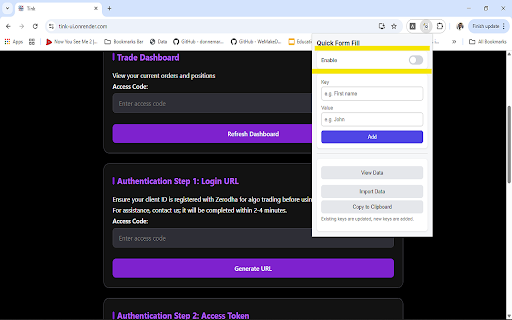
Store form field values once and select them from a dropdown while filling forms. Fast, simple, and no typing needed. Quick Form Fill helps you save time by auto-filling repetitive form fields with just one click. Save commonly used values once — such as names, emails, phone numbers, or IDs — and instantly select them from a dropdown whenever you focus on a form input. ✨ Features Save label–value pairs for reuse Switch to enable the dropdown based on need View/Update/Delete data anytime Import/Export data in Json format One-click select values (no typing required) Works on all websites Clean, lightweight, and fast Dropdown appears automatically on form if enabled Perfect for government job aspirant, developers, testers, recruiters, and anyone who fills forms frequently.

Autofill Pro Max
🚀 Tired of filling out the same forms again and again? Say hello to Autofill Pro Max your all-in-one automation buddy that saves you ⏰ time and 💪 effort by auto-filling web forms with just one click! 💻 Perfect For: 👨💻 Developers testing login screens 🧾 Data-entry professionals ⚡ Anyone who wants to make browsing faster and smarter ✨ Smart Autofill — Instantly detects and fills in all types of form fields, from simple inputs to complex dropdowns. 👥 Profile Management — Create multiple profiles for different info sets. Switch between them effortlessly! ⚙️ Powerful Rule Engine — Customize everything. Match fields by name, ID to take total control. 📦 Import / Export — Backup or sync your profiles and rules via CSV. Share them easily between devices or with teammates. ⌨️ Global Hotkeys — Assign shortcuts to your profiles for lightning-fast form fills. No clicks needed! ⚡ 1️⃣ Fill out a form on any website. 2️⃣ Click “Generate Autofill Rules.” 3️⃣ Save it to your chosen profile. 4️⃣ Next time, just select that profile and watch it fill automatically! ✨ 💡 Autofill Pro Max is your smart, customizable, and powerful solution for everything form-filling. 👉 Install it today and experience a smoother, faster, and more efficient browsing life!

Smart Form Filler
Stop typing the same details again and again. Smart Form Filler lets you save, manage, and auto-fill any web form instantly — securely and privately. ──────────────────────────── 💾 Profile Management ──────────────────────────── • Save up to 20 profiles (Free) or unlimited (Premium) • Visual field editor – no coding needed • Search, pin, duplicate, or delete profiles easily • Profile counter with color indicator • Advanced JSON editor for power users ──────────────────────────── 🎲 Random Data Generator ──────────────────────────── • Generate realistic fake data for testing and demos • Fill names, emails, phones, addresses, and dates • 1-click generation via context menu or popup ──────────────────────────── 📥 Form Capture ──────────────────────────── • Fill a form once → Save it forever • Auto-detects form fields • Auto-names profile with date/time • Reuse across any website ──────────────────────────── 📤 Import / Export ──────────────────────────── • Free: Export first 10, import up to 20 profiles • Premium: Unlimited import/export • JSON format for easy backup and sharing ──────────────────────────── 🔒 Privacy & Security ──────────────────────────── ✅ 100% local storage — data never leaves your device ✅ No tracking, analytics, or cloud sync ✅ Works offline ✅ Smart field detection (skips CAPTCHA, hidden, readonly) ──────────────────────────── ⚙️ Perfect For ──────────────────────────── 👨💻 Developers & QA – Test forms quickly ⚙️ Power Users – Switch work/personal info instantly 🖥️ Demos & Trainers – Fill demo forms securely 🛒 Shoppers – Quick checkouts and saved addresses ──────────────────────────── ⚡ How It Works ──────────────────────────── 1️⃣ Create Profile – Open extension → “Profiles” → +New 2️⃣ Fill Form – Right-click → Smart Form Filler → Select Profile 3️⃣ Generate Data – Press Alt+Shift+K for random data ──────────────────────────── 🧠 Smart Filling ──────────────────────────── • Detects text, email, tel, number, date, textarea • Works with dropdowns • Skips non-editable inputs • JSON editor for custom selectors ──────────────────────────── 🎯 Why Choose Smart Form Filler ──────────────────────────── ✅ Fast – One-click fill or keyboard shortcut ✅ Secure – 100% local data ✅ Feature-rich – Templates, profiles, import/export ✅ User-friendly – Clean and modern interface ✅ Affordable – Lifetime access for just $9.99 ──────────────────────────── Smart Form Filler Save once. Fill everywhere. Secure forever. Made with ❤️ by NRK Technologies

Auto Form Saver
Automatically saves form data and restores it to prevent data loss. > **Never lose your work again.** Have you ever spent minutes typing a long message or filling out a complex form, only to lose everything because the tab crashed or you accidentally refreshed the page? **Auto Form Saver** is here to protect your work. It silently monitors text fields and saves your input in real-time to your browser's local storage. If you come back to the page, your data is instantly restored. ## ✨ Key Features - **Auto-Save & Restore**: Saves as you type, restores immediately when you return. - **Visual Feedback**: Fields flash **green** when saved and **blue** when restored, so you know it's working. - **Privacy First**: All data is stored **locally** on your device. No data is ever sent to external servers. - **Smart Security**: Automatically ignores password fields and sensitive inputs marked with `autocomplete="off"`. - **Full Control**: Easily enable or disable the extension for specific websites via the popup menu. - **Context Menu**: Right-click any field and select **"Clear Saved Value"** to remove data for that specific input. - **Rich Text Support**: Works with standard inputs (``, ``) and rich text editors (`contenteditable`). ## 🔒 Privacy & Security We believe your data belongs to you. - **Local Storage Only**: Data never leaves your browser. - **No Tracking**: We do not collect analytics, browsing history, or personal information. - **Secure**: Sensitive fields like passwords are strictly ignored. # Privacy Policy for Auto Form Saver ## 1. Data Collection **Auto Form Saver** does **not** collect, transmit, or share any user data with external servers. All data is processed and stored locally on your device. ## 2. Data Storage - **Form Data**: Text typed into input fields and textareas is saved to your browser's local storage (`chrome.storage.local`). This data never leaves your browser. - **Settings**: Your preferences (e.g., disabled sites) are also stored locally. ## 3. Data Usage The saved data is used solely for the purpose of restoring your work if you accidentally close a tab or reload a page. ## 4. Permissions - **Storage**: Required to save your form data locally. - **ActiveTab**: Required to detect forms on the current page. - **ContextMenus**: Required to provide the "Clear Saved Value" option in the right-click menu. ## 5. Third-Party Services This extension does not use any third-party analytics or tracking services. ## 6. Contact If you have any questions about this privacy policy, please contact the developer via the Chrome Web Store support page.

AutoFill Pro - Smart Profiles, Recorder By Patilweb
Advanced form auto-fill extension with smart profiles, recorder, and auto-detect features. # AutoFill Pro - Advanced Form Auto-Fill by patilweb Advanced form auto-fill with smart profiles, recorder, and auto-detect. Save time, boost productivity. 100% secure & private. Tired of typing the same information over and over? **AutoFill Pro** revolutionizes how you interact with web forms, turning minutes of tedious data entry into seconds of effortless automation. **🧠 Smart Form Detection** - Automatically detects forms on ANY website - Intelligent field recognition (name, email, phone, address, etc.) - Works with complex multi-step forms and dynamic content **👤 Multiple Smart Profiles** - Create profiles for work, personal, business, or client information - Instantly switch between profiles with one click - Perfect for professionals managing multiple clients or personas **🎬 Advanced Form Recorder** - Record your form-filling actions once, replay them instantly - Captures clicks, typing, selections, and navigation - Ideal for repetitive workflows and complex multi-page forms **🔒 Bank-Level Security** - 100% local storage - your data never leaves your computer - AES encryption with multiple security levels - No tracking, no analytics, no data collection - Open-source transparency **⚙️ Professional Customization** - Custom CSS selectors for complex forms - Exclude specific websites from auto-fill - Keyboard shortcuts for power users - Field highlighting and visual feedback ### 🏆 Perfect For: **Business Professionals** - Customer onboarding forms - Lead generation forms - Client information sheets - Expense reports and timesheets **E-commerce Users** - Checkout forms across multiple stores - Account registrations - Shipping and billing information - Product reviews and surveys ✅ **Time Saver**: Reduce form filling time by 90% ✅ **Error Reduction**: Eliminate typos and inconsistent data ✅ **Privacy First**: Your data stays on your device ✅ **Universal Compatibility**: Works on ALL websites ✅ **Professional Grade**: Built for business and personal use ✅ **Regular Updates**: Continuous improvements and new features - **Machine Learning**: Improves accuracy based on your corrections - **Import/Export**: Backup and restore your profiles - **Multi-language Support**: Works in multiple languages - **Real-time Validation**: Ensures data accuracy before submission - **Batch Operations**: Fill multiple forms simultaneously **Long-tail Keywords:** - automatic form filling extension - secure form auto fill chrome - business form automation tool - professional auto fill extension - private form filler chrome extension 1. **Repetitive Data Entry** → Automated with smart profiles 2. **Time Wasted on Forms** → 90% time reduction 3. **Data Entry Errors** → Consistent, accurate information 4. **Security Concerns** → Local storage with encryption 5. **Complex Workflows** → Recorder for multi-step processes - **For Individuals**: Save 2+ hours per week on form filling - **For Businesses**: Reduce employee data entry time by 90% - **For Developers**: Custom selectors for complex applications - **For Privacy-Conscious Users**: Complete data control and security ### Screenshots to Include: 1. Main popup interface showing profiles 2. Form detection in action with highlighting 3. Recorder interface recording actions 4. Settings page showing security options 5. Before/after comparison of form filling speed ## 🌐 SEO-Optimized Content for Discovery **Meta Description**: "AutoFill Pro: Advanced Chrome extension for automatic form filling. Smart profiles, form recorder, 100% secure. Save hours weekly with intelligent auto-fill technology." **Featured Benefits for Chrome Store**: - ⏰ Save 90% of form filling time - 🔒 100% private and secure - 🎯 Works on every website - 🏢 Perfect for business use - 🆓 Free with premium features *This extension is perfect for anyone who fills out forms regularly - from business professionals to online shoppers to job seekers. Join thousands of users who have already transformed their productivity with AutoFill Pro.*
