
hegkboonfffpdijmbmdifcfeipihkfib
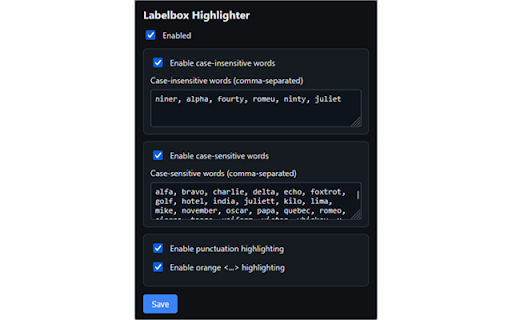
Highlights configured words/symbols in Labelbox (with iframe support) Highlights key LabelBox page elements to help users quickly spot potential errors during review. Designed as a lightweight visual aid that makes important components easier to notice without changing your LabelBox workflow

2-Click Audio Downloader
Easily download audio files from web pages. Find and save audio content with a single click. # Simple Audio Downloader for Chrome Save audio files from any webpage with two clicks. This lightweight extension automatically detects embedded audio content in your active tab and provides instant download links. • Instantly finds audio files embedded in web pages • Creates easy-to-use download links for any audio content • Supports common audio formats (MP3, WAV, OGG, M4A) • Works with both embedded players and direct audio links • Clean, simple interface with two-click downloads ## Perfect For • Saving audio content for offline listening • Downloading podcast episodes for later • Archiving audio files from your own web content • Backing up audio from your personal projects • Saving permitted audio content from educational resources 1. Visit any page with audio content 2. Click the Audio Downloader icon 3. See all available audio files instantly 4. Click to download your selected files • Fast detection of audio sources • Simple, clean interface • No account required • Works offline • Minimal permissions needed • Zero ads or tracking • Lightweight and efficient ## Limitations • Only works on websites that have the file set in the HTML • Does not work on encrypted audio • Does not work on audio served by JS or API • No data collection • Works only on the current tab • Requires minimal permissions • No external servers used • All processing happens locally Install 2-Click Audio Downloader to simplify how you save audio content from the web! Enjoying the extension? You can support its development: https://buymeacoffee.com/chithlabs Note: Please ensure you have the right to download any audio content before using this extension. Always respect copyright and terms of service for websites you visit.

ATC Callsign Finder
Search IATA, ICAO, flight designators and telephony with fuzzy matching. Callsign & ICAO Search Search by telephony callsign (e.g. "DELTA"), ICAO designator (e.g. "DAL"), or partial name. Results show the ICAO code, IATA code, spoken telephony name, airline, country, and status — everything you need to confirm a callsign mid-transcription. IATA Code Lookup Enter a 2-letter IATA code to quickly resolve an airline and its ATC telephony callsign. Aircraft Registration Search Look up any tail number to retrieve the aircraft manufacturer, model, owner/operator, and ICAO type code. Aircraft Type Search Fuzzy-search aircraft models by name or type code (e.g. "Skyhawk", "A320", "C172") to get the official ICAO type designator. Live ADS-B Exchange Integration When browsing globe.adsbexchange.com, the extension automatically detects the selected flight's callsign and injects the official ATC telephony callsign directly into the page — no popup required. FAA official publications (Chapter 3 designator lists, CAM amendments, and AT Notices) Wikipedia airline codes database Flightradar24 supplemental airline data FAA aircraft registration records Data is stored locally in your browser and can be refreshed on demand to stay current with the latest FAA publications. Built for: ATC transcriptionists Aviation radio monitors ADS-B enthusiasts Flight crews and dispatchers Stop cross-referencing multiple tabs and PDFs. Get the right callsign, instantly.

Hubstaff Time Tracker
Chrome time tracker with screenshots, online timesheets, task management, url monitoring & employee payroll Stop using multiple apps and office documents held together by duct tape and error-prone processes. With Hubstaff, start tracking time and paying your workforce automatically and save hours a week (and your sanity!). Over 8000 companies use Hubstaff to not only take the pain out of their time tracking and payroll management but also monitor the location of their workforce in the field with the seamless GPS tracking feature. You simply choose the project you are working on and tap ‘Start’. Hubstaff runs in the background while you work tracking your time and location. When you finish working or want to take a break just tap ‘Stop’. It's that easy! Hubstaff is a subscription-based service. After the 14 day trial you choose either a free or paid plan. INTEGRATES WITH THE FOLLOWING SITES Asana, Trello, Jira, Teamwork, and Hubstaff Tasks (more coming soon!) CHANGING HOW YOU MANAGE • Online dashboard and real-time reports enable you to review timesheets, view who's currently working, and control every setting down to the user level. • You're in total control of your team. SAVE TIME AND MONEY • Accurate - Time tracking is accurate down to the second so you have 100% accuracy. • Budgets - Control over-spend within your projects with weekly budgets. • Payroll - Take the hassle out of payroll with our flexible payroll system. Choose a rate (hourly or fixed), pay period, and method of payment and let the rest happen automatically. • Track time spent driving through GPS location monitoring. • Track time at the destination and know where your workers are in real-time. • See exactly when your workers leave. • Work logs - Read why people are late to a job site, had to log more time today or why they ran an errand. • Integrates with over 30 other project management products (and growing) including Quickbooks and Basecamp so you can track time down to the task. • Hubstaff runs in the background so you can do other things without any interruption. • We worked hard to optimize Hubstaff to use minimal battery power. • Your company's data is synced to our servers in the cloud, no backing up necessary. • Access it from anywhere via the website, where, and when you want. • Get a real-time, bird's eye view of your workforce. • The latest security measures are being used to protect your data. • A Hubstaff account is required before logging into the app. • Hubstaff is a subscription-based service. After the 14 day trial you choose either a free or paid plan. Note: The Hubstaff desktop or Chrome app is required for screenshot capture.

Tally counter
Easy & intuitive tally counter for keeping track of anything you want. - lightweight - syncs between all your devices - super easy to use - ability to export data to .csv - reorder items - toggle dark mode - keyboard shortcuts so you don't have to click :-) To set hotkeys / keyboard shortcuts, copy this link into the address bar: chrome://extensions/shortcuts If you want any features added, you find a bug or something is behaving unexpectedly, please contact me at capdavidd@gmail.com. Donations are welcome at https://ko-fi.com/davidcap.
