
hegiignepmecppikdlbohnnbfjdoaghj
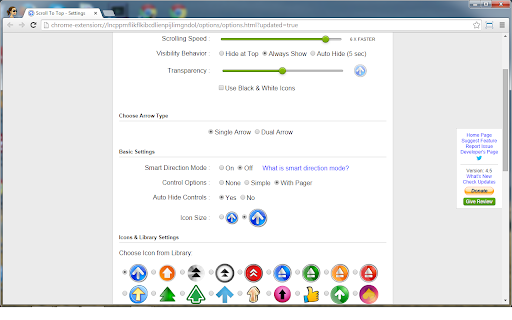


Scroll to top and vice versa in a window. Scroll To Top lets you jump back to the top or bottom of any page with a single click. A sleek button appears at the bottom-right corner, scrolling smoothly and instantly. Packed with powerful features and highly customizable to match your style, it makes browsing faster, easier, and more enjoyable. 🚀

Scroll to Top
Add a stylish scroll-to-top button for all websites. Scroll to Top is an extension that lets you easily scroll to the top of the page by clicking on a button. Simply add the add-on to your browser and start surfing. Once you scroll down on a page, a button will appear at the right-bottom corner with an - UP - arrow icon. Clicking on the button will scroll the page to the top, fast and smooth! If you want to hide the scroll button, please click on the toolbar icon once (dark grey arrow). The button will disappear immediately. Please note that pressing on the toolbar icon once again will display the scroll button. To report bugs, please fill out the bug report form on the add-on's homepage (https://mybrowseraddon.com/scroll-to-top.html).

Scroll to Top
Scroll to the top or bottom of any page with a click on the left border of the screen, and then return to your previous position. Scroll to Top adds button to the left of your browser window that lets you: ★ Return to the previous position/remember your current position by middle clicking on it. There're also customizable keyboard shortcuts for all these actions. To customize them go to chrome://extensions/shortcuts. ---------------------------------------------------------------- Permissions: Read and change all your data on the websites you visit Allows the extension to append the scroll button and do scrolling on pages (when the button is clicked). ---------------------------------------------------------------- 🧩 Follow my Facebook page (more extensions): https://www.facebook.com/browservery

Smooth Key Scroll
Smooth scroll with the keyboard Smooth Key Scroll enables smooth and responsive scrolling with the keyboard on every page. - Arrow keys to move arround with adjustable speed - Control (ctrl) and Option (alt) to modify speed - Power scrolling keys (vim, gamer, ergonomic) - Option to disable mouse hover effects v2.8.2 - Fix issue cause slow scrolling in some websites like for example imdb.com - Upgrade to manifest v3 - Make extension icon open the options page when pressed v2.8.0 - Option to disable the extension on certain websites (blacklist) v2.7.1 - Prevent welcome page from opening again when extension is installed multiple times in different browsers using the same user profile v2.6.0 - Automatically find scroll element on pages with unconventional scroll (google photos, microsoft team services, etc) v2.5.1 - Fix document.body scrolling detection on edge cases v2.5.0 - Switch to less obtrusive scrolling detection algorithm - Fix problem with Team Foundation Server v2.4.1 - Add support for iframes v2.4 - Don't scroll on google search results page when blue arrow is enabled - Add option to disable blue arrow on google instant search v2.1 - Fix scroll locking when usind find/search in page. Currently the only solution is to scroll normally when searching When google fixes this issue we may be able to re-enable smooth scroll: https://code.google.com/p/chromium/issues/detail?id=529050&thanks=529050&ts=1441646441 - Fix rare ocasion when smooth scroll would not activate after pressing the shift key in a shortcut v1.0.6 - Fix Ctrl and Alt keys on Linux v1.0.5 - Fix page not scrolling in Chrome 40 v1.0.4 - Selecting text with Shift is now possible anywhere on the page - Fix alt and ctrl speed sliders regression (options page) v1.0.3 - Fix alt-left/right functionality on windows (and other default shortcuts) - Allow alt key to be pressed and released while scrolling without changing focus to the menu (Windows) v1.0 - Options page with adjustable speeds - Fix issue with Flash - New icon v0.2 - Fix speed getting stuck should page loose focus - Fix collision between meta key and browser native functionality

Scroll to Bottom
Click the button and scroll to the end of the current page. You can change the default icon to one of several predefined alternatives or even, if you want, you can set your own toolbar icon. Please, keep in mind that the extension will not work on each and every page. It works in most sites but it will not scroll browser's internal pages (settings, history etc.), the chrome web store pages (no extension can touch these) and some complicated web pages. If it doesn't work for you, please, don't hate me too much. You can at any time remove it from your browser (right-click on the icon and select "Remove from Chrome").
