
hedanepfcnfddeelaebabpbgmidfkkac
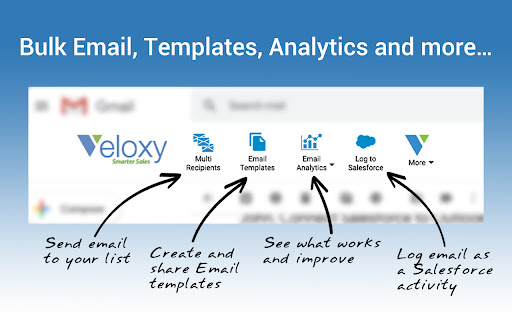


Experience the power of email tracking, Salesforce integration, and mass emails – right in your Gmail inbox. VELOXY FOR GMAIL HELPS YOU AMPLIFY YOUR EMAIL OUTREACH AND SHRINK SALES CYCLES WITHOUT LEAVING YOUR BUSINESS EMAIL INBOX Sell smarter with email tracking, bulk email and engagement analytics in your standard Gmail / Gsuite Inbox. Optional integration with Salesforce CRM also puts lead and opportunity details right there in your inbox. • Get real-time alerts as soon as your email is read • Know precisely who read your email and who did not • See if your emails are forwarded, or read many times • Save time at any sales stage by using email templates • Reach many people at once with personalized templates • Append a CAN-SPAM compliant footer and opt-out link • Automatically handle email unsubscribes the proper way • Use detailed analytics to learn what gets best engagement • Learn the best time of day, and day of week to send DEEP INTEGRATION WITH SALESFORCE CRM No other plugin offers as much integration with Salesforce CRM. You can literally do everything you normally do in Salesforce without leaving Gmail, including: • Automatically log ALL incoming and outgoing emails as activities to Salesforce • Send CAN-SPAM compliant bulk emails to prospect lists and Salesforce "views" • Create tasks and log activities in Salesforce without leaving Gmail • See lead and contact details right in your inbox • Update Salesforce leads and contacts right in your inbox • Add new leads and contacts to Salesforce with one click • Set up meetings and sync everything in seconds VELOXY IS LOVED BY THOUSANDS OF OUTLOOK USERS. NOW IT IS HERE FOR GMAIL Install the plugin and start your 15 day free trail today. DETAILED FEATURES AND BENEFITS TRACK EMAIL OPENS AND ENGAGEMENT: Take the guesswork out of sending emails. Veloxy Engage tracks if they are opened, or not and gives you real-time alerts. So you can take prompt action to keep things moving forward. When your email is forwarded to others, you can see that it was opened by multiple people on different devices in different locations. This gives you unique insight on the level of interest and engagement in your email. SAVE TIME WITH EMAIL TEMPLATES: An easy to use rich-text editor lets you create unlimited personalized templates complete with a CAN-SPAM compliant footer, for single and bulk emails. Use them for sales outreach and replies at any sales stage. You can even attach files. REACH MANY PROSPECTS IN ONE GO: Stop wasting time sending emails one-by-one, and avoid cut-and-paste mistakes. Using personalized templates, you can quickly upload a list, or import a “view” from Salesforce and send an individual email to each of its members, all at once. The emails go out from you, directly from your Gmail / Gsuite outbox, not some third-party sender or from Salesforce “on behalf of” you. ANALYZE AND IMPROVE EMAIL ENGAGEMENT: See how your cold emails and transactional emails perform, discover the best time of day and day of the week to reach your prospects, and learn from the best performers. HANDLE EMAIL UNSUBSCRIBES PROPERLY: Veloxy Engage makes any email sent from your Gmail / Gsuite account, 100% CAN-SPAM compliant. Before sending, it checks the opt-out status of each email recipient. And it automatically logs all opt-out requests for you, to prevent accidental mailings in future. SALESFORCE INTEGRATION COMES WITH VELOXY PUT SALESFORCE IN YOUR INBOX: Select an email thread, and see the lead or contact along with opportunity details right there in the familiar Gmail or Outlook interface. So you know where you stand and what do to next, without wasting time. LOG YOUR EMAILS TO SALESFORCE: In one click, you can save an email as an activity on any account, prospect or opportunity. Or you can automatically log all inbound and outbound emails to the corresponding prospect in Salesforce. This saves you time by cutting so many steps, and gives others on your team more details to work with. ADD NEW PROSPECTS TO SALESFORCE: If a prospect is not already in Salesforce, you can add it as a lead or contact in one click. The smart address search feature helps you find the address and pre-fill many of the fields for you. SET UP MEETINGS IN SECONDS: If you create an appointment for a prospect, it is instantly saved as an event in Salesforce, and all the details are put into a Gmail / Gsuite calendar invite. You only need to review it and press send.

HubSpot Sales
Email tracking, CRM for Gmail, and sales productivity tools in your inbox HubSpot connects to Gmail to help you build better pipeline and close more deals with AI-powered sales software that’s built for productivity - no matter where you work. Connect your data, tools and teams directly to your customers in Gmail and across the web to create relevant customer interactions, all powered by HubSpot’s Smart CRM. Along with the HubSpot Smart CRM and Sales Hub, the HubSpot Sales extension allows you to engage with Breeze Copilot wherever you may be. Easily leverage Breeze AI to research prospects, update data, and more! …and did we mention it’s free to get started? Note: a free HubSpot account is required to use this extension. "Now that we have connected inboxes, we're slowly getting more and more context into each of our customers, so that we have a greater picture of who we're serving on any given day…Sales Hub helps us achieve a more tailored outreach to the customer." FREE features of the HubSpot Sales Extension include: - Email tracking - CRM for Gmail - Email templates & snippets - Meeting scheduler - CRM sidebar across the web - Add companies and contacts to HubSpot - Calling and emailing - Breeze AI Copilot PAID features include: - Automated personal outreach - Additional meeting scheduling functionality - Additional sales productivity and engagement tools If you have any problems or suggestions please visit https://academy.hubspot.com for useful resources.

Mailflame for Gmail: Merge, Send, Followup & Track emails
Boost your email marketing with Mailflame. Easily send, schedule, and track email campaigns directly from Gmail. Mailflame for Gmail (By cresstudio.com) – Powerful Email Marketing Without Leaving Gmail Boost your Gmail with advanced email marketing features using Mailflame. Whether you're sending newsletters, running cold email outreach - Mailflame lets you do it all seamlessly inside Gmail. Mailflame is now in its v2.0 with new features and more consistency. You get a Free Trail of 7 days and you can cancel anytime. No questions asked! ✨ Key Features: ➤ Send Newsletters from Gmail: Craft, personalize, and send newsletters directly from your Gmail account. ➤ Mail Merge & Cold Emailing: Easily import contacts from Google Sheets and send personalized bulk emails. ➤ Email Tracking: Track email opens and unsubscribes to measure campaign performance. You can also track individual Emails from Compose box. ➤ Email Scheduling: Choose the perfect time to deliver your emails for maximum engagement. ➤ Template Management: Create and reuse email templates to save time and ensure consistency. ➤ Rich Text Editor: Add images, links, and formatting to build professional-looking emails. ➤ Automated Follow-Ups (NEW): Never miss a reply again. Schedule upto 10 smart follow-up emails directly from Gmail and keep your outreach flowing automatically upto 15 days. 🔥 Benefits at a Glance: ✅ All-in-one Gmail marketing tool - no third-party software ✅ Designed for solopreneurs, small businesses & marketers ✅ Super easy to use - no learning curve or complex setup ✅ Free to get started - send up to 25 emails/day ✅ Affordable paid plans to scale as you grow 📩 How to Send an Email with Mailflame for Gmail: 1. Open Gmail and click Mailflame in the sidebar. 2. Click New Campaign. 3. Write your email and select recipients (Google Sheets supported). 4. Preview and test the email if needed. 5. Click Send - your email gets delivered just like any other Gmail message. ⏰ How to Schedule Emails in Gmail Using Mailflame: 1. Draft your email inside Mailflame. 2. Click Schedule Time in settings. 3. Choose your desired date and time. 4. Click Send - Mailflame takes care of the rest. 📶 How to track Emails: 1. Click on the EYE button beside "Send Button" to Enable. 2. Goto "Sent" tab and hover on th EYE Icon to See the Tracking details. 3. Click on the "Link" or "File" button of Compose Modal to track Links or File as well. ↩️ How to Followup: 1. Goto "Sent" tab. 2. You willl find an backward icon. Click on it. 3. On the opened Dialog, add your followup time and body. 4. Click "Send + Followup" and Boom! Mailflame is fast, intuitive, and constantly improving. Start for free and upgrade as your email marketing needs grow. Help us build the best Gmail email marketing tool by sharing your feedback! SUPPORT AND DOCUMENTATION: Need help? Visit our support center: https://mailflame.cresstudio.com or Email us at support@cresstudio.com WHY CHOOSE MAILFLAME OVER OTHER EMAIL TOOLS? Mailflame is designed to maximize your Gmail productivity while respecting your privacy. Unlike other tools, it integrates directly into your inbox, eliminating the need for external platforms. It comes with free trial and much more reasonable price than others offer. Mailflame is ideal for: ➤ Sales & Marketing - Nurture leads and drive conversions ➤ Customer Support - Follow up on inquiries and tickets ➤ HR & Recruitment - Engage with candidates and employees ➤ Event Management - Send invites and reminders for webinars, conferences, and meetups ➤ Finance - Automate payment reminders and follow-ups ➤ Public Relations - Reach out to journalists, influencers, and business partners UPDATE v.1.4.7 improve send quality v.1.4.4 Fix to Open, Link, PDF tracking. Add From Name to Sent Email v.1.4.3 Adding Link & PDF Tracking with Detailed Analytics + Push Notification v.1.3.2 Adding Individual Email Tracking. Update in Payment Integartion v.1.2.3: Add responsiveness in templates modal v.1.2.2: Includes Click Tracking. Improves performance v1.1.2 : Solves the bugs related to Texteditor, Adds HTML Upload feature v2.0.0: Follow up on each email, upto 75 Emails in Bulk + Unlimited Tracking. 7 days Trail PRIVACY & SECURITY Mailflame prioritizes user privacy and complies with industry standards. We never store your contacts. Learn more in our Privacy Policy: https://mailflame.cresstudio.com/privacy/ Gmail and Google are trademarks of Google Inc. Use of these trademarks is subject to Google Permissions.

Revenue Grid for Salesforce and Gmail
Revenue Grid brings the power of Salesforce and Chatter to your mailbox. Sell smarter with Revenue Intelligence Revenue Grid improves your sales performance and shifts your CRM from the “view mode” to the “do mode” with Revenue Intelligence. Revenue Intelligence provides sales teams complete sales data through data capture features, analyzes data with AI, and offers actionable insights through guided selling capabilities. Activity Capture Revenue Grid automatically captures all sales and communication data from your Gmail and saves them to Salesforce. Thus, you can keep your CRM data complete and up-to-date. With this feature, you can auto-create Salesforce objects without leaving your inbox. By automating the data entry process, you can save precious time and boost your team’s efficiency. Email Sidebar Email Sidebar allows you to work with your entire Salesforce data from your inbox. For each email or lead you are working on, get real-time insights from your Salesforce records, view and edit any detail without even leaving your Gmail. Tailor Email Sidebar to your needs by customizing which objects and fields you want to see in a few clicks. Pipeline Management Revenue Grid offers you complete pipeline visibility so that you know exactly where your quota numbers stand in real-time. With real-time tracking, you can see which deals are moving, stalled, or at risk in a matter of seconds. Immediate alerts on changes in deal sizes, close dates, and scores allow you to address any situation immediately. Relationship Intelligence With Relationship Intelligence, you can map out connections between parties in a deal. By seeing who influencers, decision-makers, or stallers are, you can target the right contacts to go for the win. Insights on quality and quantity of engagement let you optimize your communication efforts to build better relations with your prospects. Revenue Signals Revenue Signals are actionable notifications that show what is going well or poorly in your whole sales process. As the driving force behind guided selling, Revenue Signals eliminate guesswork and offer full controllability over your pipeline. From alerts on important changes, to AI-driven insights about the next best action, Revenue Signals can guide your team in any stage, process, and scenario. Sales Sequences Revenue Grid’s automated Sales Sequences help your reps follow the sales process and execute better. Sales teams can build stronger relations with their prospects through insights into what works best in their sequences. With in-depth reporting on sequence performance, your reps know what to focus on and how to generate more revenue. Why Revenue Grid? What ROI to expect? ● 35% increase in closed-won ratio ● 40% increase in sales velocity ● 47% of improvement in forecast reliability Plug-and-play implementation ● Enterprise-ready ● Risk-free, low-cost implementation and onboarding ● Cross-platform support Absolute security ● ISO 27001 certified, SOC 2, and GDPR compliant ● Security reviews during every phase of product development ● On-prem deployments Revenue Grid is free for 14 days. Once the free trial is over, an additional purchase is required. Gmail and Salesforce Integration Auto-capture 100% sales data, including emails, contacts, attachments, calendar events, and tasks to Salesforce and access everything directly from your Email Sidebar Pipeline Inspection Get complete visibility into your revenue cycle, spot deals at risk and determine next steps to move them forward Relationship Intelligence Map out relationships and connections between people involved in a deal and identify the key decision-makers Revenue Signals Guide our sales team with AI-based recommendations about the next best steps on each specific deal Sales Sequences Engage more efficiently with prospects using multichannel automated sequences that feel personal and gain AI insights into what works best and how to scale success

GMass: Powerful mail merge for Gmail
A powerful mass email and mail merge system for Gmail. The easiest way to transform Gmail into a cold outreach, email marketing, and mail merge platform. ** Join the 400,000+ others who’ve given us an average of 4.8 out of 5 stars ** No credit card required + try all features during your free trial! ----------------------------------------- Key features ----------------------------------------- * Send cold email, email marketing messages, and mail merges to thousands of addresses without ever leaving Gmail * Unlimited contacts, campaigns, AND emails * Also: Unlimited email verification and unlimited spam solving (find out and fix issues before you send) * Mail merge personalization with data from Google Sheets * Personalize each mass email (even send personalized images and attachments) * Break Gmail's limits (and we'll help you do it with our in-house sending servers for both opt-in and cold outreach campaigns) * With GMass MultiSend's inbox rotation feature, you can distribute your campaign across multiple accounts * Hit the inbox, not the spam folder. 99% of GMass users report the best deliverability they’ve ever had * Spam Solver - test messages before you send to find spam rates, then use suggested tweaks to improve * Send auto follow-ups based on opens, clicks, and replies. * ChatGPT campaign creation generates an entire email campaign, creates a follow-up sequence, and handles your GMass settings * Automatically skip sending emails and automations on holidays, and choose custom days of the week to send/not send a campaign * Send triggered emails that go out automatically when a recipient opens or clicks — reach your prospects when you know they're in their inbox * Automate your outreach by automatically sending to new contacts in your Sheet * Connect your CRM or other apps using the GMass API or Zapier * Track opens, clicks, and replies. With instant reply and bounce detection and some of the most accurate open rates you'll find anywhere * Free email verification verify email addresses before you send your campaigns * Help with the Google/Yahoo bulk sender requirements is here. We've also created a one-of-a-kind system to help users with free Gmail addresses sending campaigns via a SMTP server pass DMARC - https://www.gmass.co/blog/gmail-smtp-dmarc/ * Emails can be sent as replies to the last conversation you had with each recipient * Unsubscribe and bounce management to automatically process unsubs/bounces, suppress future messages to those addresses, and more. * Hundreds of other features: Schedule emails, throttle sending speed, custom tracking links with SSL, A/B testing, spintax for varying up your copy (and AI's SpinMax to vary up every message), quick email polls with custom landing pages, add a countdown timer to emails, drip campaigns, HTML editing, 1-click replies, reusable templates, template sharing for teams, and so much more * And yet, even with all these features... sending an email campaign with GMass is just like using regular Gmail ----------------------------------------- Keep up with GMass ----------------------------------------- Website: https://www.gmass.co ----------------------------------------- How does GMass compare to other Gmail extensions? ----------------------------------------- Mixmax: cool extension, but you have to use its external web portal to send campaigns. (Also, Mixmax is much more of a sales team management platform than an email sending platform.) With GMass, the magic happens inside Gmail, using just the red GMass button. Yesware: similar to Mixmax, you can't send campaigns inside Gmail. You have to use their web interface. Plus, both Mixmax and Yesware are more expensive than GMass. Mailtrack and Snov.io: Lets you track individual emails, but with GMass, you can eliminate Mailtrack and Snov.io because GMass can track both individual emails and campaign emails. (Use the GMass button on both one-on-one emails and campaigns.) Copper: Good CRM system, but not meant for sending email campaigns. Same for Gmelius and Streak CRM. Lastly, GMass works seamlessly with Grammarly to ensure your campaigns contain perfect prose and are error-free.
