
heaooncoldnklhfjhjehhffgenofiegn
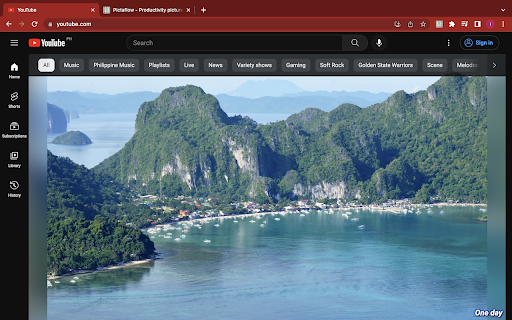
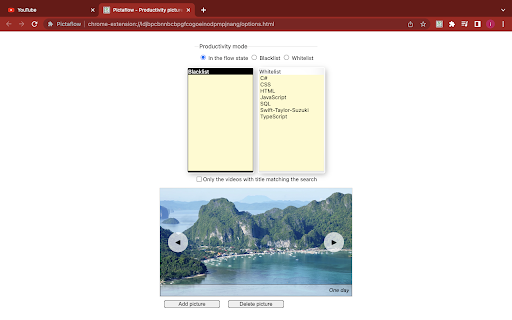
YouTube is a learning and productivity tool. It's drastic to block YouTube just because it's easy to get distracted and watch unproductive videos while you are using it to learn something for work or school. Block unproductive video searches instead Scenario, you are watching a tutorial on YouTube, and before you have even finished watching the video, you might be searching YouTube for funny cat videos instinctively! This extension will block that unproductive search and will only allow searches that contain the words or phrases you allowed When opening YouTube without Pictaflow, you are greeted with videos that can grab your attention. And before you know it, you are already watching tons of unproductive videos, forgetting that you opened YouTube to study something With Pictaflow, productivity wallpaper is your home page for your YouTube instead of suggested videos. Productivity wallpaper hides the suggested videos, this is the initial step to curb the user's tendency to click unproductive videos Stay focused & improve productivity while using YouTube. Block any distracting and unproductive videos

YouTube Latest Default
Sets 'Latest' as the default sorting option on YouTube channel videos A recent YouTube update has added the "For you" sorting option to videos and shorts. Are you annoyed that by default, the "For you" option is selected, rather than "Latest"? Quite understandable! When enabled, this extension automatically changes the sorting option of videos and shorts to "Latest". That's it.

Less Addictive YouTube
Remove some elements from YouTube to make it less addictive. Mix and match between the following options: - Hide or show thumbnails and video preview - Hide or show recommended videos sidebar - Hide or show comments - Hide or show Shorts (11-29-2025) v1.49: - Fixed broken features for a new YouTube update (November 2025), such as thumbnail video preview. - Removed the option "Show recommended channel & 2 videos end screen" because it is now a native YouTube feature (see "show" button on top-right of video when prompted by end screen). - Added option to hide the suggested videos when the user presses "V" on the keyboard during fullscreen in a video. ❌Known issue: pressing "V" also adds a gradient and removes the progress bar. It would be too invasive to YouTube's code to fix this issue, sorry. Just press "V" again to hide the gradient. (8-19-2025) v1.48: - Fixed thumbnails breaking with new YouTube update. - Fixed issue where disabling thumbnails also disable channel avatar and banner. (4-22-2025) v1.47: - New feature: Added option to show/hide the blue newness dot. Thanks AIPAL18! (6-8-2024) v1.46: - New feature: Added option to show/hide videos on the subscription page. - Extension now works for the possible future YouTube design. (1-10-2024) v1.45: - New feature: Added option to show/hide videos on the front page. Changelog (12-17-2023): - Fixed bug where extension doesn't work in new tabs. - Changed logo. Changelog (12-07-2023): New Features: - Extension now displays your changes immediately. No need to F5/Refresh to see your new settings. - Extension now works before any of the DOM objects are rendered. No more tiny flash of hidden content being shown when you reload the page. - Slightly cleaner options menu with labels above each category (Thumbnails, In video, Misc). - Option: make video length visible even with no thumbnail. - Option: show how much you've watched from the video (the red bar below the thumbnails) Bug fixes: - Bug fix: "Show Explore content" is now separate from Shorts. - Bug fix: unchecking "Show Explore content" used to remove the "Latest, Popular, Oldest" sorting on channel pages.

BT Cloud Work for HubSpot
BT Cloud Work for HubSpot With BT Cloud Work for Hubspot, we embed key BT Cloud Work capabilities into your Hubspot CRM account, allowing you to get more work done and communicate directly from Hubspot. Features * Call controls: Leverage BT Cloud Work calling capabilities, answer inbound and make outbound calls without ever navigating away from Hubspot. * Message hub: Access all BT Cloud Work text messages, voicemails, and faxes from one place. * Click-to-call and Click-to-SMS : Easily click HubSpot phone entries to call or text right within your browser or your BT Cloud Work chrome extension. * Instant screen pop: When a call comes in, BT Cloud Work for Hubspot instantly responds; identifying the caller by their corresponding Hubspot record. If no record is available, you’ll get the option to easily add a new record as a contact. * Association call logging: You may manually log calls with several associations. Be able to log a call under several associations, such as the contact, company, active deals, or tickets. You may also let the app log your calls automatically. * Server side text logging: Support logging a message as Activity under several associations, such as a contact, company, active deals or tickets either automatically or manually. The app can log new texts received to your HubSpot record even when you are offline. * Analytics: Make custom reports, and view your BT Cloud Work data within Hubspot. Get actionable insights with invaluable metrics into individual and team performance. * Work the way you want: There’s no software to download; you can log on and get access to BT Cloud Work for Hubspot from any PC or Mac.

YouTube Focus: Remove Distractions, Shorts, Suggestions
Hide or block distracting YouTube content to improve your concentration and use information rationally Ruckit is an extension designed to block distractions on YouTube™. In today's world of endless content, where people’s attention is constantly distributed, Ruckit helps users of all ages and statuses focus on what's really important. With Ruckit, you can block unwanted videos and channels, filter content, and clear your feed of anything distracting. This extension gives you the opportunity to improve your concentration, allowing you to rationalize your information and avoid unnecessary internet noise. • Hide YouTube™ Shorts, Suggestions – disable the display of YouTube™ Shorts, Suggestion, Chip bar and Latest posts for more focused viewing • Fill out Blacklist – add unwanted channels, keywords and phrases to a Blacklist for blocking. • Protect with password – set a password to protect access to the app and its settings. • Get rid of distractions – create a space for focused work without external distractions. • Set up Study/Focus mode – customize the interface to optimize the learning process without distractions and minimize distracting elements to enhance productivity. Join users who have already taken a step towards more conscious content consumption. With Ruckit, you can take control of your YouTube™ experience and achieve your goals without unnecessary distractions. Version notes Version 1.1.2 – October 2025 – Improved YouTube Shorts removal for smoother browsing experience. Version 1.1.3 – October 2025 – Fixed sync issue between YouTube and blacklist settings page. Version 1.1.4 – October 2025 – Improved Hidelist: hide comments and video suggestions in the new YouTube player. Found a bug or have an idea to make it better? Send feedback to ruckitx@gmail.com or leave a quick review in the Chrome Web Store — it really helps!
