
hdonifknoaabcipnicooajpencgllcaf
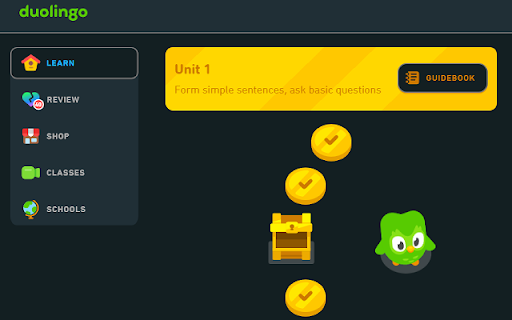
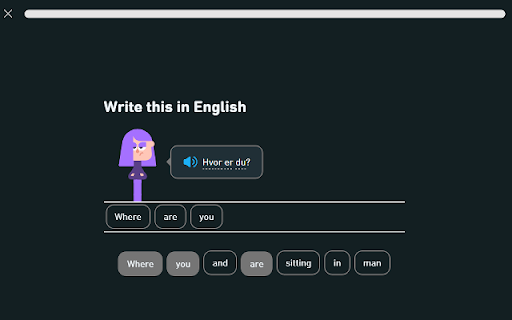
Dark mode for Duolingo ** DEPRECATED - Duolingo now has an official dark mode using the same color scheme available in the settings. This extension is no longer updated ** This is a simple extension bringing the Duolingo mobile apps' dark mode to the web version. Many other available options to enforce a dark mode on the website mess up certain designs or characters, or aren't fully compatible with all elements on Duolingo. This project is meant to solve this problem by styling all parts of the Duolingo website directly.

Duolingo Practice Button
Restore the Duolingo practice button Duolingo used to have a convenient button to click to practice your language skills. But sadly, this button no longer exists. Introducing a chrome extension to bring back the Duolingo practice button! This extension places a button on your home path screen that you can click to take you to a Duolingo practice session.

duoleavemealone for Duolingo
This extension makes the Duolingo.com language-learning site faster to use by automatically clicking through interstitial screens displayed after entering correct answers or finishing lessons. These screens' messages are displayed briefly onscreen instead. Duo's motivational messages are also skipped, because everyone already knows that you are great! :-D (Note that Duolingo now provides a setting for disabling motivational messages, which is more reliable than this extension's detection logic.) Since this extension interacts the Duolingo site, it's unfortunately likely to stop working if (or when) the site's interface is updated. **This extension is not affiliated with Duolingo.** 0.34: Skip streak end screens and legendary start/end screens. 0.32: Fix story support and improve bubble colors when dark mode is enabled. 0.31: Support Duolingo's dark mode setting, mostly (end-of-lesson messages don't seem to be displayed). Also skip the "perfect" screen after completing a message without any mistakes. 0.30: Handle /lesson URLs, apparently introduced by Duolingo's tree redesign (https://blog.duolingo.com/new-duolingo-home-screen-design/). Also make the options page a bit less ugly. 0.29: Update to Manifest V3 (hopefully an invisible change). Also fix discussion-link-loading and remove a debug console.log call. 0.28: Click through correct-answer screens for alphabet/character exercises. 0.26: Add a browser action button that can be clicked to temporarily toggle the extension off or on. 0.25: Click through most of the screens related to "legendary" (crown) lessons for gilded skills, and avoid a bug where the extension got stuck clicking a button at the end of a legendary lesson. Also add click rate-limiting to try to avoid future bugs like this. 0.24: Handle new ways that button colors are set in regular skills and stories. 0.23: Handle /progress-quiz/ URLs for Duolingo Plus. 0.20: Add on-by-default option for controlling whether correct-answer messages are skipped or not. 0.16: Display completion messages after stories. Fix a bug where the next button was clicked prematurely when answering text-entry questions in stories. 0.15: Add support for placement tests (available before creating a profile). 0.13: Improve support for Stories and enable by default. 0.12: Add an option to enable experimental support for clicking the next button in Stories. (Options are available by right-clicking on the extension's toolbar icon.) 0.11: Fix incorrect clicks at beginning of skill tests. Fix discuss links when loading URLs directly instead of navigating from main page. Add spacing between typo messages and discuss links. 0.10: Add experimental support for displaying discuss links. (Not released on Chrome Web Store.) 0.9: Skip start screen when testing out of the current level of a skill (i.e. URLs ending in /test). 0.8: Add options to control message timeouts and center messages horizontally. Also handle checkpoints (i.e. /checkpoint/ URLs) in addition to tests (/bigtest/). 0.7: Add an option page and provide support for automatically starting timed or non-timed practice. (I had to add the "storage" permission to be able to save the option's value.) Also automatically click the next button during checkpoints that are being used to test out of a set of skills. 0.6: Also automatically click the "Next" button on https://www.duolingo.com/practice. Note that motivational messages sometimes (always?) aren't skipped here. Duolingo makes it really hard to consistently detect them. :-(

Duolingo TTS Controls
Provides playback controls for some of the challenges on Duolingo. For more detailed information, screenshots, or if you have any support request, visit the development page of the extension here: https://github.com/blmage/duolingo-tts-controls - Adds controls to each sound of the listening / speaking / translation challenges. - Full controls are available by hovering over the buttons or using the keyboard shortcuts, and feature: - a rate (speed) slider, - a volume slider, - a seek bar, - a play/pause button, - a stop button, - a "pin" button (to define the current position as the new starting position). - Strives to blend seamlessly in Duolingo's UI, and to be compatible with custom themes such as Darklingo++. The selected control panel is identifiable by the keyboard icon that is added next to its buttons. In order to use the keyboard shortcuts, the selected control panel must be focused by pressing [ Ctrl ]. Once focused, the keyboard icon becomes highlighted, and you can use: - [ Ctrl ] to focus back the answer input, - [ Tab ] to select (and focus) the next control panel, - [ ] to decrease / increase the playback rate (speed) (or [ Ctrl ] + [ ← ] / [ → ]), - [ ↓ ] / [ ↑ ] to decrease / increase the playback volume, - [ ← ] / [ → ] to move the position backward / forward, - [ 0 ] .. [ 9 ] to set the position at 0 .. 90% of the duration, - [ Home ] to set the position at the start, - [ End ] to set the position at the end (think of it more or less as a stop button), - [ Space ] / [ k ]to play / pause the sound (or [ Ctrl ] + [ ↑ ]), - [ p ] to "pin" the current position (the sound will now start from there each time it is played) (or [ Ctrl ] + [ ↓ ]). Shortcuts behind parentheses are provided as alternatives for when the main ones are not available. This can happen for example when a "keyboard-aware" word bank is available for the current challenge. - The extension is deeply tied to the inner workings of Duolingo, meaning that significant changes on their side could (temporarily) break it. If that happens, you can either: - wait for me to fix it (you can open an issue on the support page if there is none about it yet), - if you're a developer, try to fix it yourself, then open a related PR on the development page. - Due to hard limitations with the underlying technology (sounds are not accessible via Ajax requests, preventing us from using the Web Audio API), the volume can not be raised over 100%. Duolingo is a registered trademark of Duolingo, Inc. This extension is not affiliated with or endorsed by Duolingo, Inc.

Duolingo Solution Viewer
Provides access to the lists of solutions for Duolingo's translation / listening challenges, and restores the correction of typos. For more detailed information, screenshots, or if you have any support request, visit the development page of the extension here.. : https://github.com/blmage/duolingo-solution-viewer .. or the (new) Discord server: https://discord.gg/ZCTB5BPctK - Provides a link to the list of solutions of the current challenge, once you have submitted your answer. - By default, the solutions are sorted by their similarity with your answer, but you can also switch to an alphabetical sort. - Click on your answer to edit it. The similarity scores of the solutions will be refreshed accordingly. - Click on the thumbtack button to pin your reference answer, and easily compare it with all the solutions. - Filter the solutions by entering one or more words in the filter input (click on the icons on the left of a filter to refine it). - Select a word (or just a part of it) in any solution to quickly add a new filter. - Remembers the lists of solutions of each challenge, to also make them available from the corresponding forum discussions. - Displays the closest solution when the answer you submitted is incorrect. - Outlines typos in answers to listening challenges. - Strives to blend seamlessly in Duolingo's UI, and to be compatible with custom themes such as Darklingo++. After having submitted an answer to a challenge, use: - [ s ] to open the solution window, and [ Esc ] to close it, - [ r ] to open the report window, - [ d ] to open the forum discussion in a new tab. When a list of solutions is available, use: - [ f ] to focus the filter input, and [ Esc ] to leave it, - [ ↑ ] / [ ↓ ] to scroll up / down the list, - [ ← ] / [ → ] to navigate through the pages one by one, - [ Ctrl ] + [ ← ] / [ → ] to go directly to the first / last page. When the filter input is focused: - enter a word then use [ Enter ] to add a filter (see the filter shortcuts below), - use [ Backspace ] to remove the last added filter, - .. and suggestions are available: - use [ ↑ ] / [ ↓ ] to select a suggestion, - use [ Enter ] to add a filter based on the selected suggestion (shortcuts will be preserved). For most languages, enter: - " word " for solutions that include the exact word, - " *example " for solutions that include a word ending with "example", - " example* " for solutions that include a word beginning with "example", - " *example* " for solutions that include a word containing "example", - " -word " for solutions that do not include the exact word (wildcard variants above are also available). For languages that do not use space-separated words (such as Japanese), enter: - " word " for solutions that include the word anywhere, - " *example " for solutions ending with "example", - " example* " for solutions beginning with "example", - " =example " for exact solutions, - " -word " for solutions that do not include the word (again, all variants above are available). - The lists of solutions are built by flattening the original solution graphs, which are not optimized against redundancies. This can lead to lists of solutions containing lots of very similar sentences. - "Fill in the blank" challenges are based on "normal" translation challenges. The lists of solutions provided for them may therefore include sentences that do not match the blanks. Duolingo is a registered trademark of Duolingo, Inc. This extension is not affiliated with Duolingo in any way.
