
hdnjehcihcpjphgbkagjobenejgldnah


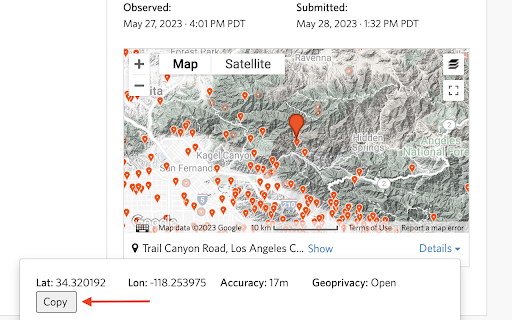
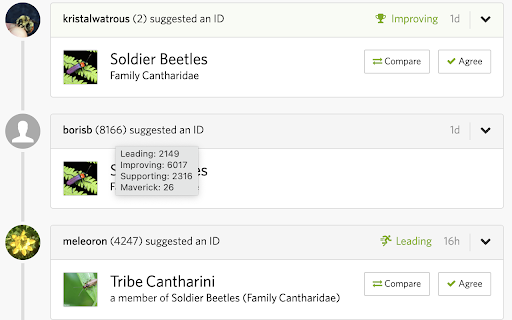
Current features: * Adds the ability to get computer visions suggestions for all images on an observation. * Adds the ability to crop & rotate images in-page and get the computer vision suggestions for the cropped image. * Adds color-coded computer vision scores to observation and upload pages. * Shows the count of your observations of a taxon on the taxon's page. * Adds button to observation & identify pages to easily copy geocoordinates. Also fixes pasting of coordinates into the observation upload map modal. * Adds identifier stats to observation pages.

Salesforce Shortcuts
Quickly open the most used URLs in your Salesforce Orgs. How to use it: 1) Open the extension using the "Alt + S" keyboard shortcut ("Option + S" on macOS). 2) Select your Salesforce Org with up and down arrows 3) Press "Control + 1" to open its Home page 3.a) use "Control + 2" to open Setup, or "Control + 3" to open Developer Console You can change the default "Alt + S" shortcut by opening the following URL in your browser: chrome://extensions/shortcuts 100% safe and private. No tracking and no permissions required to run. Also, completely free. There is also a version of this plugin that allows changing the colour of Salesforce Favicons: https://chromewebstore.google.com/detail/salesforce-shortcuts-with/pegpfhbecbiefakehnmehoaembjmican Features: - Allow exporting and importing of settings Improvements: - Ask for a review on 200th usage Features: - It is now possible to configure the plugin to search through all the orgs even if a tag is selected Improvements: - Minor styling improvements in Help page Fixes: - Fixed the issue where the Alt keyboard shortcuts are ignored when not using the Numeric Pad Fixes: - Fixed the issue where the Alt keyboard shortcuts sometimes didn't execute the correct shortcut Improvements: - New "Help" page with basic instructions on how to use the plugin - New "Settings" page where a different shortcut activation key can be selected (Control vs Alt/Option) Improvements: - Width of the Name cell will remain constant independent of the Name length - Improved spelling in some labels Improvements: - Reduced the size of the drop down icon in Tag selector - Added more robust handling of Salesforce domains to prevent adding duplicate orgs Features: - Orgs can now be assigned different colors - Holding down "CTRL" will show shortcut numbers instead of icons for easier use of keyboard shortcuts Improvements: - 12 new icons are available for custom shortcuts - When 7 or more shortcuts are displayed in the home page they are now not as narrow as before Improvements: - Explanation for "System" theme is provided Fixes: - Fixed the scrollbar look in Dark mode Improvements: - Moved "Delete Org" button to Reordering screen to prevent accidental deletions - Display plugin version in Settings - Added "Arrow Up" and "Arrow Down" icons for Custom Shortcuts - Added help text next to "Shortcut URL" field to make it more clear how it functions Fixes: - Fix the flickering when opening pages - Focused buttons couldn't be executed when pressing "Enter" key before. Now they can, but in order to open the selected Org "Ctrl + Enter" has to be pressed. Features: - Allow adding custom shortcuts that are applied across all Orgs - When Org is selected, pressing the "Enter" key will execute the first action - Allow reordering of Orgs

BBR Helper
This provides some advanced stats (game score, simple player rating and game box plus-minus) on multiple pages for NBA, WNBA, G-League, international leagues and college basketball. Including: - average stats by season on the player page - average stats by playoff series on the player page - average stats by player on the team_season page - average stats by player on the team_player page - average stats by player on the season_player page - single game/half/quarter stats by player on the game_boxscore page - single game and average stats on the gamelog and split pages - top 5 and top 20 average stats players on the season page - top 20 average stats players on the team_season page - top 20 average stats seasons rankings on the player page - top 50 career stats rankings on the player page - multiple stats rankings on the leader page - player awards column on team season page gBPM = (-0.55 * fga + 1.04 * fg3 + 1.39 * fg - 0.25 * fta + 0.79 *ft + 0.17 * orb + 0.27 * drb + 0.24 * (trb - orb - drb) + 1.34 * stl + 0.43 * ast + 0.64 * blk - 0.34 * pf - 0.95 * tov) / g """ , where orb is treated as 0.3 * trb and drb is treated as 0.7 * trb approximately when stats are not complete in early years.

Rent Offers: Renter Calculator
Calculate your move-in, monthly costs, and keep notes on the rentals you've run calculations on. The Rent Offers Renter Calculator will allow renters to calculate and estimate how much money they'll need to move into a rental property. It also helps calculate how much how money they'll pay each month and the percentage of their overall income it'll be. The calculator will work on many of the real estate listings sights you already know and love.

FLOZABLE Tab Monitor
Boost focus with timers, block distractions, get study tips, and stay updated with group alerts using FLOZABLE. Supercharge your focus and productivity with the FLOZABLE Study Focus Chrome Extension. Seamlessly integrated with your browser, this extension is your go-to tool for cultivating efficient study habits and making the most out of your online learning experience. Time Management Mastery: Effortlessly track your study time with our intuitive timer. Set focused intervals, challenge yourself, and stay on top of your study goals. Distraction-Free Browsing: Activate the distraction-free mode to limit access to non-educational websites during your study sessions. Say goodbye to procrastination and hello to enhanced concentration. Personalized Study Plans: Receive AI-generated study suggestions based on your learning habits and preferences. Tailored recommendations to keep your study sessions engaging and effective. Group Study Alerts: Stay connected with study groups seamlessly. Receive instant notifications for group study invitations, challenges, and achievements directly through the Chrome Extension. Progress at a Glance: Get a quick overview of your study progress with a personalized dashboard. See your daily, weekly, and monthly study trends, empowering you to stay motivated and accountable.
