
hdenoglahpdcegnkgbmenjgiapffndbn
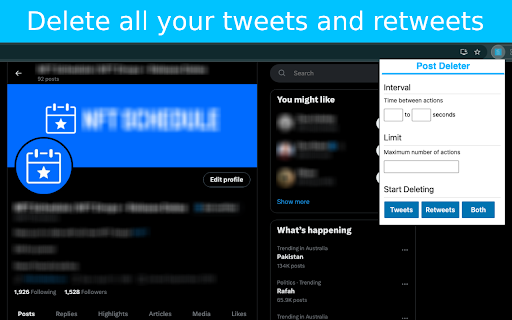

Delete all your Tweets and X posts with this Tweet deleter tool. Run it automatically and have all your Tweets deleted with a click! Delete all your tweets quickly and easily! Post Deleter is the best tweet deleter tool, providing a way to delete all of your tweets with the click of a button! Features: - Automatically delete tweets - Supports tweets and retweets - Set limit of how many tweets to delete - Set custom interval between deletes Stop manually deleting your tweets and automate the entire process. Install Post Deleter today to get started for free!

Ad Blocker: Stands AdBlocker
Stands AdBlocker – it's a free ad blocker for YouTube, Twitch, Pop-Ups, Video Ads, and websites. Block ads everywhere with Stands! Stands is the best free adblocker for Chrome that eliminates ads on YouTube, Twitch, pop-ups, video ads, and banners. Download the top-rated adblock Chrome extension and enjoy faster, interruption-free browsing today! 🚀 Why Choose Stands adblocker for Chrome? ✅ Block ads – pop-ups, video ads, banners, and auto-playing videos disappear from every site you visit. ✅ Watch YouTube and Twitch without interruption – no pre-roll, mid-roll, or live stream ads ever again. Skip ads automatically with our built-in ad skipper. ✅ Faster page loading – blocking ads reduces data usage and makes sites load up to 50% faster. ✅ Protection from malicious ads – Stands blocks dangerous ads carrying viruses, malware, and phishing attempts that could harm your device. ✅ Auto-hide cookie banners – say goodbye to annoying pop-ups asking you to accept cookies on every site. ✅ Customize your blocking preferences – you decide which sites can show ads to support your favorites, and which can't. 🎯 What does Stands AdBlocker block? 🎥 YouTube ads – removes all video ads instantly 🎮 Twitch ads – watch streams without interruptions 🍪 Cookie banners – automatic blocking of cookie notification pop-ups 📱 Social media ads – block ads on Facebook, Instagram, Twitter, and LinkedIn 🌍 Pop-ups – a true website blocker for pop-ups across every site 📥 How to remove ads? Install in 3 steps: 1. Download Stands from the Chrome Web Store 2. Install with one click 3. Done! Your Google Chrome ad blocker activates automatically – block ads for free from the very first second Also available for Microsoft Edge, and Opera. ⭐ Why is Stands the best adblocker for Chrome? Stands starts blocking the moment it's installed, letting you browse free from annoying interruptions. As a trusted adblock Chrome extension, it stands out for stability, effectiveness, and fast performance: 🔹 Lightweight – won't slow down your browser 🔹 Regular updates – always up-to-date protection against new ad formats 🔹 All-in-one protection – one extension instead of multiple add-ons 🔹 No hidden costs – completely free, forever Stands delivers superior performance compared to alternatives like Adblock Plus, AdGuard, and uBlock Origin. ❓ Frequently Asked Questions What is the best adblocker for Chrome? Stands AdBlocker is the superior choice when considering top add blockers like Adblock Plus, AdGuard, AdBlocker Ultimate, uBlock Origin, and the Pie Adblock extension. Stands effectively blocks ads and speeds up page loading times. How to enable ad blocking? To enable Stands, simply install it from your browser’s extension store. Once installed, access the settings through your browser’s menu to customize your preferences. Can I choose which ads to block? Absolutely! You can customize your settings and add exceptions for specific sites you want to support. 🔐 Your Privacy What personal information do we collect on our users, and how do we collect it? We will collect information about the websites visited by our users, search engine results pages, click stream data, and information about the content that you viewed in order to ensure the ad-blocking, and anti-malware protection are all working properly. We also provide Browsing Data to third parties for their own use, such as for market analytics purposes. All Browsing Data is filtered to remove any personal data before it is processed and provided to third parties. For detailed policies on privacy and user terms, please refer to the Privacy Policy and End User License Agreement available on the website. PRIVACY POLICY: https://www.standsapp.org/privacy-policy/ END USER LICENSE AGREEMENT: https://www.standsapp.org/end-user-license-agreement/ These documents ensure transparency and trust by choosing Stands, demonstrating our commitment to efficiency and protecting your online privacy. 📧 Support For additional support or feedback, users are encouraged to visit the Support Center or contact via email at support@standsapp.org. Get started with Stands and join millions of users worldwide!

TikTok Cleaner | Remove Likes & Reposts with One-Click
Delete all your TikTok likes and reposts in one click – keep your profile clean and organized. ✨ Main Features - ✅ Delete All in One Click → Instantly remove all your TikTok likes and reposts. - ✅ Real-Time Progress → Track the cleanup process clearly, with pause/resume support. - ✅ Export Report → Download an Excel file after cleanup for easy record-keeping. ✨ How It Works 1. Make sure you are logged into TikTok (check TikTok.com in a new tab). 2. Open the extension and choose either Likes or Reposts. 3. The tool will automatically: - Open each liked/reposted video - Remove it from your account activity - Continue until everything is cleared 4. Refresh your TikTok profile to confirm the cleanup. ✨ Why Use This Tool? - Save hours of manual scrolling and deleting - Keep your TikTok account clean, private, and professional - Perfect if you want a fresh start or need efficient account management ⚠️ Disclaimer: This extension is an independent project and is not affiliated with TikTok or ByteDance. All trademarks are the property of their respective owners.

Twitter Downloader - Twitter Video Downloader
Download Twitter videos effortlessly with Twitter Downloader. Save your favorite clips, moments, and content in just a few clicks. Twitter Downloader - Twitter Video Download: Easily Save Your Memorable Moments This powerful tool allows you to easily download any video from Twitter, whether it's a funny clip, a memorable moment, or educational material, all with one click and save it locally for viewing anytime, anywhere. Through our plugin, you can freely save various content for personal or academic use. We recommend that users do not download copyrighted content without permission. ☑️ One-Click Download, Convenient and Fast: No complicated operations, just click the "Download" icon in the bottom right corner of the video to quickly save the video. ☑️ Support for Multiple Formats:Supports downloading videos in various formats such as MP4, WebM, etc., to meet your different needs. ☑️ High-Definition Quality, Original Taste: The downloaded videos retain the original quality, allowing you to enjoy the best viewing experience. ☑️ Safe and Reliable, Privacy Guaranteed: We are committed to protecting your privacy, all download operations are completed locally, and your personal information will not be leaked. ☑️ No Password or API Required: Simplifies the user experience, no additional information needs to be entered to start downloading. ☑️ 24/7 Support: Provides technical support 24/7 to solve your usage issues. 1. Open the Twitter website or app, find the video you want to download. 2. Click the "Download" icon in the bottom right corner of the video. 3. Select the save location, and the download will start. 📝Disclaimer: This plugin is independently developed and is not associated with the official Twitter app or website. Please ensure compliance with relevant laws and regulations before use.

Tweet Copier - Copy Twitter / X Threads
Copy tweets and full X (Twitter) threads in one click. Instantly save clean text for research, notes, writing, and archiving. Tweet Copier is a Chrome extension that lets you copy tweets and entire Twitter/X threads instantly with one click. Save clean, structured tweet text directly to your clipboard for research, writing, archiving, or reuse. 🚀 Key Features ✅ Copy Single Tweet Instantly copy the full text of any tweet, including quoted tweets and emojis. Copy tweet text instantly without screenshots or manual selection. ✅ Copy Twitter / X Threads Automatically detects and copies the entire thread by the same author. ✅ Auto-Scroll for Long Threads Loads hidden tweets so you can copy long Twitter threads in one click. ✅ Clean, Structured Formatting Preserves emojis, line breaks, and auto-numbers tweets (e.g., 1/12, 2/12). ✅ Native X Integration Adds Copy and Thread buttons directly to the X action bar (left of Grok). 👨💻 Who This Is For Content Creators – Save tweets and threads for blogs, newsletters, or social media. Researchers & Students – Archive Twitter discussions and primary sources. Journalists – Preserve tweets and threads before edits or deletion. How to Use - Install Tweet Copier. - Refresh X (Twitter). - Click Copy or Thread on any tweet. - The tweet text is copied instantly to your clipboard. 🔒 Privacy-First Twitter Extension No data collection No tracking or analytics No external servers Runs entirely locally Tweet Copier does not automate engagement, modify content, or interact with your account. It only reads tweet text you explicitly choose to copy.
