
hddlphpfekmaefefhogldolpfiohmgnn
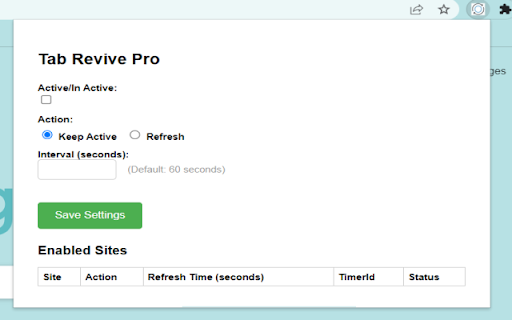
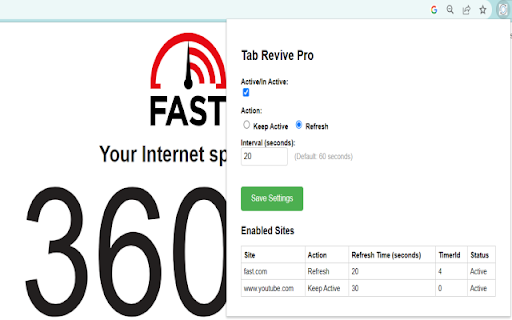
The TabRevivePro Chrome extension is designed to revolutionize your browsing experience. Effortlessly keep your tabs alive and active in the background. Say goodbye to losing valuable page content due to inactivity. Or automatically reload tabs at custom intervals, eliminating the need for constant refreshing. Presents site settings, offering the flexibility to configure various options (Enable/Disable, Action, Time Interval) for different sites. Stay in control of your browsing experience with ease. While browsing on any site, simply click on the TabRevivePro Extension icon, access the popup, and effortlessly configure settings for the active site. Once added, the site instantly appears in the table.

Keep Active
Prevent session timeouts and maintain your online presence. Keep Active Extension Keep Active is a Chrome extension designed to prevent session timeouts and maintain your online presence with minimal effort. Key Features Custom Refresh Intervals: Set how often the extension refreshes your chosen page. Choose Any URL: Keep any website or dashboard active based on your needs. Simple Interface: Easy-to-use design for quick setup and use. Privacy First: Your data stays private—no collection or sharing. How It Works Install the Extension: Add Keep Active from the Chrome Web Store. Set It Up: Enter a URL and refresh interval. Stay Active: Start or stop the extension with a single click. Benefits Prevents automatic logouts due to inactivity. Ideal for remote work, webinars, and research sessions. Reduces disruptions to your workflow. Privacy Keep Active runs locally in your browser and does not store or transmit personal data. Disclaimer Keep Active is meant for legitimate use only and should not be used to bypass website security policies.

Force Background Tab
Description: Normally, Each click on a link that wants to open a new tab will ACTIVE THE NEW TAB Now, After install this extension, the new tab will RUNNING IN BACKGROUND version 2.2.0 New feature: With the new rule management, users can set whether a site open in background or not version 2.1.5 Using chrome.storage instead of localStorage, options will sync with google account version 2.1.4 Add support for Chrome 79 https://developer.chrome.com/extensions/tabs#property-Tab-pendingUrl version 2.1.3 Add chrome-extension:// to exception list version 2.1.2 Revert to version 2.1.0, that the version without moentizus file version 2.0.5 Sorry for the hotfix caming late bugfix:add NEWTAB's url of chrome version 30.x to exception list version 2.0.3 bugfix:fix the problem that open 2 tabs in background when making 1 click bugfix:remove the active mode for the bug above, also means it may be a FLASH when you openning a new tab version 2.0.1,2.0.2 bugfix:fix the problem that open 2 identical tabs when using Google Reader version 2.0.0 improved:improve the efficiency in passive mode feature:add active mode to prevent the FLASH when open a new tab version 1.12.0 bugfix:when Chrome first open the extension can not work improved:update some API method because deprecated version 1.11 improved:update Manifest_Version to version 2, and fix script to fit new version

Run In the Background
No js code, only let your chrome running in background On Windows OS, You may want to run Chrome in background for quick restart, but if there is no extension have background permission, Chrome will quit totally if last tab is closed. This extension does only one thing that makes Chrome running in the background. And the chrome icon with be seened in the windows system tray.

Refreshy
Refreshy helps refresh your tabs in your browser! So much power from such a tiny robot! What does Refreshy do: ======================== - Can refresh current tab you are on (even if you change tabs!) - Can refresh specific tabs (pick 1, or many!). - Can refresh all tabs. - Can perform hard refreshes (to bypass cache). - You set the time you want it to refresh. (*NEW*) You get a countdown until next refresh in the extension. - You can set a random refresh interval (so websites don't think you're a bot). - On each page you can see a small timer to let you know how much time the next refresh is coming, even if the extension is closed! (*NEW*) Refreshy does all of this for you...absolutely 100% FREE! - No software locks. - No subscriptions. ======================== NEW TO VERSION 2.1.0! ======================== - Due to popular demand Refreshy now gives you a refresh timer on the extension. I want to say thank you to everyone who requested this. - Refreshy now has a timer you can see in the lower right corner of any tab you are refreshing! Even if the extension is closed, you will know exactly how long you have until the next refresh. Thank you James for the suggestion! ^_^ - Manifest V3 support. It's finally here. Refreshy had a long refresh timer, but it was time for a hard refresh! Refreshy now is completely updated. I rewrote so much of the code to bring this into modern times. Let's keep Refeshy alive for years to come! ======================== Note from Creator ======================== Thank you for taking the time to look at Refreshy. The name might not be unique, but each and everyone of you are truly what makes Refreshy unique. Thank you to everyone who has let this little robot help you in your day to day. Thank you to everyone who has reached out about me making improvements. If you see anything or think of an idea that can make this extension better, please feel free to reach out! If you truly love the extension and want to help support me, Refreshy will always be free, but you can buy me coffee at https://www.paypal.com/paypalme/dinob661 Thank you! ^_^
