
hdcpnjcdfpgfbnpihgmaknpbkkmlfoig
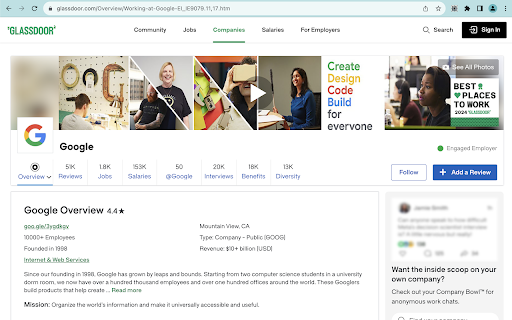
Glassdoor Easy Access simplifies your journey into the world of company insights, salary data, and employee reviews. With this innovative Chrome extension, gain seamless entry to Glassdoor's vast resources without the hassle of logging in. Whether you're exploring job opportunities, seeking company cultures, or comparing salary benchmarks, "Glassdoor Easy Access" offers you a straightforward pathway to the information you need to make informed career decisions. Unrestricted Access: Browse Glassdoor content freely, bypassing login requirements. Streamlined Experience: Enjoy a clean, user-friendly interface that focuses on content discovery. Quick Installation: Set up the extension in seconds and start navigating Glassdoor with ease. Privacy-Focused: Access content anonymously, with no need to share login credentials or personal information. How It Works: Once installed, the "Glassdoor Easy Access" extension automatically detects when you're on Glassdoor and discreetly removes login prompts, allowing you to view content uninterrupted. It's that simple – no configurations, no logins, just instant access to valuable insights. Get Started: Elevate your Glassdoor experience today. Install "Glassdoor Easy Access" and step into a world of transparent company insights and career opportunities, all at your fingertips.

In Private Mode
Use Linkedin Private Mode app to view linkedin profile anonymously, go incognito mode, and hide profile from others. 🛡️ Private Mode for LinkedIn Chrome Extension! Ultimate tool for browsing LinkedIn anonymously. With growing concerns about online security, it's essential to have a tool that let's you use the platform discreetly and securely. 🌟️This tool lets you quickly change what others see when you view their profile: • Show Name and Headline (you see others’ names and headlines). • Private Mode: you stay anonymous to others while viewing their profile. With linkedIn private mode, you can browse the platform securely without leaving any traces behind. Ensure privacy with just a click. Select what other see when you’ve viewed their profile: 1. Unhide name and headline 2. Enable private mode 🧐 Stay Hidden: • Activate incognito to check accounts anonymously and keep identity concealed. • Use private mode for linkedIn to ensure your online activities remain confidential. • Use an app to stay stealth while browsing. 🔐 Complete security: ▸Enable incognito to ensure your anonymous searches and views are hidden from tracking. ▸Stay incognito incognito to safeguard the personal information. ▸Adjust settings and make your profile hidden and private. ▸Activate linked in private mode to prevent others from seeing activity. ⚙️ Customizable settings: ♦️ Adjust settings to customize your online visibility. ♦️ Customize privacy settings to ensure your profile remains hidden. 👤 Anonymous Profile Viewing: ➤ Use private mode to view In profile anonymously and protect identity. ➤ Discover how to view others anonymously without alerting users. 🔐 Secure Usage: 1. Keep yourself anonymous and secure with incognito mode. 2. Ensure profile remains hidden and secure from prying eyes. 3. Activate In private mode to secure web activities and protect data. 🕵️♂️ Effortless Anonymity: 🌐 Make your page anonymous with simple steps to protect identity. 🌐 Stay anonymous and private. 🌐 Learn how to do private browsing without leaving a trace. 🔒 Enhanced Security: 1) Protect yourself with advanced privacy settings. 2) Maintain security with advanced tools. 3) Use this app to view Linkedin profiles anonymously and safeguard your privacy. 4) Enable anonymous mode to enhance account security and protect data. 🔍 Visibility Settings: A. Hide in profile from others and enhance anonymity. B. Use private mode and surf without leaving digital breadcrumbs. 🪪 Identity Control: ① Take control of privacy and optimize visibility. ② Control online presence. ③ Switch on In private mode. 🌎 Enhanced Productivity: ① Easier browsing with Google one step away 💸 What are the benefits of this tool? ▸ By enabling this feature, you can search jobs, connect with recruiters, and engage with potential employers without alerting them to your activity. ▸ Maintain a level of anonymity, giving you the freedom to reach out to contacts without feeling self-conscious or worried about being noticed. 💬 Why use the private mode extension? 1️⃣ In private mode ensures your web activities remain confidential, allowing you to view profile anonymously and keep your identity concealed. 2️⃣ With this feature, you can view discreetly without leaving a trace. 3️⃣ Whether you do hiring, search jobs, or look for how to grow network, this tool offers peace of mind knowing that you're hidden from others. ❓ How does the linkedin private mode work? 💡 The extension allows you to view profiles anonymously, keeping your identity concealed from others. ❓ How do I install the Chrome extension? 💡 Simply click "Add to Chrome" and then select private mode ❓ May I use the extension for jobs search and hiring? 💡 Absolutely! Use our private mode app to get all the benefits of premium regarding private browsing. ❓ How to see who viewed your profile without premium? 💡 Learn how to turn on private mode quickly to view profiles anonymously, keeping your visits hidden from others. Disclaimer: In Private Mode is not affiliated, associated, authorized, endorsed by, or in any way officially connected with LinkedIn Corporation, registered in the U.S. and other countries. LinkedIn is a trademark of the LinkedIn Corporation.

Clear Glass
Removes obstructive review-gate overlays on supported job-review sites for logged-in users Improve usability of job review websites by removing restrictive popup and script behavior. This extension works entirely on the client-side. Supports Glassdoor, Blind, and Repvue. Glassdoor (requires log-in for full functionality offered by this extensions): - Bypasses need to write review to see most of site's content - Stops popups and scroll locks from preventing site navigation on load - Reveals full review text for both employee company reviews and employer responses - Reveals full candidate interview text - Supports the following regions outside of the US: at, be, ca, ar, au, br, ch, de, es, fr, hk, ie, it, nl, sg, in, nz, mx, uk. If you identify a region that needs support, please email me and I will add it to this list. - Unlocks option to search in for keywords in interview page - 'Filters' button still disabled for now, but likely redundant functionality Blind (no log-in required): - Removes blocking element with messaging 'Join the Blind community' that obstructs full content of posts and discussions - Does NOT work for Review section, Salary section, or other "blurred" components as these are blocked at the server level Repvue (no log-in required): - Provides complete access to all of the site's content without login or review This extension works entirely on the client or user side, and so certain features which are blocked with higher sophistication on the server end of a website will not be able to be unblocked. For Glassdoor and Blind, this can include some salary information in most cases. However, if there are any sections that are still blocked despite this extension's best efforts and you would like me to look into resolving it, please email me and I can determine if it is something this extension can be expanded to accommodate.

G-Jobs Scraper: Export Jobs, Reviews, Salaries & More
Extract job listings, company profiles, employee reviews, salary data, and interview experiences from Glassdoor with this browser extension. All data processing runs locally in your browser, so your collected information stays on your machine. The tool includes monitoring capabilities to track page changes and alert you when specific conditions are met. ✓ Monitor any Glassdoor page for changes and receive instant alerts ✓ All data extraction and processing happens locally in your browser ✓ Export to CSV, Excel (XLSX), JSON, HTML Table, and Raw JSON ✓ Automatic pagination for multi-page search results ✓ Batch process multiple URLs in a single session ✓ Customizable field selection and conditional formatting What Data You Can Extract Jobs: Job titles, IDs, salaries (min, mid, max), locations, employer ratings, easy apply status, and application URLs from Glassdoor search results. Job Details: Full descriptions, required skills, education requirements, experience years, employer industry, sector, size, headquarters, revenue, CEO approval ratings, and detailed compensation and culture ratings from individual Glassdoor job pages. Companies: Company names, headquarters, sizes, industries, descriptions, job counts, overall ratings, career opportunity ratings, compensation ratings, culture ratings, and CEO ratings from Glassdoor company lists. Company Details: Mission statements, founding dates, revenue, stock tickers, websites, competitors, subsidiaries, certifications, review counts, salary counts, and benefit counts from Glassdoor company overview pages. Reviews: Summaries, pros, cons, advice, dates, overall ratings, career opportunity ratings, compensation ratings, culture ratings, work-life ratings, business outlook, CEO opinions, and employment details from Glassdoor review pages. Salaries: Base pay and additional pay at 10th, 25th, 50th, 75th, and 90th percentiles, total salary counts, and currency information from Glassdoor salary pages. Interviews: Experience descriptions, difficulty levels, outcomes, process details, advice, duration, questions, and negotiation details from Glassdoor interview pages. Additional Data: Company awards, branch locations with addresses, benefit ratings, and company photos from Glassdoor company pages. Use the Page Watcher to track changes on any Glassdoor page over time. Set conditions on specific fields, such as new job postings matching your criteria or salary updates for a role. Receive instant notifications via webhook or ntfy.sh when your conditions are met, so you stay informed without manual checking. The Batch URL Opener lets you queue multiple Glassdoor URLs for processing in one session. Add URLs manually or auto-collect them from search result pages. The extension processes each URL, extracts the data, and compiles everything into a single export file. Perfect For Ideal for recruiters, job seekers, and market researchers who need to compile employment data from Glassdoor at scale. Simplifies the process of gathering job listings, company information, salary benchmarks, and employee reviews for offline analysis. This extension supports Glassdoor domains across multiple regions, including the United States, United Kingdom, Canada, Australia, Germany, France, India, and other international Glassdoor marketplaces. All scraping and data exports are performed locally on your machine. The extension collects general usage metrics to improve performance and reliability, but your scraped data is never sent to external servers. This extension provides tools for extracting publicly available data. Users are responsible for ensuring their use complies with applicable terms of service and local regulations. The developer provides the tool and is not liable for how it is used. For assistance or questions, contact hello@nifty.codes. Glassdoor is a registered trademark of Glassdoor, Inc. (Indeed/Recruit Holdings). This extension is an independent tool and is not affiliated with, endorsed by, authorized, maintained, or sponsored by Glassdoor, Inc. (Indeed/Recruit Holdings).

Unlock The GlassDoor
Removes overlays and login modals from Glassdoor to improve browsing experience Unlock The GlassDoor is a productivity Chrome extension designed to enhance your Glassdoor browsing experience by removing intrusive content overlays and login modals that interrupt reading. Key Features: - Automatically removes content-blocking overlays on Glassdoor pages - Eliminates persistent login modals and popup interruptions - Restores natural scrolling functionality on restricted pages - One-click manual unlock button for instant content access - Smart detection that only activates on glassdoor.com domains - Dynamic icon indicators showing extension status - Real-time monitoring for dynamically loaded blocking elements This extension is perfect for professionals, job seekers, and researchers who frequently browse Glassdoor for company reviews, salary information, and interview insights. It ensures uninterrupted access to valuable career information without compromising your browsing experience. The extension only modifies the visual presentation of Glassdoor pages and does not bypass authentication or access controls. It simply removes visual barriers that prevent you from reading publicly available content. Privacy-focused: No data collection, no tracking, no external connections. The extension operates entirely locally within your browser. Technical Details: - Works exclusively on glassdoor.com domains - Uses Chrome's latest Manifest V3 standards - Minimal permissions for maximum security - No background data processing or storage
