
hdbmlgmefggbbcmnnlcidpdpjflgofhh
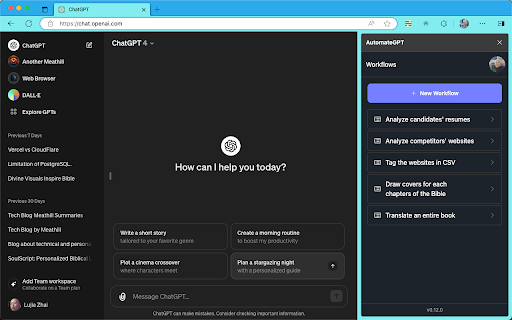
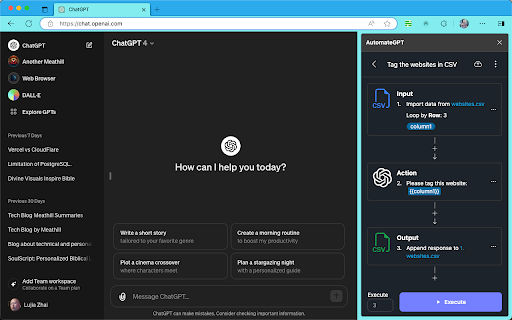
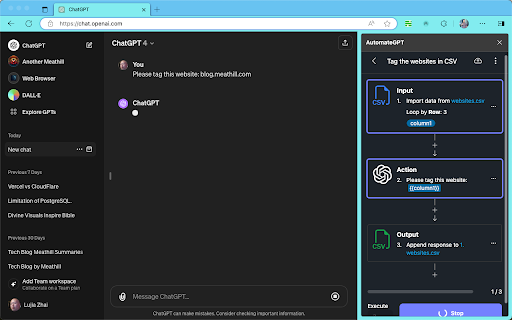
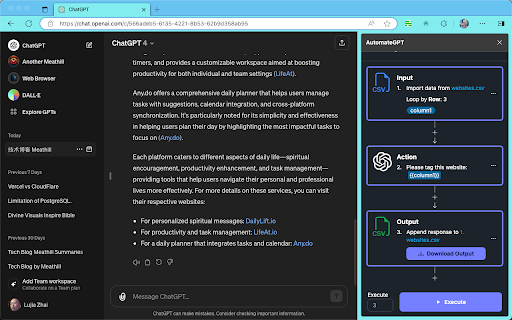
ChatGPT is becoming increasingly powerful, and GPTs can help us reuse the advanced experience of predecessors. However, ChatGPT… ChatGPT is becoming increasingly powerful, and GPTs can help us reuse the advanced experience of predecessors. However, ChatGPT still remains somewhat distant from our daily work, such as: not supporting large texts; difficulty in handling problems that require multi-step solutions; lengthy execution time, making automation challenging. Automate GPT is an innovative browser extension designed to maximize the potential of ChatGPT by integrating its advanced features like deep context understanding, advanced web browsing capabilities, special data analysis and insight abilities, along with DALL-E's creative drawing functions. Automate GPT can further enhance our work efficiency and creativity, assisting us in completing tasks like large text translation, website summarization, and automated image categorization.

AutoGPT - Auto send ChatGPT/Sora prompts and download images/videos
ChatGPT/Sora efficiency extension, batch automatic sending prompts and downloading images/videos, prompts management, and more. AutoGPT: Your ChatGPT Efficiency Extension! Your Creative Journey Accelerator! 1. Automatic batch sending 2. Automatic downloading 3. Supports Text to Image/Video 4. Supports Image to Image/Video (single/multiple with prompt sending) 5. Task management for sending, automatic queuing, adjustable order, add or delete tasks anytime 6. Batch prefix and suffix for prompts 7. Prompt templates, automatic batch combination 8. Prompt variable functionality 9. Batch images/videos and prompts management for downloader 10. Batch AI upscaling and batch AI background removal 11. Support Sora

ChatGPT Prompt Automation Queue
Automate ChatGPT prompts with prompt chains and queues for efficient, time-saving interactions. Effortlessly save and send multiple messages to ChatGPT in sequence, streamlining your workflow and saving time. •Save a sequence of messages you usually use. •Select your saved sequence, and the extension sends each message one by one automatically. Compared to the manual labor of repeating the same questions, this extension allows you to save sequences you frequently repeat and reuse them on demand. ~ Free •Unlimited Saved Sequences: Store as many sequences as you need. •Unlimited Messages per Sequence: No limit on the number of messages in a sequence. •Cross-Platform Support: Works on all operating systems with Chrome. •Supports Multiple GPT Versions: Compatible with GPT-4, GPT-4o, GPT-3.5. ➤ Perfect For: •Bloggers: Automate writing, ranking, and rewriting content by reusing common prompts. •Researchers: Streamline data cleaning, pattern finding, and extracting insights with repetitive sequences. •Content Creators: Enhance your content production process by automating common tasks and prompts. •Developers: Automate coding tasks, debugging steps, and documentation creation. •Save Sequence: Save a chain of multiple prompts for comprehensive responses from ChatGPT. •Automatic Sending: Select your saved sequence, and the extension sends each message one by one automatically. •Is ChatGPT Prompt Automation Queue free to use? Yes, it is completely free. •What operating systems are supported? All of them, as long as you use Chrome. •Do I need to sign in to my ChatGPT/OpenAI account? The extension operates on your local computer, so you do not need to log in to your ChatGPT account within the extension. •What is ChatGPT Prompt Automation Queue? ChatGPT Prompt Automation Queue is a browser extension that saves and sends multiple messages automatically to ChatGPT. It waits for a response from ChatGPT and then sends the next saved message automatically. --------------------------------------------------------------------------------------------------------------------- Download now and automate your ChatGPT interactions effortlessly!

PageTrail
This Extension tracks your daily surfing activity PageTrails is designed to enhance productivity by tracking time spent on various websites. It records active browsing time, aggregates it at the domain level, and provides a concise summary of web activity. This extension is ideal for users seeking to monitor their web usage patterns and optimize their online time.

Gemini Bulk Auto Q&A Generator
Batch automate Gemini Q&A with JSON export. Web search, citations, automated tasks for SEO/GEO content creation **Gemini Bulk Auto Q&A Generator - Boost Your AI Productivity 10x** A powerful automation tool designed for content creators, SEO experts, and market researchers. Automate batch questioning to Gemini AI and complete hours of work in just minutes. • **Batch Automation** - Import multiple questions at once and automatically ask Gemini AI one by one, no manual work needed • **JSON Export** - Export all Q&A results in structured JSON format for easy processing and analysis • **Citation Tracking** - Automatically record all citation sources to ensure content credibility • **Real-time Progress** - Clear progress bars and statistics to monitor task execution • **Pause/Resume** - Pause tasks anytime and resume later when needed • **Retry Failed** - Automatically identify failed questions with one-click retry • **Simple to Use** - No learning curve, ready to use immediately • **Highly Efficient** - Automated workflow saves 90% of your time • **Regular Updates** - Actively maintained with new features added regularly 1. Install the extension and open Gemini website (gemini.google.com) 2. Click the extension icon in the sidebar 3. Enter your questions in the input box (one per line) 4. Click "Start" and wait for results 5. Click "Export Results" to get the JSON file ✓ Supports both logged-in and anonymous Gemini modes ✓ Optional temporary chat mode (no history saved) ✓ Multi-language interface support ✓ Real-time log viewing for transparency Whether you're a content creator, marketing expert, researcher, or developer, this tool will multiply your Gemini efficiency. Install now and start your high-productivity AI journey!
