
hclplnlieojbfkdigpdpofcencmlcbna


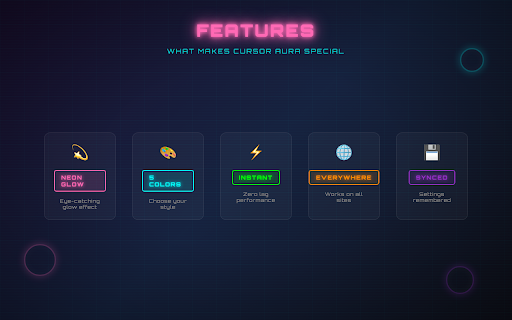
Add a retro-styled transparent circle around your mouse cursor Cursor Aura adds a customizable glowing circle that follows your mouse cursor across every website. FEATURES • 5 neon colors: Pink, Cyan, Lime, Orange, Purple • One-click toggle on/off • Settings sync across all your tabs • Retro-styled popup with CRT effects • Lightweight - no slowdown HOW TO USE 1. Click the Cursor Aura icon in your toolbar 2. Flip the switch to turn it on 3. Pick your color 4. Vibe Your settings are saved automatically. Works on all websites. Perfect for screen recordings, presentations, or just adding some personality to your browsing.

Gems Cursor - Crystal Cursor for Chrome
Shine online with Gems cursors. Perfect for fans of diamonds & sparkling crystals! Shine online with sparkling Gems cursors. Perfect for fans of diamonds, crystals & precious gemstones! Transform your browsing experience with the dazzling brilliance of precious gems and crystals. This Chrome extension replaces your standard cursor with stunning jewel-inspired designs that add sparkle and elegance to every click! Features: • Gems Cursors - Choose from designs featuring diamonds, rubies, emeralds, sapphires, amethysts, crystals, and other precious gemstones • High-Quality Graphics - Crisp, vibrant cursor designs with realistic sparkle effects and brilliant shine • Customizable Cursor Size - Adjust cursor dimensions to match your preferences • Favorites System - Mark and quickly access your most-used gem cursors • Zero Performance Impact - Lightweight design ensures smooth browsing • Easy Toggle On/Off - Quickly disable when needed How to Use: 1. Install the extension from the Chrome Web Store 2. Click the Gems Cursor icon in your browser toolbar 3. Browse through available gem-themed cursor designs 4. Select your preferred cursor for normal browsing 5. Adjust cursor size using the size slider if needed 6. Enjoy your new sparkling browsing experience! Perfect for jewelry lovers, crystal enthusiasts, and anyone looking to add a touch of luxury and brilliance to their daily browsing. Download now and let your cursor shine like a diamond with every click!

Crazy Cursor - Magical Particle Mouse Effects
Beautiful particle mouse effects plugin with stunning presets for dazzling cursor visuals. # Crazy Cursor for Chrome™ Use a large collection of free cursors or upgrade to premium for even more amazing effects. Customize your Chrome browser experience with our free collection of mouse cursor effects at Crazy Cursor. At Crazy Cursor we have created a giant collection of beautiful particle effects that follow your mouse cursor. We have over 50 different effects available for you to enjoy. With your help, our collection has grown so big that we divided it into categories that should fit every taste, like: - **Basic** - Simple and elegant cursor effects - **Nature** - Natural elements like snow, fire, water, and sand - **Emoji** - Fun emoji effects including hearts and stars - **Glow** - Luminous and glowing effects - **Fun** - Playful and entertaining cursor decorations - **Tech** - Technology-themed particle effects - **Orbital** - Orbital and spiral effects - **Science** - Scientific effects like lightning and electricity - **Physics** - Physics-based effects with collisions - **Geometric** - Geometric shapes and patterns - **Space** - Space-themed effects with stardust - **Animals** - Animal-themed effects like fireflies - **Gesture** - Hand gesture effects Some of our cursor effects are available for free, but most premium effects await you with an upgrade. Keep an eye out for new and trending additions. We offer 12 free effects that you can use immediately after installation: - Colorful Particles - Gradient Trails - Fire Effects - Falling Bubbles - Water Ripples - Flying Emojis - Glowing Fireflies - And many more! - **Interaction Modes**: Choose between slide mode (effects follow mouse movement) or drag mode (effects appear on click and drag) - **Particle Count**: Adjust between "many" or "few" particles for performance optimization - **Multi-language Support**: Available in English, Chinese, and Japanese - **Search & Filter**: Easily find effects by name, description, or category 1. **Install the Extension**: Add Crazy Cursor to your Chrome browser 2. **Open the Popup**: Click the extension icon in your browser toolbar 3. **Choose an Effect**: Browse through the collection and click on any effect to preview it 4. **Toggle On/Off**: Use the toggle switch in the popup header to enable or disable effects 5. **Customize Settings**: Click the settings icon to adjust interaction mode and particle count Preview effect appearance by clicking on it in the extension window and moving your mouse. The effect will follow your cursor in real-time. Access the settings drawer to customize your experience: - **Language**: Switch between English, Chinese, and Japanese - **Interaction Mode**: Choose slide mode or drag mode - **Particle Count**: Select "many" for more particles or "few" for better performance ⚠️ **After installing the extension, refresh previously opened tabs to use it on those pages.** ⚠️ **Note that the extension may not work on Chrome Web Store pages or the home page. Open another website (e.g., google.com) to test the extension.** Unlock all premium effects and support the development of Crazy Cursor by upgrading to premium. Premium users get access to: If you encounter any issues or have suggestions, please contact our support team. We're constantly working to improve Crazy Cursor and add new exciting effects! **Enjoy customizing your Chrome browsing experience with Crazy Cursor!**

Cursor Trail FX
Lightweight extension that adds customizable cursor trail effects. Perfect for demos, tutorials, and everyday browsing fun. 轻量级插件,为鼠标指针添加可自定义的拖尾特效。非常适合演示、教学和日常浏览增添乐趣。

Archer's Aura
This game is the winner of the 2025 HW Hackathon! It was made over the course of 2 days by a group of 5 talented individuals. It is… This game is the winner of the 2025 HW Hackathon! It was made over the course of 2 days by a group of 5 talented individuals. It is an action-packed, 2D game where players control an archer navigating through various enemies falling from the sky. The gameplay involves precise aiming and shooting mechanics, requiring players to overcome obstacles and defeat enemies using a bow and arrows.
