
hcjohblbkdgcoikaedjndgbcgcfoojmj

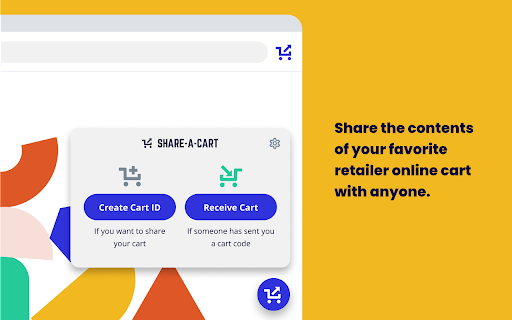


Share-A-Cart allows you to share the contents of your cart with anyone else. Share-A-Cart is a free browser extension that lets you share your online shopping cart with anyone. Whether you’re planning a grocery trip, sending a gift list, or managing a classroom supply order, Share-A-Cart makes collaborative shopping simple and efficient. 1. Shop online like usual at your favorite retailer. 2. Use Share-A-Cart to generate a unique cart sharing link. 3. Send the link to anyone - they can instantly view and load your cart on their device. Affiliate Disclosure: Share-A-Cart may earn an affiliate commission on purchases facilitated by the extension. 🏠 Great for Home Use - Share grocery lists with family - Send birthday or holiday gift ideas - Organize back-to-school shopping with kids or co-parents 💼 Perfect for Work - Teachers can share classroom supply lists with administrators - Office staff can streamline purchasing with centralized supply lists - Small businesses and teams can collaborate on procurement and restocking 🌐 Supports Thousands of Retailers - Including Amazon, Walmart, Wayfair, Apple, and many more! - See all supported stores here: https://share-a-cart.com/supported ⭐ Top Features - Free to use – no sign-up required - Supports 95% of all online stores - View & organize carts with tags and keywords - Reorder easily from cart history - Print & export carts you’ve created or received 👥 Who’s Using Share-A-Cart? - Families & friends planning meals and gifts - Teachers and staff organizing supplies - Offices and businesses streamlining orders - Influencers sharing promoted products with followers - Homebuilders managing client needs 💬 Why Choose Us? - Trusted since 2018 - Over 2 million carts shared - Used in 1,400+ schools - We don’t sell your data to any third parties or data brokers - Responsive customer support Q: Where is the extension icon? A: It's on the right side of your toolbar. You may want to pin it so that it's always there. Just click the icon that looks like a puzzle piece, and then click the pin icon next to Share-A-Cart. Q: What does Share-A-Cart do with my user data? A: We don't sell user data to any data brokers. You can access most of our features for free and without giving us your email address or going through any registration process. Q: If I send a link to a cart to someone, do they need the extension as well? A: Not always. Many major retailers are fully supported without requiring the extension on the recipient’s end. Q: What if I find a retailer that you don't support? Or if I have an issue? A: Email us at info@share-a-cart.com, and we'll get back to you right away. We are adding support for new retailers every week. Q: Can the person I send a cart link to edit my cart? A: Yes! The receiver of the cart can add or remove items and change quantities. This is really helpful if you are sending a giant wishlist (like a Christmas gift list) to someone because it allows them to choose exactly what they want to order. Q: Why should I use Share-A-Cart instead of other extensions that do the same thing? A: No other extension supports as many stores as Share-A-Cart, and we have many helpful features that our competitors don't. We have been in business since 2018, and this is not a 'side project' for us. And if you report an idea for a feature, new retailer, or a bug, we get back to you right away! NOTE: Share-A-Cart does not complete any purchases on your behalf. It only helps shoppers move items from their cart to a recipient's cart. All checkouts must still be completed by the user. Share-A-Cart is not related to or endorsed by any of our listed retailers. 🏬 Affiliate Disclosure Share-A-Cart participates in affiliate programs with some of the retailers we support. This means we may earn a small commission when you use Share-A-Cart extension to "Create Cart ID" and "Receive Cart" on a supported retailer's website. Affiliate relationships do not influence which retailers we support, how the extension works, or the prices you pay. 🔒 Privacy First: We never sell your data. No registration needed. 🛍️ Note: Share-A-Cart doesn’t place orders for you - it simply shares your cart. 🏬 Not affiliated with any specific retailers.

Share-A-Cart for Instacart
Share-A-Cart for Instacart allows you to share the contents of your cart with anyone else. Share-A-Cart is a free browser extension that lets you share your online shopping cart with anyone. Whether you’re planning a grocery trip, sending a gift list, or managing a classroom supply order, Share-A-Cart makes collaborative shopping simple and efficient. 1. Shop online like usual at your favorite retailer. 2. Use Share-A-Cart to generate a unique cart sharing link. 3. Send the link to anyone - they can instantly view and load your cart on their device. Affiliate Disclosure: Share-A-Cart may earn an affiliate commission on purchases facilitated by the extension. 🏠 Great for Home Use - Share grocery lists with family - Send birthday or holiday gift ideas - Organize back-to-school shopping with kids or co-parents 💼 Perfect for Work - Teachers can share classroom supply lists with administrators - Office staff can streamline purchasing with centralized supply lists - Small businesses and teams can collaborate on procurement and restocking 🌐 Supports Thousands of Retailers - Including Amazon, Walmart, Wayfair, Apple, and many more! - See all supported stores here: https://share-a-cart.com/supported ⭐ Top Features - Free to use – no sign-up required - Supports 95% of all online stores - View & organize carts with tags and keywords - Reorder easily from cart history - Print & export carts you’ve created or received 👥 Who’s Using Share-A-Cart? - Families & friends planning meals and gifts - Teachers and staff organizing supplies - Offices and businesses streamlining orders - Influencers sharing promoted products with followers - Homebuilders managing client needs 💬 Why Choose Us? - Trusted since 2018 - Over 2 million carts shared - Used in 1,400+ schools - We don’t sell your data to any third parties or data brokers - Responsive customer support Q: Where is the extension icon? A: It's on the right side of your toolbar. You may want to pin it so that it's always there. Just click the icon that looks like a puzzle piece, and then click the pin icon next to Share-A-Cart. Q: What does Share-A-Cart do with my user data? A: We don't sell user data to any data brokers. You can access most of our features for free and without giving us your email address or going through any registration process. Q: If I send a link to a cart to someone, do they need the extension as well? A: Not always. Many major retailers are fully supported without requiring the extension on the recipient’s end. Q: What if I find a retailer that you don't support? Or if I have an issue? A: Email us at info@share-a-cart.com, and we'll get back to you right away. We are adding support for new retailers every week. Q: Can the person I send a cart link to edit my cart? A: Yes! The receiver of the cart can add or remove items and change quantities. This is really helpful if you are sending a giant wishlist (like a Christmas gift list) to someone because it allows them to choose exactly what they want to order. Q: Why should I use Share-A-Cart instead of other extensions that do the same thing? A: No other extension supports as many stores as Share-A-Cart, and we have many helpful features that our competitors don't. We have been in business since 2018, and this is not a 'side project' for us. And if you report an idea for a feature, new retailer, or a bug, we get back to you right away! NOTE: Share-A-Cart does not complete any purchases on your behalf. It only helps shoppers move items from their cart to a recipient's cart. All checkouts must still be completed by the user. Share-A-Cart is not related to or endorsed by any of our listed retailers. 🏬 Affiliate Disclosure Share-A-Cart participates in affiliate programs with some of the retailers we support. This means we may earn a small commission when you use Share-A-Cart extension to "Create Cart ID" and "Receive Cart" on a supported retailer's website. Affiliate relationships do not influence which retailers we support, how the extension works, or the prices you pay. 🔒 Privacy First: We never sell your data. No registration needed. 🛍️ Note: Share-A-Cart doesn’t place orders for you - it simply shares your cart. 🏬 Not affiliated with any specific retailers.

Share-A-Cart for AliExpress
Share-A-Cart for AliExpress allows you to share the contents of your cart with anyone else. Share-A-Cart is a free browser extension that lets you share your online shopping cart with anyone. Whether you’re planning a grocery trip, sending a gift list, or managing a classroom supply order, Share-A-Cart makes collaborative shopping simple and efficient. 1. Shop online like usual at your favorite retailer. 2. Use Share-A-Cart to generate a unique cart sharing link. 3. Send the link to anyone - they can instantly view and load your cart on their device. Affiliate Disclosure: Share-A-Cart may earn an affiliate commission on purchases facilitated by the extension. 🏠 Great for Home Use - Share grocery lists with family - Send birthday or holiday gift ideas - Organize back-to-school shopping with kids or co-parents 💼 Perfect for Work - Teachers can share classroom supply lists with administrators - Office staff can streamline purchasing with centralized supply lists - Small businesses and teams can collaborate on procurement and restocking 🌐 Supports Thousands of Retailers - Including Amazon, Walmart, Wayfair, Apple, and many more! - See all supported stores here: https://share-a-cart.com/supported ⭐ Top Features - Free to use – no sign-up required - Supports 95% of all online stores - View & organize carts with tags and keywords - Reorder easily from cart history - Print & export carts you’ve created or received 👥 Who’s Using Share-A-Cart? - Families & friends planning meals and gifts - Teachers and staff organizing supplies - Offices and businesses streamlining orders - Influencers sharing promoted products with followers - Homebuilders managing client needs 💬 Why Choose Us? - Trusted since 2018 - Over 2 million carts shared - Used in 1,400+ schools - We don’t sell your data to any third parties or data brokers - Responsive customer support Q: Where is the extension icon? A: It's on the right side of your toolbar. You may want to pin it so that it's always there. Just click the icon that looks like a puzzle piece, and then click the pin icon next to Share-A-Cart. Q: What does Share-A-Cart do with my user data? A: We don't sell user data to any data brokers. You can access most of our features for free and without giving us your email address or going through any registration process. Q: If I send a link to a cart to someone, do they need the extension as well? A: Not always. Many major retailers are fully supported without requiring the extension on the recipient’s end. Q: What if I find a retailer that you don't support? Or if I have an issue? A: Email us at info@share-a-cart.com, and we'll get back to you right away. We are adding support for new retailers every week. Q: Can the person I send a cart link to edit my cart? A: Yes! The receiver of the cart can add or remove items and change quantities. This is really helpful if you are sending a giant wishlist (like a Christmas gift list) to someone because it allows them to choose exactly what they want to order. Q: Why should I use Share-A-Cart instead of other extensions that do the same thing? A: No other extension supports as many stores as Share-A-Cart, and we have many helpful features that our competitors don't. We have been in business since 2018, and this is not a 'side project' for us. And if you report an idea for a feature, new retailer, or a bug, we get back to you right away! NOTE: Share-A-Cart does not complete any purchases on your behalf. It only helps shoppers move items from their cart to a recipient's cart. All checkouts must still be completed by the user. Share-A-Cart is not related to or endorsed by any of our listed retailers. 🏬 Affiliate Disclosure Share-A-Cart participates in affiliate programs with some of the retailers we support. This means we may earn a small commission when you use Share-A-Cart extension to "Create Cart ID" and "Receive Cart" on a supported retailer's website. Affiliate relationships do not influence which retailers we support, how the extension works, or the prices you pay. 🔒 Privacy First: We never sell your data. No registration needed. 🛍️ Note: Share-A-Cart doesn’t place orders for you - it simply shares your cart. 🏬 Not affiliated with any specific retailers.

Cart Exporter | Download your shopping cart as a CSV spreadsheet.
Export your shopping cart to a CSV spreadsheet. Supports Amazon, AliExpress and eBay. Export all the items in your shopping cart to a CSV spreadsheet, including their Title, Price, Quantity and Link! Depending on the retailer, we also support fields like Seller Name, SKU, Item Number and more. (Note: A CSV is a spreadsheet which you can import directly into Excel or Google Sheets.) Cart Exporter supports exporting a CSV spreadsheet of your shopping cart for the following retailers: ⬇️ Install the Chrome extension: Begin by installing the Cart Exporter Chrome extension. Our lightweight extension lets you quickly export your shopping cart to a CSV/Excel spreadsheet. 💾 Export your shopping cart: Navigate to your shopping cart for any of our supported retailers (see above) and click the Cart Exporter extension icon. In one click, you can export the items in your shopping cart to a CSV/Excel spreadsheet, including their title, price, quantity and product link and more. 💻 Open your spreadsheet: Open your spreadsheet in Excel or Google Sheets. Now you have all the items from your shopping cart in a handy spreadsheet format. Q: What retailers are supported? A: We support Amazon, AliExpress and eBay alongside other retailers. See the "Supported Retailers" section above for the full list of retailers supported by Cart Exporter. Q: How do I export my shopping cart? A: To export your shopping cart with Cart Exporter, start by installing our Chrome extension. Then visit your shopping cart page, open our extension, and use it to export a CSV/Excel spreadsheet of your cart items. Open this spreadsheet with Excel or Google Sheets to view all your items. Q: What fields does the CSV spreadsheet include? A: When you export a CSV/Excel spreadsheet of your shopping cart items, it includes the following fields: Title, Quantity, Price, Total Cost and Product Link. Some retailers include additional fields like Seller Name, Item Number, SKU etc. Q: Does the CSV spreadsheet stay updated? A: No, the CSV spreadsheet of your shopping cart items generated with Cart Exporter does not stay updated. If you change the items in your cart, you should use our extension to export a new spreadsheet. Our Chrome extension creates a spreadsheet of all the items in your cart at the current moment, and unfortunately it's impossible for us to update it. Install our Chrome Extension to quickly export your shopping cart to a CSV/Excel spreadsheet. It's free, easy to use, and takes 1 minute to get started. Note: Some product links exported via the Cart Exporter Chrome extension include an affiliate tag.

AMZ Cart Export: Export your Amazon cart to CSV
Export your Amazon cart to a CSV spreadsheet, including their title, ASIN, price, quantity and URL of all your cart items. Export your Amazon cart to a CSV/Excel spreadsheet with this extension! This extension exports all the items in your Amazon shopping cart to a CSV spreadsheet, including your items title, ASIN, price, quantity, total cost and product link. (Note: A CSV is a spreadsheet which you can import directly into Excel or Google Sheets.) ⬇️ Install the Chrome extension: Begin by installing the AMZ Cart Export Chrome extension. Our lightweight extension lets you quickly export your Amazon cart to a CSV/Excel spreadsheet. 💾 Export your Amazon cart: Navigate to your Amazon cart and click the AMZ Cart Export extension icon. In one click, you can export the items in your Amazon cart to a CSV/Excel spreadsheet, including their title, ASIN, price, quantity and product link. 💻 Open your spreadsheet: Open your spreadsheet in Excel or Google Sheets. Now you have all the items in your Amazon cart in a handy spreadsheet format. Q: How do I export my Amazon cart? A: To export your Amazon cart with AMZ Cart Export, start by installing our Chrome extension. Then visit your Amazon cart page, open our extension, and use it to export a CSV/Excel spreadsheet of your Amazon cart items. Open this spreadsheet with Excel or Google Sheets to view all your cart items. Q: What fields does the CSV spreadsheet include? A: When you export a CSV/Excel spreadsheet of your Amazon cart items, it includes the following fields: Title, ASIN, Quantity, Price, Total Cost and Product Link. Q: Does the CSV spreadsheet stay updated? A: No, the CSV spreadsheet of your Amazon cart items generated with AMZ Cart Export does not stay updated. If you change the items in your cart, you should use our extension to export a new spreadsheet. Our Chrome extension creates a spreadsheet of all the items in your cart at the current moment, and unfortunately it's impossible for us to update it. Install our Chrome Extension to quickly export your Amazon cart to a CSV/Excel spreadsheet. It's free, easy to use, and takes 1 minute to get started.
