
hcdjjibhifjclfoblokahaacifcjpgfl

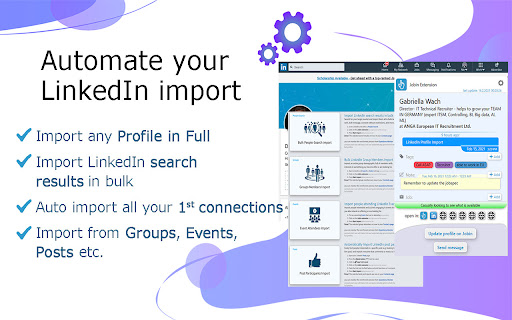


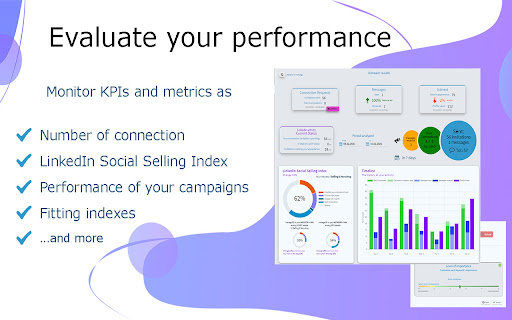
The most powerful LinkedIn Automation tool for lead generation and recruiting Have you ever wanted an automation tool that doesn't just automate your recruiting process, but also imports new leads from more than just searches and lets you organize them all into a modern ATS and CRM? Jobin.cloud is a SaaS platform catered to finding and contacting the right people with integrated automation, ATS, CRM and lead generation technologies for both your contacts and accounts; we call it "workgroup" and it can be shared with as many colleagues and team members as you want. With the press of a single button instantly import not just name and role, but the entire profile with emails, skills, experiences and all the rest, into your Jobin.cloud aggregated repository. 🚀 Automate your LinkedIn Import • Import any Profile in FULL with one click • Import LinkedIn search results in bulk • Import Group Members in bulk • Import Event attendees in bulk • Import Post Participants in bulk • Google X-ray search • Auto import all your 1st connections in one click • Auto import all messages exchanged with your connections. 💬 Automate your LinkedIn Outreach • Bulk Emailing, Messaging and inMails • Custom messaging templates • Smart fields that adapt to each profile • Bulk personalized Connection requests with automated follow-ups • Bulk withdraw invitations Export your data to .CSV file 📊 Marketing efforts made simple Evaluate your LinkedIn performance on Jobin Jobin.cloud lets you observe various important metrics including the number of profile views & search appearances, your social selling index and evaluations of your campaign's performance. ATS and CRM features: What good is importing and messaging people in bulk if you keep contacting the wrong people or lose track of your passed conversations 🎯 Contact the right people • Advanced candidate ranking systems • Additional filtering, tagging and custom notes • Geographic searches with postcode, regions, distance, etc. • Contact method and connection level filters • Fully customizable pipeline ✅ Data kept clean • Automatic profile updating • Automated data de-duplication • Automated data cleaning and merging ⚡ Lightning fast .CSV file data migration in just 5 minutes Thanks to Jobin.cloud's automatic profile updating, if your imported contacts also happen to have LinkedIn URLs you can fully update them with all their available data as well 🔎 Sourcing and Enrichment features: It doesn't stop at just LinkedIn information, Jobin.cloud comes with an integrated contact enrichment, enrich your contacts with data from all over the web: • Reach over 900M emails • Get 5 free enrichment credits a month forever • Automated and bulk enrichment in one click • Distinguish between personal and work emails • Phone numbers, social media profiles and more • Bulk personalizable emails campaign outreach Additional information together will illustratory videos can be found on our features page 🚀 Sourcing Features: https://www.jobin.cloud/features/linkedin-automation ⭐ Filter and Tracking Features: https://www.jobin.cloud/features/filter-and-manage 🎯 Outreach Features: https://www.jobin.cloud/features/outreach 🆓 Try Jobin.cloud out for free in our Tutorial workgroup, request a free trial or pick the free plan. 🆓

Waalaxy - LinkedIn Automation Tool
Make LinkedIn your No. 1 acquisition channel with Waalaxy. Automated prospecting and recruitment made easy Waalaxy’s mission is pretty simple: Make LinkedIn your No. 1 acquisition channel. Our goal is to make automated prospecting and recruitment easier than ever. With our intuitive extension, you can easily import prospects directly from LinkedIn and set up your prospecting campaign with just a few clicks - no technical skills required! Here’s a glimpse of what you can achieve with Waalaxy: Automate your LinkedIn outreach and email follow-ups effortlessly. Extract profiles from LinkedIn People Search, Sales Navigator, and Recruiter Lite with just a few clicks. Set up personalized prospecting campaigns in minutes and let Waalaxy handle the rest, freeing up to 70% of your time to focus on.. well, whatever you want. Enrich vital prospect data instantly and sync it with your favorite CRM like Hubspot, Pipedrive and 2000+ apps through Zapier/Make. Stay organized and ensure that no lead slips through the cracks. Manage multiple LinkedIn accounts seamlessly within a unified workspace. Collaborate with your team, share leads, and analyze performance statistics, making Waalaxy ideal for sales, marketing, and recruitment teams. Streamline your LinkedIn conversations with Waalaxy's integrated inbox. Create message templates, schedule timely follow-ups and much more, all within one intuitive interface. Waalaxy is directly integrated into LinkedIn interface. It’s like activating the hidden god mode. Find your prospect’s email, schedule messages, create reusable message templates & more, directly in LinkedIn. Start using Waalaxy for 0€, for as long as you want with our freemium plan. Give a try to our premiums plans risk-free with a free trial. Our expert team is ready to assist you 5/7 day directly on the chat, ensuring you get the most out of every feature (and without having to wait days that someone replie to your emails). Join over 100,000 professionals who have revolutionized their LinkedIn prospecting with Waalaxy. Transform your outreach and experience accelerated lead generation today! Begin your journey with Waalaxy and turn multi-channel prospecting into a money-making game.

LinkHelp - Workplace Automation Tool
Workplace automation for Growth, Sales, Outreach, Lead Generation and Job seek 🚀 AI-Powered Automation for Growth, Sales & Hiring LinkHelp helps you turn your workplace into a high-performance growth channel using AI + smart automation. Automate outreach, engagement, lead generation, hiring, and job search — while staying safe, human-like, and compliant. 🧠 AI Profile Summaries Understand prospects in seconds and approach them the right way. 💬 AI Smart Engagement Automatically engage with the latest posts to stay visible and relevant. 🎯 What You Can Do with LinkHelp ✔️ Send personalized connection requests at scale ✔️ Run automated outreach & follow-up campaigns ✔️ Engage with posts, profiles, and networks automatically ✔️ Extract data from profiles and connections ✔️ Track campaign performance from one dashboard 👥 Built For Used across tech, marketing, real estate, finance, and more. ✨ This is just the beginning. Install LinkHelp for free and grow smarter with AI.

LinkedIn JobLens — Smart Job Filters
LinkedIn JobLens helps you clean and filter your LinkedIn job search results so you see only the roles that matter. Stop scrolling through irrelevant LinkedIn jobs: ✅ Hide promoted jobs ✅ Hide jobs you already applied for ✅ Hide Easy Apply listings that attract mass spam ✅ Hide already seen Jobs ✅ Find roles early, before they get crowded ✅ Save time with instant job filters 🔍 Smarter job discovery, less noise JobLens applies intelligent filtering to surface roles that match YOU — faster and cleaner than LinkedIn’s default search interface. ⚡ Save hours per week Users of LinkedIn job filtering tools like *Hide Applied Jobs*, *LinkOff*, and *Jobs Filterer for LinkedIn* see major productivity gains by removing unwanted listings locally in their browser — JobLens gives you even more control. 🎛 Multiple filters. One lens. Unlike narrow job blockers, JobLens supports a wide range of filters so you can refine what you see based on time, competition level, and job type. 🔐 Privacy-first and independent This extension runs entirely in your local browser. It does **not** send your job data to external servers, and is **not affiliated** with LinkedIn in any way. Built independently to help job seekers and professionals search better. Career tools like *LinkedIn Jobs Filter*, *noBS LinkedIn Job Filter*, and *FilterOut - LinkedIn Content Filter* prove that users reward clarity + utility — JobLens delivers both, without keyword clutter or robotic tone. 🚀 Start your LinkedIn job search with confidence Turn on JobLens, pick your filters, and watch irrelevant roles disappear, leaving behind smarter opportunities — including low-competition and high-quality job posts. If you search LinkedIn jobs every day, you need JobLens.

CommenTron — AI Booster for LinkedIn
CommenTron - Your LinkedIn Engagement Assistant 🚀 Do you want to stand out on LinkedIn but find it hard to craft comments that reflect your personality and keep conversations going? CommenTron extension is here to help! Powered by AI, CommenTron helps you write LinkedIn comments instantly, letting you engage faster and more effectively. With just a few clicks, you can customize the tone, length, and even end your comments with a question to drive more engagement. Perfect for anyone looking to save time and boost their LinkedIn visibility! 👉 Key Features 1. Custom Comment Length: Choose from 4 comment lengths (Super short, Brief, In-length, Multi-paragraph) based on the post's needs. 2. Custom Tone: Select from 16 unique tones, like Supportive, Witty, or Respectfully Opposed to make your comments truly reflect your personality. 3. Add Emojis: Decide whether to sprinkle your comments with emojis for a fun touch! 4. End with a Question: Want to keep the conversation going? Automatically end comments with a question to get more replies. 5. Mention the Author: Personalize your comments by mentioning the post author’s name. 6. Open-Ended Comments: Generate open-ended comments that encourage responses and more profile activity. 7. Offer Your Services: Choose from 30+ industries and subtly offer your services through the comments, driving leads and opportunities. 8. Reply to Comments: Not only can you comment on posts, but you can also reply to comments, showing you're an active and engaged participant. 9. Top Contributor Badge: Get help writing contributions for LinkedIn collaborative articles in just 1 click, increasing your chances of earning the coveted Top Contributor badge! 2. Personalized Interactions: Make your comments unique and reflective of your personality with our tone and emoji features. 3. Boost Your Visibility: Stay active and visible on LinkedIn, increasing your chances of being seen and remembered. 4. Establish Yourself as a Thought Leader: Consistent, high-quality comments help position you as an expert in your field. 👉 Installation & Setup Setting up CommenTron is quick and easy! 1. Click on ‘Add to Chrome’ to install the extension. 2. Pin CommenTron to your browser for easy access. 3. Log in to LinkedIn and refresh your profile. 4. Choose any post you want to comment on, click on the extension to choose the filters, and click on “comment” on the post. 5. There you go! You're ready to start creating engaging comments. 👉 Frequently Asked Questions (FAQs) 1. Is my LinkedIn data secure while using CommenTron? Yes, we take data security seriously. Your data is encrypted and will never be shared without your consent. 2. Can I use CommenTron for lead generation? Definitely! With the “Offer Services” feature, you can craft comments that subtly promote your services, making it a great tool for networking and lead generation. 3. How does CommenTron improve my LinkedIn engagement? CommenTron helps by generating thoughtful, AI-powered comments based on the post's content. You can add a personal touch with tones and questions, making your interactions more engaging. 4. Are the comments unique and customizable? Yes! CommenTron offers different lengths, tones, and even lets you choose whether to add emojis. You can customize every comment to match your style. 5. Can I use CommenTron to reply to comments as well? Absolutely! CommenTron helps you reply to comments on your own posts and on others, keeping the conversations alive and active. 👉 Ready to Boost Your LinkedIn Presence? Install CommenTron today and start engaging with your network like never before. It’s quick, easy, and perfect for anyone looking to save time while staying active on LinkedIn!
