
hccbmhffbioeohofjlmppbicgppcmgde

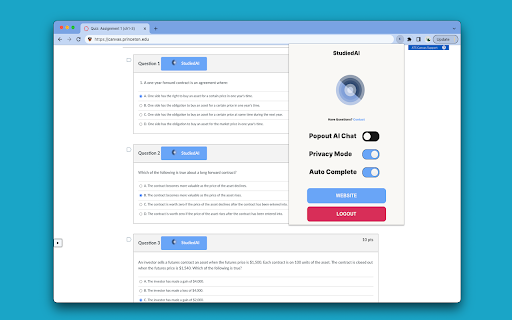

Online education assistance tool. Answers at your finger tips. Instantly. Online education assistance tool. Answers at your finger tips. Instantly. StudiedAI accelerates your workload significantly. Integrates directly into the top online educational platforms such as Canvas, Blackboard, and Moodle. Utilizes AI technology to answer any question. Always Improving Our AI model improves with every question answered. The more you use StudiedAI the better it gets. Private Platforms detect when you leave the tab. With StudiedAI you'll never have to leave the tab again! Any Question, Anywhere On a site that's not supported? With our popup chat ask StudiedAI any question. Looking for support? Send an email to support@studied.ai

eJOY AI Dictionary
Your ultimate knowledge and English learning tool to discover the world and upskill yourself. Translate video, websites and PDF. 💧 FEATURES HIGHLIGHTS for LIFELONG LEARNERS 1️⃣ UNDERSTAND EVERYTHING INSTANTLY • Watch videos with bilingual subtitles. • Translate PDF, image-based documents. • Get translation of words, phrases in videos with just one click. • Understand specialized vocabularies with AI dictionary. • Get all details about words: definitions, pronunciation, synonyms, collocations, examples, slang, video context, etc. • Quick search via GIFs, Google, or Wikipedia and other commonly used dictionaries without opening new tabs. • Display translations next to the original text (Inline Translation). 2️⃣ CAPTURE KNOWLEDGE & VOCABULARIES IN VARIOUS FORMATS • Save words, phrases, or paragraphs while surfing content on platforms like YTube, Nflix, Course, PDFs,... • Organize and categorize vocabulary and knowledge based on topics. • Integrate into any favorite websites for lookup and capturing knowledge. 3️⃣ REVIEW - REMEMBER VOCABULARY FOREVER • Review words with 10+ games • Get reminders by spaced repetition algorithms • Track learning progress and word's fluency. • Synchronize data and learning progress with the app on your phone. • Have various game options to improve 4 English skills: Mix Games, Flash Card, Multiple Choice, Rearrangement, Fill in the Blank, Speak, Listening Flash Card.(Some including Youtube videos in the gameplay) • Import your vocabulary list or flashcard sets. 4️⃣ AI ASSISTANT • EXPLAIN: Explain specialized vocabulary, idioms, grammar, or complex sentences. • SUMMARIZE: Summarize videos and texts, even lengthy one-hour videos. • DEEP DIVE: Dig deeper into a concept from the content you are watching or reading the help of AI, giving you suggested questions to fuel your curiosity • REWRITE: Edit your writing according to the tone and style you aim for. • REPLY: Summarize email content and suggest reply content. • GRAMMAR: Explain advanced grammar structures used in the selected paragraph. • DETECT PHRASES: Identify phrases and idioms in the selected text. ----- 💧HOW TO USE • Download the extension from the Chrome Store (Works on Chrome, Cốc Cốc, Microsoft Edge, Brave) • Click on a new word or select a phrase, press the green water droplet icon to look up related information. • Add words to your vocabulary notebook. • Visit the Game Center to review words. • Subscribe to the our YouTube channel for more tutorials: https://www.youtube.com/c/eJOYEnglish/ With only one account, you can get access to all products. Your data and learning progress are synced across all platforms. • The extension to watch bilingual videos, translate and save vocab on any websites. • The mobile app to learn English communication with daily short videos and review vocab with interactive games. https://ejo.bz/ejoy-app2. • Web app to practice English skills and learn vocabulary. https://ejoy-english.com/go. ----- 💧ABOUT US Fueled by the belief that learning should be joyful and impactful, eJOY was built to empower us and many learners to unlock our potential through engaging and personalized experiences. Recognized for excellence, we proudly claimed the first prize at the STARTUP Vietnam contest in 2022 the 3rd prize in the TECHFEST National Startup contest in 2019, a testament to our commitment to delivering exceptional learning outcomes for everyone. ----- 💧CONTACT US • Contact: support@ejoylearning.com • Connect with eJOY developers in our community: https://discord.gg/8Y5eUZq8BE

AnswerAI - Homework AI Tutor & Study Helper
Your AI assistant ChatGPT Plugin.Answer questions and get AI answers quickly,write emails,articles,chatbot,learning assistant. Ask anything and learn everything with one of the leading AI educational apps for student success. Answer.AI is the only app that is there for students both in and out of the classroom, and revolutionizing the way you learn. With Answer.AI's web extension, your screen will become a powerhouse of personalized education and learning. You can screenshot or highlight any question on your browser and get step-by-step solutions, generate brainstorming drafts for any type of writing, chat with AskAI about tough concepts, master complex math questions with Geometry mode, and more. With over 6 million users, our mission is to help our evergrowing community achieve their milestones and crush their goals both in and out of the classroom. 🥳Here are some features you can look out for: 📍Upload a screenshot for instant answers Easily upload a screenshot of your question, and Answer.AI will analyze it to provide accurate answers—perfect for complex math problems and more. 📍Ask and Answer Click the Answer.AI icon to initiate a real-time conversation, or select any text on a webpage to receive detailed answers instantly. No matter the complexity, Answer.AI offers clear explanations. 📍Writing Assistant Answer.AI also serves as an AI-powered writing assistant, helping you create high-quality content in seconds, making it perfect for essays, articles, and more. 📍Smart Homework Solutions Submit your questions and get step-by-step solutions, ensuring you not only get the correct answer but understand the underlying concepts. 📍Highlight and Solve Answer.AI works on any website you visit and integrates smoothly into your Chrome browser. Simply highlight text or use the extension to get answers quickly and efficiently. 🌟 Getting Started: 1️⃣ Click the Answer.AI icon on your screen to start a conversation. 2️⃣ Highlight text on any webpage, click the Answer.AI icon, and receive an answer immediately. 🧑💻 How to use the Chrome Extension: 1️⃣ Click the "Add to Chrome" button. 2️⃣ Log in to your Answer.AI account. 3️⃣ Start using Answer.AI! You can open the Answer.AI sidebar anytime you need help. Answer.AI offers both free and premium versions. Free users receive limited access, while premium users enjoy enhanced features and unlimited usage. 📍What platforms does Answer.AI support? Answer.AI is available on iOS and Android (download via the Apple Store or Google Play), as well as a Chrome extension for Windows and Mac users. 💯Ready to upgrade your learning experience? Install Answer.AI today and leave your feedback—your suggestions help us continue to innovate. You can contact us at support@answerai.pro or go to our website, https://answerai.pro for more info. We love hearing from you!

Quizard AI - Homework Tutor
Study smarter with Quizard! Instant AI answers and explanations for your all your questions to help you learn and succeed! ✨ Homework & AI Answers Solver Are you struggling to understand your homework and study materials? Don’t worry, Quizard is here to help! Take screenshots 📸 and get instant answers, explanations, and related resources for any question. 💁♀️ 🪄 【 Instant and Accurate Solutions 】 ✅ Instant answers: in just seconds receive answers, explanations, and related resources to your question ✅ The #1 AI in accuracy: we are 20% more accurate than ChatGPT and deliver the highest quality, most accurate answers with speed ✅ 24/7 support: use Quizard anytime, anywhere, we’re always there to help you ✅ Math: Quizard can accurately recognize and solve even the most complex math problems that have symbols which can’t be copy and pasted 🔥 【 Take A Screenshot, Get An Answer 】 ✅ Screenshot feature: allows effortless question-asking by capturing a screenshot ✅ Highlight text: simply highlight and solve any question found online ✅ Type In Your Question: you can directly type your question into the text box to receive an instant answer ✅ Universal compatibility: use it on websites like Canvas, Blackboard, Moodle, Google Classroom, and more 🎓 【 Any Subject, Any Level 】 ✅ Any type of question: we can solve multiple choice, short and long answer questions, and provide step by step solutions to your word problems ✅ Help on any subject: from math, history, chemistry, biology you name it we got you covered ✅ Every grade level: whether you’re a college student, high school student, or even an adult looking to brush up on your knowledge, Quizard is the perfect tool to help you succeed. 🗣 【 Clarify Your Understanding 】 ✅ Ask follow-up questions: interact with Quizard to explore complex topics effortlessly ✅ Related resources: we generate you related resources from the web based on the question to confirm the solution we’ve provided and see how others have solved it 💻【 How To Use 】 🟪 Click the “Add to Chrome” button and pin it to the toolbar. 🟪 Log in to your account. 🟪 Press Cmd/Ctrl+Shift+K to wake up Quizard 🟪 Start working with AI! 🗣️【FAQ】 📌 Is it free to use? -Yes, we offer limited use for free. For unlimited access, you can choose the Quizard Pro Subscription. 📌 Is my Quizard Pro Subscription active on both the mobile and Quizard Chrome Extension version? -Yes! If you are a Quizard Pro subscriber link your device in-app or through the Chrome Extension 📌 How can I link my Quizard profile to the extension or from the extension to the app? -From the extension, go to your settings and click “Link Device.” You will then receive further instructions for linking with your mobile device! 📌 ChatGPT is banned in my country. Does it work in my country? -Yes. Our chrome extension works in all countries. 📌 Can I use your service on my phone? -Yes. Quizard is available on all devices (Chrome Extension, iOS, Android). Search up “Quizard AI” in the App Store/Google Play Store

SolvelyAI - AI Homework Tutor & Study Helper
SolvelyAI is your AI Homework Helper—instant screenshot solving, step-by-step AI Answers, AI Summary, and Study Helper tools. Capture, Solve, Summarize, and Learn Anytime, Anywhere 🚀 Solvely.ai is the AI learning assistant for solving problems and understanding content faster. Our revolutionary One-Click Solve now gets you answers to an entire page of questions at once. 💬 👉 Your AI Homework Solver Stuck on a tough assignment? Whether it's one question or a whole page, get instant clarity. 🆕 One-Click Solve All : Solve all problems on your screen at once with one click. Press the magic button for instant answers, no screenshots required. ✔️ Take a Screenshot to Get Instant Answers: Quickly capture your homework questions and receive immediate solutions from AI. ✔️ Step-by-Step Solutions: Understand complex problems with detailed, step-by-step explanations that guide you to mastery. ✔️ Save Problems for Later Review: Keep a record of your questions and solutions for future reference and revision. ✔️ Solutions in Various Formats and Languages: Access solutions in different formats and languages to suit your learning preferences. 👉Your AI Content Summarizer Overwhelmed by long videos and articles? Get the key ideas in seconds. ✔️ Real-Time YouTube Summaries: Get AI-generated summaries, key points, and time-stamped chapters while you watch. Instantly grasp the core concepts of any video and jump directly to the most important parts. ✔️ Summarize Any Webpage in Seconds: Instantly distill any article, academic paper, or online report into a concise summary and key talking points. Absorb complex information at a glance and accelerate your research. 📌Pro tip: Use our quick capture shortcuts for faster question solving: 👉Learn Smarter, Not Harder Get the Solvely.ai extension now and embark on an extraordinary journey of knowledge and success. Unlock the power of AI and make every study session count! 💪📚🌟
