
hcajefpkmimmoiljokpnjoaeoapebohe

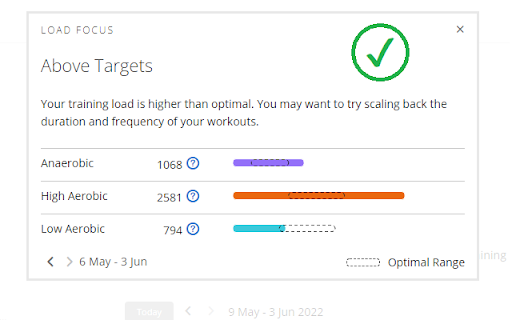
This Chrome extension fixes missing LoadFocus feature on Garmin Connect Web by modifying XHR response. Garmin devices are very popular among professional cyclists and amateur cyclists. These devices track and record various activity data (heart rate, power, location, speed etc.) of the athlete. The recorded user data is accessible for Garmin users either from their physical device interface or via web interface (Garmin Connect Web - https://connect.garmin.com/) or mobile app. For some of the Garmin users, a special part of the data (LoadFocus) is NOT showing up in Garmin Connect Web (this is a bug), even though they are able to see LoadFocus in their device screen. This is a well known issue for more than 2 years but unfortunately this has not been fixed by Garmin. https://forums.garmin.com/apps-software/mobile-apps-web/f/garmin-connect-web/169713/load-focus-missing-for-edge-530 So this is where the extension comes into play. It simply looks for a special XHR request and slightly modify (changes a JSON setting from false to true) the response. This will be useful for all Garmin users who wants to see their training load from Garmin Connect Web interface.

Garmin Badge Database
Sync your badge and challenge data from Garmin Connect Garminbadges Updater updates Garmin Badge Database (https://garminbadges.com) with your badge and challenge data from Garmin Connect. 1. Install the extension 2. Click Settings and enter the API key from your Dashboard (https://garminbadges.com/dashboard) 3. Browse to Garmin Connect (https://connect.garmin.com) and login 4. Click the extension to display the Sync now button 5. Click the button and wait for the sync to complete Every time you got updated badge or challenge data you just press the Update button and Garmin Badge Database will be updated with your latest data.

Workout Uploader for Garmin Connect
Take the hassle out of adding structured workouts to Garmin Connect! This Chrome extension lets runners, coaches, and planners… Take the hassle out of adding structured workouts to Garmin Connect! This Chrome extension lets runners, coaches, and planners easily manage custom training plans with flexible upload options — no more manual typing or repetitive clicking.

Garmin Connect workouts manager
Enhance Garmin Connect: plan, share, and manage workouts with quick delete and bulk removal. Simplify your training today! An extension that enhances your Garmin Connect experience by adding missing features from the official site. Easily plan repetitive workouts, download existing workouts to share them with friends, and efficiently manage your schedule. With options for quick deletion and bulk removal, streamline your workout planning and take control of your fitness routine like never before. Try it now to simplify your training regimen.

Garmin Connect Pace Calculator
Calculate pace averages of your splits in Garmin Connect activities! Go to any Garmin Connect activity, select the Laps tab and simply select the laps you're interested. A new table footer will appear with the average time per lap, along with total time and distance, average pace, and average power (if available) for selected laps. ## Changelog: * 1.1.0 - Upgraded dependencies, fixed bug in Laps table. * 1.0.0 - Upgraded dependencies, switched to Typescript, adjusted selectors according to latest changes in Garmin classes. * 0.7.0 - Added average cadence and average stride length columns. * 0.6.0 - Added Stryd lap power metric to the summary, if available. * 0.5.0 - Again - adjustments required due to changes in Garmin "steps" workout. Upgraded all dependencies, migrated to manifest v3. * 0.4.0 - Adjustments required due to changes in Garmin "steps" workout. * 0.3.17 - Handle custom workouts correctly. Extension now works correctly after navigation between activities using the buttons * 0.2.0 - Laps with duration of over 60 minutes are now supported correctly. * 0.1.2 - Initial version.
