
hbpfpcanaoaoajbfbihdfidbmoilmhbk
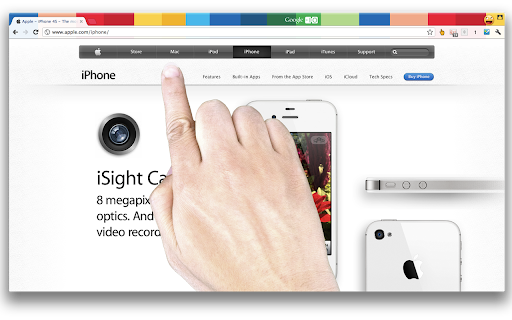
With a massive hand comes massive responsibility With a massive hand comes massive responsibility Need a hand is a handy Chrome Extension that allows you to overlay a hand on any web page that you control with your mouse pointer. You need this extension if: 1. you want check how easy your web site is for touch screen devices like the iPad, 2. you want to demonstrate something and want a nice looking pointer, 3. you have a serious hand fetish, 4. you find it amusing to have a giant hand on your screen. This is an updated version of the original Need A Hand extension by www.liquidx.net, whose original version can be seen at https://liquidx.net/made/2012/needahand. This update was created because the original extension hasn't been updated since 2016 and needed to be migrated to Manifest V3 to continue working with modern Chrome browsers. - Updated to Manifest V3 from Manifest V2 - Updated jQuery from version 1.7.1 to 3.7.1 - Added feature to hide the mouse cursor when the hand is visible - Modernized JavaScript syntax and error handling - Updated messaging and resource access APIs to comply with current Chrome extension standards 1. Install the extension 2. Click the extension icon in your toolbar to toggle the hand on/off 3. Move your mouse to control the hand 4. Click the extension icon again to disable the hand Original extension by Alastair Tse (https://www.liquidx.net).

Pointer Pop by Click and Theme
Minimalist Beautiful Cursors - No Bloated Apps, Just Style. ➤ Choose from a curated collection of cursors ➤ Minimalist black, green glow, blue glow in reversed, bitcoin, mars rovers and dog paw. ➤ Easy to enable/disable and switch between cursors 🌟 Early Access Note: I'm just getting started with this extension, let me know what you think! Every review and comment helps shape its future. Have ideas or found a bug? Let me know at ricky@clickandtheme.com. Enjoy! - The Click & Theme Developer @ricky@clickandtheme.com

sampi3
Modulate YouTube videos using different effects and filters. A different way to experience YouTube. Create the vibe you want. (slowed + reverb the extension) Slow down, speed up! Add reverb! Adjust to your liking and enjoy!

MyEffects
Add high-quality slowed, reverb, pitch shift, bass, echo, spacial, vocal and wobble effects to YouTube videos MyEffects for YouTube Take control of your audio experience. This extension provides professional-grade real-time audio manipulation for videos on YouTube. Adjust speed and pitch independently, apply rich reverb, or boost the bass with intuitive, immediate controls. Go beyond basic adjustments with advanced features like a dynamic wobble effect that syncs to the beat, echo, vocal clarity enhancement, and immersive 8D spatial audio. A set of curated presets instantly delivers popular styles like "slowed + reverb," and "deep bass." Designed for clarity and precision, the interface gives you granular control when you need it without getting in the way. It processes audio directly in your browser for high-quality, low-latency output. Enhance your favorite music videos with a powerful, all-in-one audio toolkit. Note that this extension has a problem working with mixes (specifically youtube mixes autoplay function) and if you encounter any lagging, refreshing the page should fix the problem.

Music Mixer
FOSS Music Mixer applies presets to audio on most websites such as Spotify, SoundCloud, and YouTube. The presets were built around Nightcore but have expanded to include reverb. You can also create custom presets with whatever values you want. Features: - Pitch shifting with semitone control - Reverb with adjustable decay - Playback rate control - Save and load custom presets Zero data collection. Source on GitHub at github.com/Kernocal/audio-mixer-extension
