
hbjngniphaadpelgmjimpflapcmalefn

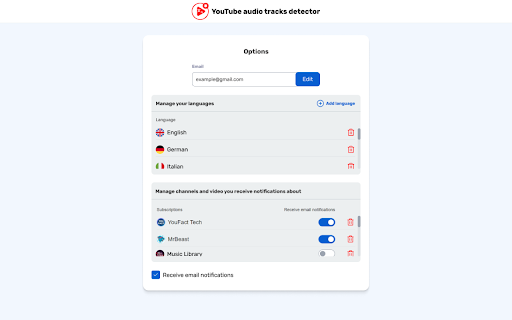
The extension sends notifications when new videos and/or audio tracks in chosen languages are added to preferred YouTube channels. Just provide a link to the YouTube channel or video that interests you, choose the target language and as soon as an audio track or video in your language appears there, you will receive notification in your email. The frequency of notifications can be adjusted to your requirements. The extension also recommends the channels you might like. For YouTube creators, this is an opportunity to increase their reach and views, as well as attract new viewers and reduce the bounce rate by dubbing content in their native languages. The result is the increased depth of viewing and growth in income. For subscribers, this is an opportunity to watch channels and videos in their preferred languages as soon as they come out by setting up notifications. YouTube Audio Tracks Detector by vidby - Enjoy the world’s best content in your language!

YouTube Multi-Language Realtime Audio
Enjoy YouTube videos in any language with real-time audio translation for a seamless, inclusive viewing experience. # 🎥 YouTube Multi-Language Realtime Audio: Transform Your Viewing Experience 🌐 Break Language Barriers – Enjoy YouTube videos in real-time, in any language. With YouTube Multi-Language Realtime Audio, your favorite YouTube content becomes instantly accessible in your preferred language. The original audio is seamlessly replaced with your chosen language, creating an immersive and inclusive viewing experience. ## ✨ What Does the Extension Do? Imagine watching a YouTube video that wasn't recorded in your language—complex discussions, cultural nuances, and humor often get lost in translation. This extension solves that problem by dynamically translating video audio into your selected language as the video plays. No need to rely on subtitles or wait for creators to upload additional language tracks. Instead, our powerful cloud-based AI processes the audio in real-time, delivering a natural-sounding translation so you can fully understand and enjoy the video. Whether it's educational content, entertainment, or global news, YouTube Multi-Language Realtime Audio ensures the message is never lost, regardless of the original language. ## 💡 Why Should You Install It? 1️⃣ Access Content Beyond Language Barriers Unlock global content by exploring videos from creators all over the world. Watch videos as if they were produced in your language. 2️⃣ Instant Translation, Zero Hassle Skip waiting for creators to upload additional audio tracks. This extension automates the process, making real-time translation effortless. 3️⃣ Inclusive and Seamless Join the conversation with ease. Non-native speakers, language learners, and diverse audiences can now fully engage with YouTube content without missing key points. 4️⃣ Versatile Language Support Select from multiple supported languages, including English, French, and Spanish, with more options coming soon. Whether you're diving into tutorials, documentaries, or international TV shows, this tool has you covered. 🎧 Real-Time Audio Translation Translate YouTube video audio into your selected language as the video plays, with smooth and lag-free performance. 🤖 Advanced AI Translation Powered by state-of-the-art AI models for unmatched accuracy and natural-sounding translations. 🎙️ Premium Voice Quality Experience crystal-clear audio translations with realistic voice generation technology. 🌍 Customizable Language Preferences Easily switch between supported languages to suit your needs, making it perfect for multilingual households or language exploration. ⚡ Cloud-Powered Performance Leverage the power of cloud computing for consistent, high-quality translations without taxing your device. 1️⃣ Install the Extension: Add YouTube Multi-Language Realtime Audio to Chrome. 2️⃣ Set Your Preferences: Select your target language in the settings page. 3️⃣ Play a YouTube Video: Open any YouTube video as you normally would. 4️⃣ Activate Translation: Click the new button labelled "T" next to the volume panel in the YouTube media player. 5️⃣ Enjoy Seamless Playback: The original audio is instantly replaced with natural-sounding translations. ## 👤 Who Is It For? - 🎥 Content Consumers: Watch videos in any language and fully understand the content - 🧠 Language Learners: Practice listening skills with fluent and accurate translations - 📚 Students & Researchers: Dive into foreign-language resources without delays - 🌎 Global Professionals: Stay competitive by accessing international content - 👨👩👧👦 Families & Friends: Share favorite videos with loved ones who speak different languages ## 🚀 Why It's Cutting-Edge - Advanced AI models deliver lightning-fast translations - Premium voice synthesis creates natural-sounding audio - Optimized cloud infrastructure ensures consistent performance - Perfect for accessibility, allowing visually impaired or reading-challenged users to fully enjoy content ## 🎯 Use Cases 1️⃣ Watch Global News: Stay informed with international news channels, no matter the language. 2️⃣ Learn New Skills: Follow tutorials and courses created by creators worldwide. 3️⃣ Enhance Entertainment: Enjoy movies, shows, and music videos in your language. 4️⃣ Collaborate Across Borders: Use industry-specific videos to work effectively with global teams. ## 📈 Performance and Reliability YouTube Multi-Language Realtime Audio works with any YouTube video and leverages cloud computing for consistent, reliable performance. Our cutting-edge technology ensures you get the highest quality translations and voice synthesis available. ## 🌟 Ready to Unlock a New World of Content? Don't let language barriers limit your YouTube experience. Whether you're exploring international videos, learning a new language, or simply enhancing your entertainment, YouTube Multi-Language Realtime Audio is the ultimate tool for seamless, real-time translation. 👉 Install Now and Enjoy YouTube Like Never Before!

YouTube Original Audio Selector
Automatically selects your preferred or original language audio track on YouTube videos YouTube Original Audio Selector is a simple, lightweight Chrome extension that automatically picks the audio track you want to hear—no clicking around, no guesswork. Whether you're learning a language, watching foreign films, or just want the original voices instead of AI dubs, this tool makes sure you get the real deal. 🎧 Why You'll Love It Always Picks the Right Audio Automatically selects the original audio or your favorite language when it’s available. No More AI Voices Tired of robotic AI dubbing? This extension skips it in favor of real human voices by default. Set It Your Way Prefer English? Spanish? Just want the original? You can choose your go-to audio track. Works With Multi-Audio Videos Especially handy for YouTube videos with multiple synced tracks—it just works. No Interruptions Runs quietly in the background—no pop-ups, no delays. Takes Seconds to Set Up Just install, pick your preference, and forget about it. It’ll handle the rest. How It Works When you open a YouTube video that has more than one audio option, the extension checks what’s available and switches to your preferred track automatically. You don’t have to lift a finger. Who It’s For 🌍 Viewers who want videos in their native or target language 🎓 Language learners looking for real pronunciation 🎬 Film lovers who care about original performances ⏱️ Anyone tired of manually changing audio settings Your Privacy Matters We don’t track anything. Your settings stay on your device—no data collection, no sharing, no nonsense.

Youtube Audio Control - Auto Language Switcher
Automatically forces your preferred audio track language on YouTube videos and Shorts (e.g., Original, English, Japanese). I know you're tired of YouTube forcing dubbed audio on you. If you watch international creators (like MrBeast, educational channels, or movie trailers), you know the frustration: YouTube often defaults to a dubbed audio track based on your location, hiding the creator's original voice. Youtube Audio Control solves this instantly. It automatically detects and switches the audio track to your preferred language as soon as the video starts! - Smart Priority System: Define your Primary language (e.g., English) and a Secondary backup language. - Force Original Audio: Our smart fallback logic detects the "Original" track even if it's not in your preferred list. - Works Everywhere: Seamlessly handles standard Videos and YouTube Shorts (even when swiping!). - Visual Feedback: A subtle "Toast" notification lets you know when the audio has been switched. - Zero Configuration Needed: Set it once, and it works in the background forever. - Click the extension icon to open settings. - Type your preferred language (e.g., "English" or "Japanese"), the same way it appears on your screen when selecting an audio track. - Check "Fallback to Original Audio" to ensure you always hear the source audio if your preferences aren't available. - Browse YouTube! The extension will fix the audio automatically. - No Data Collection: Your settings are saved locally on your Chrome browser. We do not track your watch history or personal data. - Permissions: We require access to youtube.com strictly to interact with the video player and change the audio track. Support the Project: This extension is developed by an independent developer and writer. If it saves you time and frustration, consider supporting the project via the link in the extension menu!

Youtube™ Default Audio Track
Auto change Youtube™ audio track to your preference Do you enjoy watching YouTube™ channels in languages other than your own but struggle with YouTube defaulting the audio to your native language? Our extension, "YouTube™ Default Audio Track", is here to enhance your viewing experience. It effortlessly switches the audio track to your preferred language, allowing you to enjoy content the way it was intended. Features - Easily set and save your preferred language for audio tracks, so you can always hear your favorite channels in the language of your choice as long as it is provided in video. - Choose from the original language of the video or any available dubbed audio tracks. If you interest in how it work, feel free to check source code here: https://github.com/Cheersupzoo/yt-default-audio-track
