
hbghjfaenddmdpbkobgdcgkmcdcdjjko
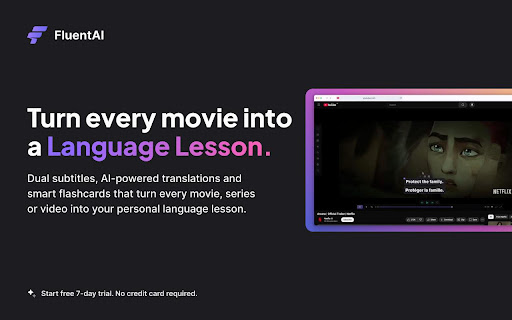
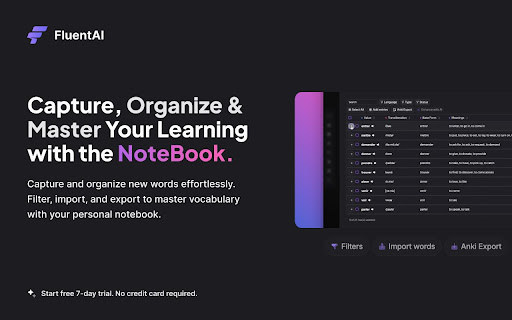


Discover the best way to learn a new language while watching your favorite movies and series on Netflix, YouTube, and Disney+. FluentAI – AI-Powered Dual-Subtitle Language Learning Extension FluentAI turns movies and videos into interactive language lessons. It overlays dual subtitles (original + translation) on Netflix, YouTube, Disney+, and other platforms, so you read and learn simultaneously. Every word is clickable: instant translations, definitions, example sentences, and grammar analysis appear in a popup just like a built-in dictionary. This immersive approach follows the trend of other tools (e.g., Language Reactor, Lingopie) that emphasize “Netflix dual subtitles” and interactive vocabulary. FluentAI goes further by using AI to support all languages (no hard-coded list) and syncing subtitles precisely with the audio. * Dual Bilingual Subtitles: Works on Netflix, YouTube, Disney+, HBO Max, etc., showing original and translated subtitles together. Instantly look up any subtitle word (click or tap) to get translations, pronunciation, and usage examples. * AI-Powered Translation & Grammar: Unlike simple subtitle-only tools, FluentAI uses AI to translate any language and analyze grammar. Clicking a word also reveals grammar notes and contextual explanations (similar to Lingopie’s AI grammar feature). Sentence breakdowns and AI grammar help make even complex lines easy to understand. * Integrated Vocabulary Notebook & Flashcards: Save words or entire phrases with one click. FluentAI automatically creates smart flashcards (with audio and example sentences) and lets you export them (e.g., to Anki). A built-in notebook organizes saved words with filters and tracks which words you’ve learned (feature-comparable to Migaku’s flashcard system). * Custom Playback Modes: Learning modes like Pause Mode (auto-pause on new words), Voice-Repeat Mode (listen and repeat with AI voice), and Resume Mode help match the video to your study pace. There’s even speed-control and looping to focus on tricky phrases. * Customizable Subtitle Display: Adjust subtitle font, color, size, position, opacity, and background blur. Support for lifelike text-to-speech means FluentAI can read any subtitle out loud in a natural voice – handy for pronunciation practice. * Full-Length, Multi-Language Support: Thanks to AI, FluentAI works on full movies or series in any language, without pre-built subtitle sets. Whether it’s Spanish telenovelas or Korean dramas, FluentAI generates dual subtitles on-the-fly. (Competitor tools like Trancy support many sites and languages, and FluentAI matches that flexibility.) * Progress Tracking & Statistics: FluentAI keeps statistics on your learning – how many words you’ve saved, practiced, or mastered. Use these analytics to see your improvement over time (a feature missing in basic subtitle extensions). Comparison with Other Extensions: FluentAI includes all the core tools of the popular language-learning players and adds extra AI enhancements: * Language Reactor (a.k.a. “Language Learning with Netflix”): Offers dual subtitles on Netflix plus a popup dictionary. FluentAI matches these (covering Netflix and much more) and adds AI-synced subtitles and interactive word analysis on YouTube, Disney+, etc. * Lingopie: Provides smooth bilingual subtitles and clickable word lookups with AI grammar help. FluentAI offers the same instant translation and grammar insights on subtitles, but extends them to all streaming/video sites and languages. * Migaku: Known for its powerful flashcard creation and tracking. FluentAI likewise lets you create flashcards from any video subtitle and export decks (e.g., to Anki), while also providing more playback-learning modes. * Trancy: Supports bilingual subs on YouTube/Netflix and has AI text translation for web content. FluentAI’s focus is on video, but it also handles any site text. On videos, FluentAI provides similar bilingual subtitles plus advanced modes (pause, voice-repeat) not found in Trancy. By combining these features, FluentAI becomes a one-stop solution: Netflix dual subtitles, YouTube dual subtitles, plus interactive word definitions, grammar breakdowns, example sentences, and smart flashcard tools – all in one extension. Try, you’ll like it.

Learn languages with Netflix & YouTube
Language learning with Netflix, YouTube, Coursera. eLang smart extension - dual subtitles, personal vocabulary & more Smart text and subtitles translator. Translate any language in one click with eLang Extension. Watch YouTube videos, Netflix series, and Coursera classes in original. ★ TRANSLATE IN 1 CLICK texts and subtitles on Netflix, YouTube, Coursera ★ DETAILED INFO about the translated word: synonyms, pronunciation ★ SMART SUBTITLES for YouTube, Netflix, Coursera in 2 languages ★ CONVENIENTLY NAVIGATE through videos with ‘repeat’ and ‘slow repeat’ of phrases, search through subtitles ★ LIST of all subtitles with timecodes ★ ADD NEW WORDS with translation and context to your vocabulary ★ PLAY & EXERCISE your saved words on desktop and mobile ★ 102 LANGUAGES Available eLang Extension is a smart translation tool for your browser. It works well both with text and videos, making it an essential assistant for work and language learning purposes. Also you can train the words you translate in our new mobile app. It is free for iOS and Android: App Store - https://apps.apple.com/by/app/elang-words-train-vocabulary/id1622786750 Play Market - https://play.google.com/store/apps/details?id=com.englishingames.easy5 Install our extension and translate foreign content much faster! *** From eLang team *** https://elang.app/games Spend your time wisely with our mobile games. We offer apps for every topic of English: irregular verbs, phrasal verbs, prepositions, vocabulary, and many more. Play with English words, improve your comprehension, and raise your English language level! https://elang.app/elangtv eLang-TV - online service for learning English with your favorite videos on your mobile. Translate unknown words and phrases on the go!

Language Learning with Netflix & YouTube-AFL
Language learning with Netflix: dual subtitles, YouTube support, AI mind maps & speaking coach for fast, fun progress. Language Learning with Netflix & YouTube – Now with AI Mind Maps & AI Coach Learning a new language doesn’t have to be boring. This Chrome extension transforms your Netflix and YouTube sessions into an interactive language course powered by AI. Whether you’re binge-watching a Netflix series or following a YouTube channel, you can now combine entertainment with real progress in your target language. It’s the ultimate tool for language learning with Netflix and language learning with YouTube—and it just got smarter with new AI features. If you are looking for a modern language reactor, you are at the right place. Install the extension on Chrome. Refresh once and start watching. Learn in context, practice vocabulary, and let AI help you organize your knowledge. Watch with subtitles in both the original language and your native language. Premium users can even add a third subtitle line for maximum comprehension. Hover over any word to get instant translations and meanings in context—no pausing, no switching apps. Every word, phrase, or sentence you save is automatically connected into an AI-generated mind map, helping you visualize relationships between vocabulary and concepts. This makes remembering and reviewing new words effortless. Practice directly with an AI coach that adapts to your saved words and phrases. Chat with the AI about your Netflix shows or YouTube videos, ask for grammar tips, or get quizzes based on your learning history. Control playback, repeat sentences, or slow down dialogue with handy shortcuts designed for learners. Highlight words or sentences, save them, and export to Anki or other flashcard apps. Perfect for offline review and spaced repetition practice. Upload your own subtitles on Netflix (premium feature). The video automatically pauses when you hover over unknown words, so you never miss important context. See the full subtitle transcript in the sidebar and jump to any point in the video. 🎬 Why This Extension is a Game-Changer Combines language learning with Netflix and language learning with YouTube in one extension. Built-in AI mind maps make learning structured and memorable. The AI language coach gives you interactive, personalized practice. Learn directly from native speakers in real-world contexts—movies, shows, and videos you already enjoy. Beginner-friendly, customizable, and ad-free. We roll out new features every two weeks—expect more AI enhancements, smarter translations, and advanced learning tools to supercharge your study routine. ✅ Start Learning for Free Free to install, with optional premium features. Optional login for syncing progress. Turn your Netflix and YouTube time into a fun and effective AI-powered language learning journey. Install today and see how fast you can progress! - Lots of shortcuts ----DONE - Upload your own subtitles (paid feature) --DONE - Downloading and Printing subtitles----DONE - Machine translation for movies without your native subtitles (paid feature) --- DONE - Easily hide subtitles with shortcuts on Netflix (paid feature) ---DONE - Export movies' vocabularies and sentences to learn with Anki--- DONE - Custom playback speed: the ability to slow down dialogue to increase comprehension --- DONE - The ability to see THREE subtitles at the same time (paid feature) ---DONE - A shortcut for unlimited repetition of sentences for practicing listening--- DONE - Custom AUTO-PAUSE (paid feature)- DONE - The ability to modify the saved words and sentences---DONE - Advanced shortcuts (premium's feature) ---DONE *We're releasing at least one new feature every second week. Stay tuned for more... :) How much does using this extension cost? Nothing. You can learn languages with this extension completely for free. You can use it on your computer with Google chrome and enjoy any movie in any language at no cost. No catch. Install today and get started for FREE! We do have a premium subscription available to users. With the subscription, you will have an ad-free experience with access to some additional features. ********************** ********************** ********************** - NO disturbing ads - NO need for credit card - Optional login ********************** ********************** ********************** Be the first to install and enjoy the benefits of this revolutionary way of language learning with movies - Install for FREE and start having more fun with foreign movies - This extension helps you to turn movies into an enjoyable personal language course! - No more dictionaries, you can just hover over a word and get the meaning right away, you can also keep the words and practice them later - Fast fluency by learning from native speakers - Master any language without any boring book or language class ★ QUESTIONS, FEEDBACK: This extension is very new, and still in development. Please help us by sending a little e-mail if you see crashes, bugs or just want to say Hi 😊 **VERSION: 4.0.0 -Complete refactor of the extension for better performance -Support for synonyms in more than 20 languages -Shortcuts for delaying subtitles on Netflix (for better synchronization) -Smart dictionary in Chinese and English for detecting phrasal verbs **VERSION: 3.0.0 - A clear cancelation button in the setting of the extension is added - Third subtitle with the help of machine translations - Now you can upload your own subtitles on Netfelix movies without subtitles (Premium users) - The ability to enable/disable phonetic for Chinese, Japanese, and Korean languages - Added On/off button on the player bar - Higher user safety with migration from V2 to V3 manifest **VERSION: 2.0.0 - Added SHORTCUTS - Now you can DOWNLOAD subtitles for any movies and review them later - Added the ability to EDIT your saved vocabularies and sentences and keep the interesting part of it - Support for Korean - Added Pinyin - phonetic support - for Japanese, Korean, traditional, and simplified Chinese - Added shortcuts for repeating a sentence for increasing listening comprehension - OFFLINE REVIEW by exporting PDF of the saved vocabularies in the movies - The ability to change subtitle background color to increase contrast for watching any kind of movies **VERSION: 1.0.0 - Double subtitles released(beta) - Export word lists based on movies and dates for using with flashcard software like Anki - Word PRONUNCIATION with left click - Save words - Export words as text format was added: Go to setting and click on the export words button. - Save sentences - Ability to change the location of subtitles by drag and drop

SecondSub - Dual Subtitles for Netflix, Disney+, Coupang Play and TVING
SecondSub offers dual subtitles and advanced options for Netflix, Disney Plus, Coupang Play, and TVING, enhancing your streaming. 🚀 SecondSub: Use Dual Subtitles on Netflix, Coupang Play, Disney Plus, and TVING! 🎬 Upgrade your OTT viewing experience! SecondSub supports dual subtitles on Netflix, Coupang Play, Disney Plus, and TVING, helping you learn languages while fully immersing yourself in content. 🗣️📚 - 📝 Dual Subtitle Support – Display two languages simultaneously for a more natural learning experience! - 🌐 Auto-Translated Subtitles – No problem even if your preferred language isn’t available! - 🎬 Supports Major OTT Platforms – Works seamlessly with Netflix, Coupang Play, Disney Plus, and TVING! - ⏩ Subtitle-Based Navigation & Repetition – Move to subtitle start points and repeat playback with hotkeys, perfect for language learning! Install now for free and enjoy a whole new viewing experience! 😎🍿 🔧 Is the extension not working properly? If you encounter issues after the initial installation, please check the following: 1️⃣ Close all browser windows completely and restart the browser. If the extension did not load properly, restarting the browser may resolve the issue. 2️⃣ Check for conflicts with other extensions. If you have other extensions that use keyboard shortcuts, they might interfere with the functionality. Try temporarily disabling other extensions at chrome://extensions and test again. 3️⃣ Check if the video you are watching provides subtitles. For the extension to work, the video must support subtitle selection. If you don’t see any available subtitles in the extension, verify whether the video offers subtitles in any language.

NflxMultiSubs 2021 (Netflix Multi. Subtitles)
Bilingual Subtitles for Netflix (fixed) Best ever Chrome/Firefox extension to unleash bilingual subtitles on Netflix! This is a fixed and updated re-release of the original NflxMultiSubs. This version contains a fix for the 2021 Netflix redesign that broke the original, and has various other bugfixes and improvements. Click on the extension button to access the extension settings. Note: this extension will only show the subtitle languages that are available in your country. Features: - Enable secondary subtitles in the available languages (incl. image-based subtitles like Japanese, Chinese, Russian, …) - Smart selection on secondary subtitles. Choose between 3 subtitle activation modes: disabled; automatically match subtitle language to audio language; or remember the last selected language. - Seamless integration with native Netflix player UI -- switch languages in place - Adjust playback speed with a hotkey ( [ and ] ) - Free and open source! Report bugs by creating an issue on Github (https://github.com/gmertes/NflxMultiSubs) or send me an email (click "contact the publisher" on the right of this page). v3.0.0: - Fix Chrome version with experimental manifest v3 support v2.3.5: - NEW: improved font size settings. This should make font size better adaptable to various monitor sizes and resolutions. - Fix a crash in the candidate subtitle server selection. v2.3.4: - NEW: Extra out of region languages can now be used as secondary subtitles. To do so, activate the wanted language as a primary subtitle first. The language will then show up in the secondary subtitle list ready to be used. After selecting the wanted language as secondary sub, the primary language can be switched back. For now you have to do this for every new playback. - Fix the subtitle color picker on Firefox - Fix key binds for the playback rate controller (now [ and ] for all keyboard layouts) v2.3.0: - Fix critical bug in subtitle builder - NEW: You can now change the color of text-based subs from the settings page. v2.2.10: - Fix primary sub scaling - Improve secondary sub scaling for 4K displays - Show vertical scrollbar when subtitle list overflows v2.2.3: - NEW: Add secondary language options (disabled, audio, last used) - Fix subtitles overlapping in certain cases - Fix image-based subtitle scaling - Fix image-based subs sometimes falling outside of top screen edge v2.2.2: - Improve subtitles activating on the first try without requiring a refresh v2.2.0 (first release): - Fix for the September 2021 Netflix redesign that broke the original extension
