
hbgdeallnfobjidhfmjlldiilhggjioh
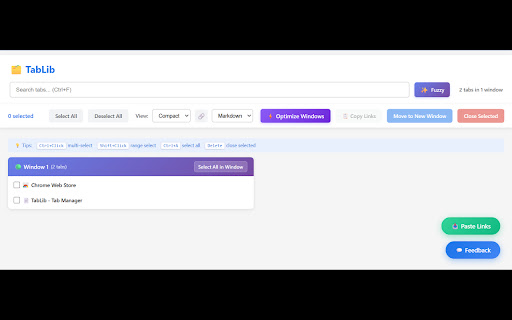
Powerful tab manager with multi-selection, fuzzy search, and smart window organization. Manage hundreds of tabs effortlessly. TabLib is a Chrome extension designed to revolutionize how you manage browser tabs, especially if you're someone who juggles dozens or hundreds of open tabs daily. Whether you're a researcher, developer, multitasker, or just someone who loves exploring the web, TabLib provides the tool to transform chaotic tab clutter into organized efficiency with innovative features that go beyond standard browser tools. Key Features That Make TabLib Essential 🎯 Revolutionary Multi-Selection System Forget clicking one tab at a time—TabLib introduces intuitive selection methods that save you time and frustration: Checkbox Selection: Simply check boxes next to tabs for precise control. Ctrl+Click: Toggle individual tabs on or off with a quick keyboard modifier. Shift+Click: Select entire ranges of tabs between two points, perfect for bulk operations. Select All in Window: Instantly grab all tabs from a specific window. Visual Feedback: Selected tabs are clearly highlighted, so you always know what's chosen. This multi-selection system lets you handle groups of tabs as easily as single ones, making bulk actions like closing or moving tabs a breeze. 🔍 Intelligent Fuzzy Search Finding the right tab in a sea of open pages has never been easier: Real-Time Filtering: Type in the search box, and tabs filter instantly by title or URL—no need to scroll endlessly. Search Results Counter: See exactly how many tabs match your query at a glance. Select All Results: Quickly highlight every matching tab for batch operations. Keyboard Shortcut: Hit Ctrl+F to jump straight to the search box. Whether you're looking for that specific article, documentation page, or shopping site, TabLib's search keeps your workflow smooth and interruption-free. 🪟 Smart Window Organization Tabs are naturally grouped by their windows, with clear visual indicators: Active Window Highlight: See which window is currently focused with a green indicator (🟢). Tab Counts: Instantly view how many tabs are in each window. Move to New Window: Relocate selected tabs to a fresh window with one click, ideal for separating work projects or personal browsing. This organization helps you maintain mental clarity, preventing tabs from blending into an overwhelming mess. Ctrl+Shift+Space (or Cmd+Shift+Space on Mac): Open TabLib instantly. Ctrl+F: Focus the search box. Ctrl+A: Select all visible tabs. Delete: Close selected tabs. Escape: Clear search or deselect everything. These shortcuts let power users navigate and manage tabs without touching the mouse, keeping your hands on the keyboard for maximum productivity. Clean, responsive design that adapts to your screen. Smooth animations for a polished feel. Tab favicons and previews for quick visual identification. Color-coded windows for easy differentiation. The UI is designed to be intuitive yet powerful, ensuring you spend less time managing and more time doing. Why Install TabLib? If you frequently open multiple tabs for research, work, or entertainment, you know the pain of losing track of important pages or wasting time hunting for them. Standard browser tab management falls short when you have 50+ tabs open—scrolling becomes tedious, closing the wrong tab is easy, and organizing by window is manual and error-prone. TabLib solves these problems by giving you professional-grade tab management tools right in your browser. Benefits for Different Users: Researchers & Students: Quickly search and organize reference materials across multiple windows. Developers: Group tabs by project, move debugging sessions to new windows, and close outdated docs in bulk. Multitaskers: Handle shopping lists, news articles, and social media without losing your place. Power Users: Manage hundreds of tabs effortlessly with keyboard shortcuts and multi-selection. TabLib is lightweight, privacy-focused (no data collection), and built with Manifest V3 for modern Chrome compatibility (88+). It's free, open-source under MIT license, and customizable if you're tech-savvy. Installation & Getting Started Once installed from the Web Store, press Ctrl+Shift+Space to open the manager and start organizing your tabs immediately. Upgrade your tab management game with TabLib—turn tab chaos into controlled productivity. Download now and experience the difference! 🚀

TabTap - Clean & Fast Tab Manager
Search, organize, and manage tabs with ease. Make browsing simple and stress-free. 🔎 Search and filter tabs across all open windows 🗄️ Archive tabs to declutter and revisit later 🗂️ Group tabs by domain or window ↕️ Sort tab groups by tab count or by time 👓 Handle duplicate tabs effortlessly ♻️ Restore closed tabs with one click 🏂 Add up to 3 quick-access shortcuts ⚙️ Customize your interface in Settings 🏗️ Manage tabs across multiple windows 🔒 Privacy First: your data stays on your device, no tracking, no collection 🎨 Flexible Views: switch between tab list, domain, or window grouping 🛠️ Make it yours: customize TabTap to your workflow ⚡ Fast and lightweight: simple, clean, and quick 🌙 Light and dark themes: pick what feels right for you [v1.15.0] - Close All Duplicates: close all duplicate tabs with one click [v1.13.0] - Choose whether to keep tabs in the archive after reopening Reopening archived tabs now offers two options: 1. Reopen and keep in archive 2. Reopen and remove from archive You can customize the interface by toggling "Show Options for Removing from Archive when Reopening" in Settings. [v1.11.1] - Remember Archive Toggle in Settings: choose whether the plugin reopens in Archive mode if that was your last session - Group actions for archived tabs: fixed inconsistencies with restore/delete operations caused by a race condition [v1.10.1] - Archive Recovery: restore recently deleted archived tabs - Current Tab Finder: locate and scroll to the current active tab - Full URL Display: display complete URLs instead of domains in tab subtitles [v1.8.1] - Archive: archive tabs and groups for later use [v1.7.1] - Open Tabs in the Current Window: open a tab or a group of tabs in the current window [v1.6.0] - Open Tabs in a New Window: open a tab or a group of tabs in a new window - Focus Window: focus a specific window with one click [v1.5.3] - Duplicate Tab Management: identify and manage duplicate tabs [v1.3.1] - Group Close: close all tabs in a domain or window group with one click [v1.2.0] - Tab Counter Badge: quickly check your open tab count - Tab Counter Badge Toggle: enable or disable the tab counter badge in Settings [v1.0.0] - Tab Grouping: view, search and manage tabs grouped by window or domain [v0.2.0] - Quick Access Shortcuts: add shortcuts to your favorite websites [v0.1.0] - Tab Search and Filter - View Open Tabs - Remove Tabs - Restore Closed Tabs - Dark/Light Themes 💬 We'd love to hear from you! Your feedback helps make TabTap better. If you have any suggestions, feature requests or bug reports, please leave a comment in the Support section! 😊 If You like TabTap, please leave a rating on the Chrome Web Store:) It makes a big difference for us and helps us a lot.❤️ Hope you enjoy TabTap! ^^

Tab Organizer
Intelligent tab management with auto-grouping and powerful search 🎯 Stop Drowning in Tabs – Take Control with Tab Organizer! Are countless browser tabs overwhelming your workspace and slowing you down? Tab Organizer is your ultimate productivity companion, effortlessly grouping, sorting, and tidying your browser tabs—all in just a few clicks. Automatically organizes your tabs into intuitive groups based on content and usage. Stay laser-focused with a clean, structured workspace. Save and restore your entire browsing session, including multiple windows and tab layouts. Jump right back into your workflow without missing a beat. Instantly identify duplicate or rarely-used tabs and get actionable suggestions for keeping your browser fast and clutter-free. Easily merge, split, or move tabs between windows. Ideal for multi-screen setups and complex workflows. Keep tabs (literally!) on your browser health with an always-visible dynamic tab counter. Supports Arabic, Bengali, Chinese, Dutch, English, French, German, Hebrew, Hindi, Indonesian, Italian, Japanese, Korean, Punjabi, Portuguese, Russian, Spanish, Turkish, and Vietnamese. 👤 Ideal For: - Power users and developers managing multiple projects - Students and researchers organizing extensive sources - Anyone aiming to boost their productivity and workflow - Users craving a simplified, seamless browsing experience 💡 Why Choose Tab Organizer? - Sleek, user-friendly interface - Lightweight & optimized for peak performance - Privacy-focused – zero data collection - Regular updates & dedicated support - Pro-level efficiency with smart keyboard shortcuts 🚀 Download Tab Organizer today and reclaim control of your browser! Free • No Ads • Built for Maximum Productivity

SmartTab - Tab Manager & History Search
Tab manager that searches inside tab content. Organize unlimited tabs, restore closed tabs & browse with complete privacy The ultimate tab manager for Chrome. SmartTab revolutionizes tab management with full-text search inside tab content, smart organization, and complete privacy. Revolutionary Tab Search Unlike other tab managers, SmartTab searches INSIDE tab content, not just titles. Lost that React article in 50+ tabs? Find it instantly by searching any text you remember. The only tab manager with true full-text search. Lightning-Fast Tab Manager - Instant popup (0.3s) - manage tabs without leaving current page - Alt+H opens tab manager from anywhere - Real-time search as you type - Zero lag, maximum speed Smart Tab Organization - Tab Folders - Unlimited folders for project-based tab management - Auto-Grouping - Tabs organized by domain automatically - Bulk Operations - Select multiple tabs to manage at once - Time Filters - Find tabs from last hour, day, week, or custom range - Duplicate Finder - Close duplicate tabs in one click Advanced Tab Tools - View all tabs with status indicators (active/audio/pinned) - Restore closed tabs (last 25 saved) - Cross-window tab management - Tab memory warnings - Complete keyboard shortcuts for power users 100% Private Your tabs stay yours. All data stored locally. No servers, no tracking, no accounts required. Optional Chrome Sync for favorites only. Tab Sessions & Backup Export/import tabs and settings. Transfer tab workspaces between devices. Never lose important tab sessions again. SmartTab captures searchable content from every tab, creating your personal knowledge base. Our algorithm prioritizes: - Title matches (highest relevance) - URL/domain matches - Content matches with context - Recent visits - Exact phrases 🎯 Perfect For - Researchers - Find sources by concepts, not titles - Developers - Search error messages across documentation tabs - Students - Organize study tabs by subject - Professionals - Manage work tabs efficiently - Anyone with 20+ tabs open 🚀 Quick Start 1. Install & pin SmartTab 2. Browse normally - auto-saves tabs 3. Press Alt+H to search everything 4. Use "/" for instant search SmartTab - The tab manager that transforms your browser into a searchable workspace. Complete privacy, instant access, intelligent organization. *Your tabs, your privacy, your control.*

Tabbiy - Auto Group & Sidebar Tab Manager
The ultimate sidebar tab manager! Auto-group, customize titles, save, hibernate & switch tabs fast for a clutter-free browser. 🚀 Tabbiy: The Ultimate Sidebar Tab Manager & Auto-Organizer Tabbiy is an elegant sidebar tab manager designed to end the headache of having too many tabs. By providing a powerful vertical tab list and auto-grouping features, Tabbiy turns your cluttered browser into an organized, high-performance workspace. Whether you want to reduce Chrome memory usage or find a specific page in seconds, Tabbiy is the productivity tool you’ve been looking for. ✅ End Tab Clutter: Transform a messy horizontal tab bar into a clean, searchable sidepanel list. ✅ Smart Auto-Grouping: Automatically group tabs by domain or custom rules to keep related tasks together. ✅ Save Memory & CPU: Hibernate tabs or move idle pages to a "Staging List" to drastically boost browser speed. ✅ Custom Tab Titles: Rename any tab to eliminate vague labels and identify your content at a glance. ✅ Fast Switching: Use shortcuts to jump between current and recent tabs instantly, perfect for cross-page comparison. ✅ Pro Data Portability: Export your tab lists and titles in JSON, HTML, CSV, or Markdown (Pro). 1️⃣ Sidepanel Management (ALT+D): A dedicated vertical interface for grouping, saving, hibernating, and drag-and-drop reordering. 2️⃣ Auto-Grouping: One click to categorize tabs by domain. Pro unlocks 3 sets of custom rules, fixed colors, and unlimited groups. 3️⃣ Tab Hibernation: Suspend active tabs to free up RAM and quickly resume access whenever you need them again. 4️⃣ Tab Staging (Saving): Move temporarily unused tabs to a staging list to clear your interface while maximizing memory release. 5️⃣ Rename Tabs: Easily edit any tab title directly from the list to clear up vague labels. Your custom titles are saved automatically for quick identification. 6️⃣ Multi-Format Export: Free JSON export; Pro version unlocks CSV, HTML, and Markdown for professional backups. 7️⃣ Quick Switch (ALT+E): A lightning-fast shortcut to toggle between your current page and the last opened one. 8️⃣ Dark & Light Themes: Beautifully designed UI that matches your system theme for a comfortable visual experience. 💬 How do I disable auto-grouping? 🌲 Simply click the "Auto" button at the bottom of the sidepanel to turn off grouping and clear all current groups. 💬 How can I group tabs more effectively? 🌴 Go to "Settings" -> "Grouping Rules" to define custom patterns, then click "Apply" to see the magic happen. 💬 Does it support collapsing groups? 🌵 Currently, we focus on a "visible at a glance" design to help you find tabs faster without extra clicks. 💬 Can I use individual features without Auto-Grouping? 🍀 Yes! All features—sidepanel, hibernation, saving, and renaming—work independently to fit your specific workflow. 💬 Is Tabbiy free to use? 🌳 Yes! The core features—including the vertical Tab Management, auto-grouping, tab hibernation, and tab saving—are 100% free forever with no ads. Pro version is entirely optional for power users who need advanced automation. ✅ Status prompts for Sidepanel list buttons have been updated to top-right overlays for better visibility. ✅ Optimized tab loading status within the list to enhance loading behavior. ✅ Added an entry for the "Close Duplicate Tabs" function to the context menu. ✅ Removed redundant shortcut configurations for closing the Sidepanel. ✅ Redesigned feedback form for a smoother and more intuitive submission experience. ✅ Optimized Welcome Page styling and added skeleton screen preloading for a smoother visual experience. 🍺 Productivity starts with a clean browser. Tired of messy tabs slowing you down? Install Tabbiy today and refresh your browsing experience! 📨 Questions or Feedback? We’d love to hear from you: support@tabbiy.top Crafted with ❤️ by Tyrus Labs.
