
hbejmlkhkfmengijojiehbpmmfbkkhdk
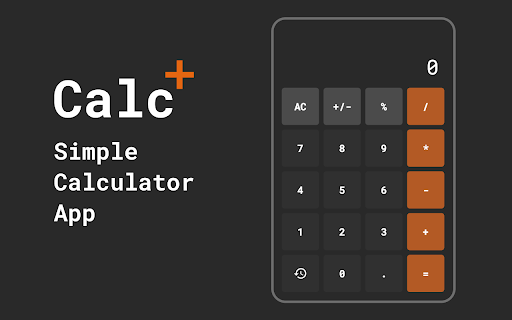

Grab a quick and easy calculator right in your browser—perfect for fast calculations on the go! Use Calc — Calculator app as free, smart and simple calculator. This calc chrome extension works fast and efficient. 🚀 Calculator app - ultimate calculation extension for Google Chrome! Whether you're a math professor, student, or professional dealing with computations, our app extension is the answer to all your numerical needs. With a simple click, unleash the power of numbers in your browser. 🌟 Effortless calculations: 1️⃣ Say goodbye to the hassle of searching for an calculator app. 2️⃣ With our extension, a simple click opens accurate calculations in your browser. 3️⃣ Perform your task without missing a beat. ❇️ Free and easy: 1. Enjoy the benefits of tool without spending money for desktop calculator. 2. Our free calculator app is user-friendly. 3. It is perfect for everyone, from students to professionals. 🔥 Basic and powerful: - Simplicity is key. Our basic calculator is designed for quick tasks. - No complexities – just the tools you need for number crunching. - We prioritize user experience with an intuitive and clean design. - Unlock a world of possibilities with smart calculator. It's the best calculator app for your everyday needs. ⚒️ Download and go: 🔸 Looking for solution that's always at your fingertips? Download calculator app and enjoy the convenience of having your personal tool on demand. 🔸 Make it personal with my calculator – a customizable feature that lets you set preferences and create a tailored experience just for you. 🔸 Our extension may be a normal calculator on the surface, but it packs a punch when it comes to delivering accurate and reliable results every time. 📒 Open the Possibilities: 🔺 You can easy open calculator in one click. It's like having a desktop calculator, but more accessible and convenient. 🔺 Our tool get title of the best calculator app. 🔺 It's a game-changer for professionals who need to stay productive offline. 🌐 Online calculator on the go: 🔹 Our extension transforms your browser into a powerful online calculator 🔹 Whether you're research project or managing finances, our tool will assist you. 🔹 Fast calculator download right from your browser. 📈 Free calculator app – cost-effective solution: ❗️ Quality calculations shouldn't come with a hefty price tag. ❗️ Our free calculator app is not only efficient but also budget-friendly. ❗️ Experience the convenience of calc without spending dollar. 💎 Basic calculator for quick and simple tasks: ① Sometimes, simplicity is key. Our tool is tailored for quick calculations. ② No unnecessary complexities – just the essential tools for you. ③ Perfect for students, professionals, for a quick calculation. 👥 Smart calculator for better functionality: 1) Unlock a world of possibilities with our extension. 2) It goes beyond basic calculations, offering features that cater to your needs. 3) It's not just about solving equations; it's about providing tool for your tasks. #️⃣ Seamless browser integration: With our extension, your browser becomes a powerful tool at your fingertips. Enjoy the convenience of performing calculations without the need to switch between tabs or applications. Use app calculate in your work. ▶️ Research projects made easier: For research projects that involve complex calculations, our simple calculator extension provides a seamless solution. Easily access simple calculator within your browser, streamlining your workflow and saving valuable time. 🍋 Financial management simplified: Whether you're budgeting, tracking expenses, or planning investments, our calculator app is a valuable tool for managing finances. Perform various financial calc right from your browser, making the process efficient and user-friendly. 🧐 FAQs about the extension 🏨 How to install extension 🔸 To install an extension in Google Chrome, first, open Chrome on your computer.. 🔸 Then, navigate to the Web Store. 🔸 Search for the desired software, click on it to view its details, and finally, click the "Add to" button to install it. 🌻 How to see calculation history 🔸 To view calculation history in a Chrome extension, click on the extension's icon in the Chrome toolbar. 🔸 Then, locate and click on the History button that opens the history feature within the extension. 🔸 Once accessed, you'll be able to see a list of past calculations, typically displayed in a separate window or sidebar within the tool interface. 😉 How to use extension offline 🔸 To use a Chrome extension offline, ensure that you've installed the solution while online. 🔸 Once installed, you can access the tool even when offline by opening a new tab in Chrome and clicking on the icon. 🔸 The calculator should function normally without requiring an internet connection, allowing you to perform calculations offline Transform your browsing experience into a productivity powerhouse with our calculator app extension. Nice tool for work and study.

Ordinary calculator
A ordinary calculator extension with hidden functionalities. Ordinary Calculator - A Simple Calculator with Hidden Features The Ordinary Calculator extension is a sleek and intuitive calculator that also hides some unique functionalities. While it works like a standard calculator, it offers more for those who know the secret! • Basic Calculator: Perform everyday calculations with ease. The interface is simple, clean, and efficient. • Hidden Bookmark Feature: Want to access your favorite web pages directly from the calculator? Enter ‘1111’ into the calculator and then press the ‘fn’ button to unlock a hidden bookmarking feature where you can save and manage your favorite web pages. • Side Panel Mode: The Ordinary Calculator extension runs seamlessly in Chrome’s side panel for quick access while browsing. If the side panel doesn’t automatically open when you click the extension icon, simply right-click the icon and select “Open in Side Panel” to access the calculator. 1. Calculator Mode: Just click on the extension icon to open the calculator in the side panel (or right-click and select “Open in Side Panel” if it doesn’t automatically open). 2. Bookmark Mode: Enter 1111 in the calculator, and you’ll be taken to a special bookmark manager where you can add, edit, and delete your favorite websites. Enjoy the simplicity of a basic calculator, with the bonus of a hidden bookmarking feature that you can access anytime! Whether you’re calculating numbers or managing your favorite web pages, the Ordinary Calculator has you covered.

Simple Calculator
Simple Calculator is a popup tool for quick, essential calculations, supporting addition, subtraction, multiplication, and division. Simple Calculator is a user-friendly tool designed to facilitate quick calculations in a convenient popup window. It supports essential arithmetic operations, including addition, subtraction, multiplication, and division. The interface is straightforward, enabling users to perform calculations efficiently without unnecessary distractions. Ideal for everyday tasks, Simple Calculator provides a reliable solution for users needing a fast and accessible way to handle basic mathematical functions.

Calculator [Alt + C]
A simple calculator for those quick calculations, without leaving the browser A simple calculator for quick calculations, without leaving your browser. How many times have you left your browser to open the calculator app on your PC or Mac? Ever been in the middle of a movie and felt like calculating those bills? Using a spreadsheet but need a quick calculation? This extension saves you those extra steps, giving you instant access to a calculator with a click of a button or a custom-assigned shortcut. CALCULATE WITHOUT EVER LEAVING YOUR BROWSER. "Calculator" by theindiecompny helps you perform quick calculations on the web, without leaving your train of thought or the tab. ---INSTALLATION & USAGE--- Best Way to Use this Calculator: 1. Install it 2. Use "Alt + C" to launch quickly. You can also customize this shortcut key, for me it is "Ctrl+1" [go to this link and assign your keys to "Activate the Extension": chrome://extensions/shortcuts] 3. Enjoy! --- Please rate it after using it, bad or good. Thank you.

Calculator
A Beautiful Calculator with simple and scientific modes and useful converters. Beautiful Calculator: Combining Elegance with Functionality Transform your everyday calculations with our Beautiful Calculator app - the perfect blend of modern design and powerful functionality. Whether you need quick basic math or complex scientific calculations, our intuitive interface delivers results with style. Simple Calculator : Perfect for everyday arithmetic Scientific Calculator : Access advanced functions for academic and professional needs Date Calculator : Easily compute time intervals and important dates Comprehensive Conversion Tools : Save time with our built-in converters for all your measurement needs: Experience the Difference Our calculator stands out with thoughtful features: Eye-catching modern UI with elegant design elements Extra-large, crystal-clear numbers and symbols for easy viewing Intuitive layout that simplifies complex calculations Customizable dark/light theme to match your preference One-tap copy function - just click your result to save to clipboard Calculation history that tracks your previous work Whether you're a student, professional, or anyone who needs reliable calculations, our Beautiful Calculator combines practical functionality with stunning design. Download today and experience the perfect balance of form and function in your everyday calculations.
