
hapcnpnopbmifahnnehfcncojejoiefn

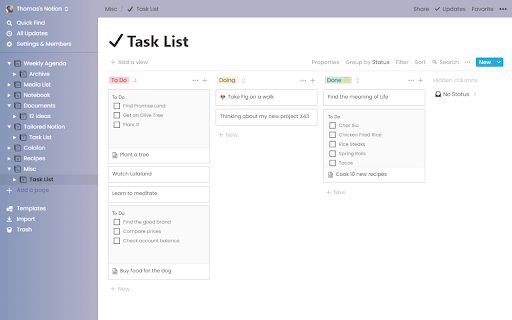
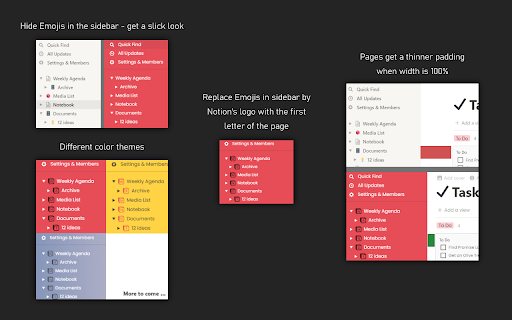

Redesign Notion the way you want Notion is your all-in-one workspace, where you can write, plan, collaborate and get organized. If it's not already your favorite app, you should try it now: notion.so Tailored Notion is a browser extension to improve the look of Notion when you use it directly from Chrome. - Headings have the same font as the body - You can export your settings and save them in a Notion note for another browser, to share with your friends or for later - Better compatibility with dark mode - Fixed menu's icons - You can now change the text color - Fixed bugs with sidebar icons replacement - Erase changes and reset to Notion's default parameters UPDATE v0.3.7 - You can now pick different colours for the side & top bar or the background. Use at your own risk ;) - bug fixes UPDATE v0.3.4 - themes have been dropped and replaced by a font picker and a font-color picker - More options have been added to get a focus mode. It removes unnecessary tools when you need deep-focus - you can now pick a font from your device. So you have ample choice and it's faster than Google Fonts Features: - Pick a sidebar & top bar color - Pick a font from your device - Remove page's icon and cover - Hide side & top bar - Pages get a thinner padding when width is 100% - Hide Emojis in the sidebar - get a slick look - Replace Emojis in sidebar by Notion's logo with the first letter of the page - Remove emojis from the browser tab - Remove the help button Once the extension is installed, make sure to pin it for easy access. By clicking on the logo, you will access all available options. You must hit "Save" and refresh the page to see the changes.

Notion - Add to calendar
This extension create a link for save notion event in google calendar You can add simply notion's events in your calendar. For the moment, just google calendar is supported.

Notion Tweaks
For Notion. Development of this extension is in stop. Development of this extension has been discontinued and is deprecated. Chrome Extension to tweak Notion. Features ・Open or Create Today's Page of a specific database ・Create Page of a specific database quickly ・Enter the timestamp(HH:mm) quickly ・Close Slash command menu and Emoji menu ・Narrow the page margins when page width is less than 850px ・Narrow the margin at the bottom of Code Block ・Always show the language of Code Block

Save to Notion
Save the Web to Notion - 💾 Save web articles, emails, tweets, Youtube videos, Linkedin posts, cooking recipes and more… To read them later in Notion. - 🏷️ Fill database properties (tags, relation, checkbox…), right in the extension. - 📸 Take screenshots & pick images from the web and upload them to Notion. - ✍️ Highlight portions of text directly from the web and send them right to Notion. - 🧠 Automatically Map data on webpages, such as article’s publication date, author name etc… To database properties, so you don't have to copy/paste. - 👑 Create different forms for your various use cases, whether it be for work or personal purposes. Start using Save to Notion today for free! It is helping thousands of individuals everyday to be more productive and enjoy Notion in their personal and professional lives. You have an issue or want to give a feedback / suggestion? Drop me an email :) The extension doesn't collect any data unless you make an account. If you do, it may collect anonymous usage data to help us understand how you use the extension and what features we should work on first.

Notion Search
Search Notion pages on the popup Search Notion pages on the popup. Quickly find content in your Notion workspace without switching tabs. Just click the icon of this extension and type your search term in the popup. You can also open it with Ctrl + Shift + P.
