
hakeahboieaiaapenniofdgebjgibibf


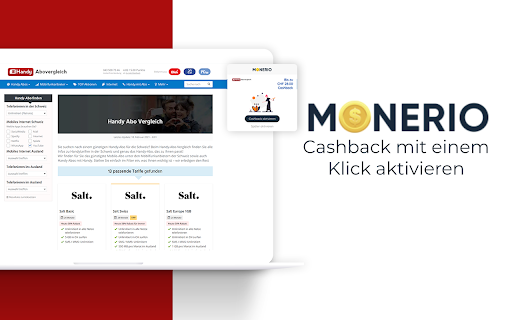

Online shoppen. Geld zurück erhalten. Vergiss nie mehr deinen Cashback. Bei jedem Einkauf in über 1'100 angeschlossenen Online-Shops erhältst du von Monerio Cashback. Mit dieser Browser Erweiterung erhältst du beim Aufruf eines angeschlossenen Shops automatisch einen Hinweis, damit du die Aktivierung deines Cashback nicht vergisst. Klicke danach einfach auf «Cashback aktivieren» und schon wird dein Einkauf automatisch erfasst. Zudem bietet dir der Monerio Shopping Helfer viele weitere interessante Funktionen: CASHBACK MIT EINEM KLICK Wenn du einen unserer über 1'100 Partner-Shops besuchst, wird dir eine Meldung angezeigt, damit du deinen Cashback nicht vergisst. Mit nur einem Klick wird anschliessend dein Cashback erfasst. GUTSCHEINCODES WERDEN DIREKT BEIM EINKAUF ANGEZEIGT Wenn du die Website eines unserer Partner-Shops aufrufst, werden dir die besten verfügbaren Gutscheincodes angezeigt, die in diesem Shop gelten und mit Cashback kombinierbar sind. TOP AKTIONEN DIREKT IM BROWSER-FENSTER Mit einem Klick auf die Monerio Browser Erweiterung werden dir automatisch die derzeit beliebtesten Aktionen angezeigt. Du musst dazu nicht einmal Monerio besuchen und siehst auf einen Blick die angesagtesten Deals und Gutscheincodes. DEIN MONERIO ACCOUNT IMMER IM BLICK In der Browser Erweiterung hast du deinen Monerio Account immer im Blick. Wie viel Cashback du bisher gesammelt hast? Wie viele Cashbacks schon bestätigt wurden? Wie es mit deiner Freunde-Werbung vorwärts geht? Das siehst du alles direkt mit einem Klick auf die Erweiterung! AUTOMATISCHE ANWENDUNG VON GUTSCHEINCODES Bei einigen angeschlossenen Händlern werden automatisch alle auf Monerio erfassten Gutscheincodes bei deinem Warenkorb ausprobiert. Der Gutscheincode, der den grössten Rabatt gibt, wird anschliessend angewendet. So musst du nicht selbst alle Gutscheine durchprobieren. Dein Surfverhalten wird mit der Monerio Erweiterung nicht von uns analysiert oder beeinträchtigt.

Satsback.com
Earn free bitcoin rewards when you shop online at more than 10K merchants worldwide. Satsback.com helps you earn bitcoin on your everyday online purchases at thousands of participating merchants worldwide. Simply install the extension, create (or log in to) your free Satsback.com account, and shop as usual. Whenever you visit a participating store, you’ll see a prompt to activate your bitcoin rewards. How it works: 1. Install and pin the Satsback.com extension in your Chrome browser. 2. Create an account or log in at Satsback.com. 3. Shop as usual—our extension will notify you when bitcoin rewards are available. 4. Earn a percentage of your purchase back in bitcoin, credited to your Satsback.com dashboard. Key benefits: • Automatic alerts for eligible stores. • Fast and flexible bitcoin Lightning withdrawals. • Access to thousands of global merchants across many categories. Why Use Satsback.com? • Turn routine shopping into an opportunity to accumulate bitcoin over time. • Support a global network of merchants offering real value-back rewards. • Enjoy a transparent earning process with no hidden fees or gimmicks. Note: Satsback.com does not provide financial advice, nor do we guarantee any specific outcome. Reward rates may vary by merchant and are subject to change. Install the Satsback.com extension now and start earning bitcoin on your next online purchase!

SecureSafe Password Manager
Use the SecureSafe password manager to keep track of your ever-growing list of passwords. –––––––––––––––––––––––––––––––––––––––––––––– With the SecureSafe Browser Extension, you can log into websites, online stores or web applications directly from your browser. How do I log in to the SecureSafe Password Manager from my browser? Open the SecureSafe password manager by clicking on the SecureSafe icon in the top right-hand corner of the browser bar. Now log in with your SecureSafe username and password. If you do not yet have a SecureSafe account, you can register for free via our web or mobile app. How can I automatically insert passwords in the login field? Search for the password entry using the search field. Select the desired password entry with the mouse and click on the "Fill in" button to automatically populate the login fields.

Premiumize.me
Premiumize.me extension for Google Chrome/Chromium Premiumize.me allows you to download your torrents securely via our servers. You can also download from several one-click-hosts as premium user without waiting time or captchas. If you want you can use our usenet access, too. But that's not all: with Premiumize.me you also have a voip account (credits included), a VPN service with several locations and a proxy service to circumvent geo-restrictions. With this addon you are able to download as premium user from several one-click-hosts directly in browser. You don't even need to copy the link, as it detects automatically when you enter a supported link in your browser. Addionally you can use our proxy service to circumvent the geo-restrictions of several supported sites. In case your site is not supported you can select a country and the whole browser traffic will be routed via our proxy. To use this extension you need a valid premium account on Premiumize.me. Without you are not able to use it.

Adtraction
Google Chrome extension for Adtraction. Designed for partners, this extension acts as a powerful tool to promote advertisers active on the Adtraction platform. An easily accessible button on your Chrome toolbar serves as your gateway to retrieving tracking links, searching for relevant products, and applying to partner programs. Key features: • Apply to programs • Generate deep links • Generate shortened tracking links • Create product widget ads • Search for products If you are not yet an Adtraction partner, sign up here: https://adtraction.com.
