
haihcdibljdnefmjmngcgfngbhjfghph
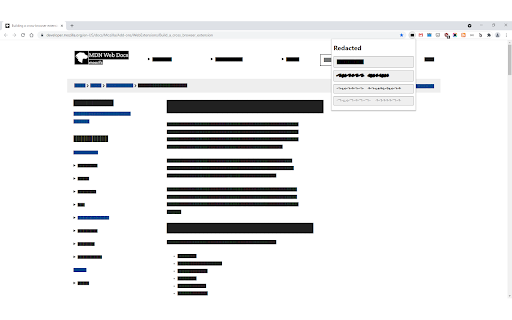
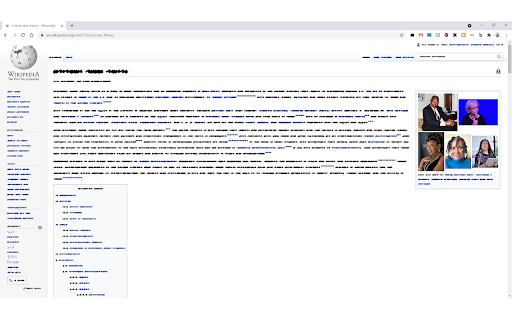
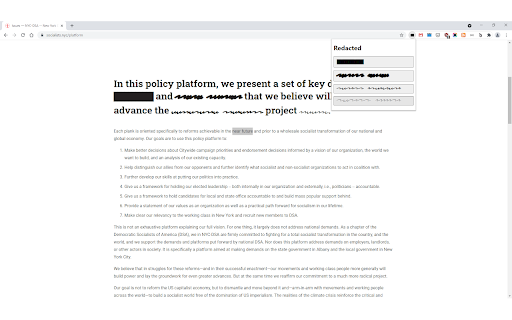
Redact text on a page before taking a screenshot of it. Redact text on a web page before taking a screenshot using the Redacted font created by Christian Naths.

Redactor
Redactor lets you black out posts on X, Reddit and Hacker News that match custom word filters. You can hover over redacted text to view it if you wish. To configure the word filters, go to the add-on's Options page. Words are case-sensitive and only match post text, not usernames.

chg-sf-highlighter
Highlights useful salesforce fields for CHG healthcare employees

SustEarn
Reduce your carbon footprint. Earn rewards for sustainable actions. SustEarn: Revolutionize Your Browsing Experience with Sustainability and Rewards! Welcome to SustEarn, the innovative Chrome extension that transforms your internet browsing into a journey of environmental awareness and rewards. With SustEarn, track your carbon footprint in real-time, earn coins for eco-friendly web surfing, and redeem them for fantastic offers. Plus, connect with a community of like-minded users right from your browser! Track Your Carbon Footprint: SustEarn offers a unique feature that calculates CO2 emissions based on your browsing habits. Stay informed about your environmental impact with detailed stats and tips to improve your carbon footprint. Earn Eco-Coins: Get rewarded for sustainable browsing! Earn coins for minimizing CO2 emissions, which can be accumulated and redeemed for a variety of exciting offers and discounts from eco-friendly brands. Redeem Exciting Offers: Your eco-coins are more than just points – they're a currency for sustainability. Redeem them for exclusive deals, discounts, and offers from our wide range of partner brands committed to environmental sustainability. Community Chat Feature: Engage with a community of eco-conscious individuals. Share tips, discuss sustainability, and connect with users who share your passion for the environment through our in-built chat feature. User-Friendly Dashboard: Experience a sleek, intuitive dashboard that offers quick access to your carbon footprint stats, coin balance, and a marketplace for offer redemption. Privacy-Focused: We respect your privacy. SustEarn operates with minimal data usage and ensures that your browsing data remains confidential. Privacy policy : https://slae.app/privacy-policy/ Regular Updates & Tips: Receive regular updates on how to reduce your digital carbon footprint and learn more about sustainable living. How It Works: Install the SustEarn extension with just a click. Browse the internet as usual. SustEarn calculates your CO2 emissions in the background. Earn coins based on your sustainable browsing habits. Redeem your coins for offers, or chat with fellow eco-minded users. SustEarn is more than just an extension; it's a community, a reward system, and a step towards a greener planet. Join us in making a difference, one click at a time! Note: The extension is free to use, but some offers and rewards might be subject to terms and conditions by partner brands. Got questions or feedback? We'd love to hear from you! Contact us at support@slae.app Join the SustEarn community today and turn your browsing into a force for good! 🌍💚🌱

Redact PDF
Use Redact PDF to make editing easy. Fill and sign PDF, make PDF fillable, and edit text and information in your documents online. Redact PDF Chrome extension allows you to create, edit, and fill PDF form easily, ensuring professional results every time. Whether you’re looking to create fillable forms or edit documents online, this tool has you covered with its advanced features and user-friendly design. 🌟 Key Features ▸ Fill and sign your documents directly in your browser for seamless workflows. ▸ Seamlessly add text to PDF and edit files directly in your browser. ▸ Use features of extension to protect sensitive information. ▸ Create fillable forms for contracts, applications, and surveys, or create editable PDF files for continuous updates. ❓ Why Choose Redact PDF? 1. Efficiency: Quickly redact text in PDF and make files secure. 2. Versatility: Perfect for editing, filling, or creating fillable forms. 3. Reliability: Ensure sensitive data is protected with advanced tools. 4. Flexibility: Allows you to make document fillable and interactive for various needs. 5. Accessibility: Fully browser-based with no software downloads required. 🧩 How It Works • Add interactive fields like checkboxes and dropdowns to enhance your Text for better usability. • Upload your document to the Redact PDF extension. • Choose your desired action: remove text from PDF or replace text PDF to refine your documents. 👤 Customize your file by adding or redacting information using intuitive tools. You can also PDF change color of text to match your document style. Save and share your updated file instantly. Redact information in static files to ensure confidentiality. 🎯 Benefits of Using Redact PDF 1️⃣ Redact on PDF directly without additional software. 2️⃣ Create fillable forms for seamless data collection and collaboration. 3️⃣ Edit and add text to documents effortlessly. Use the tool for instant revisions. 4️⃣ Redact PDF document to maintain professional confidentiality. 5️⃣ Protect data with tool features designed for security. 💻 Just like Word document: 🔹 Effortlessly highlight key sections for better readability and navigation. 🔹 Add annotations or comments to collaborate seamlessly with team members. 🔹 Convert static content into interactive forms to streamline data collection. 🔧 Advanced Tools for Professionals 🟢 Edit sensitive details. 🟢 Use the extension to redact from PDF and ensure private information stays private. 🟢 Perfect for legal, financial, and business documents needing redact information PDF capabilities. 🟢 Transform static files for contracts and agreements. 🤵♂️ Who Can Benefit? - Businesses: Simplify contracts, invoices, and proposals with creating a fillable forms. - Educators: Use the extension to design quizzes or assignments. - Freelancers: Streamline workflows by redacting information and creating forms. - Organizations: Ensure data security with advanced redact in PDF features. Easily transform documents into editable formats with this powerful extension. Add text fields, checkboxes, and dropdown menus to create dynamic, interactive forms. Perfect for contracts, applications, or surveys, this tool simplifies the process of customizing files for seamless collaboration and updates. 💎 Features You’ll Love ➤ Edit documents online with a user-friendly interface. ➤ Easily edit your documents for sensitive or confidential information. ➤ Remove text from file while maintaining the original document layout. Use tools to fill PDF online. ➤ Create interactive forms. ➤ Share safely using redact PDF online functionality. 📌 Why Redact PDF Stands Out - All-in-one solution for redacting documents and creating forms. - Comprehensive redaction tool for secure editing. ✔ Additional Information 1) Merge Documents Seamlessly: Combine multiple files into a single cohesive document, streamlining your workflow. 2) Annotate: Add comments, highlights, and notes to enhance collaboration and document review processes. 3) Advanced Formatting Tools: Adjust fonts, sizes, and layouts to ensure your documents maintain a professional appearance. 4) Dynamic Element Integration: Add dropdowns, checkboxes, or radio buttons to create fully interactive forms. 5) Secure Sharing Options: Share your updated files securely using advanced encryption features. 📒 Wrap-Up Redact PDF empowers you to take full control of your document workflow. From redacting information PDF files to creating forms and editing text, this Chrome extension simplifies complex tasks. Redact PDF is the ultimate solution for efficiency and security. Install it today and elevate your productivity!
