
hacpielkgkknfjbpeepanegkdfjkdkia
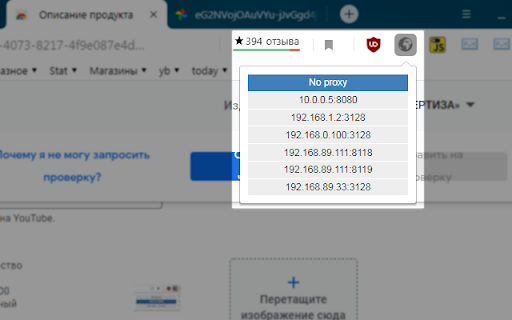
Расширение "Simply Proxy Switcher" позволяет быстро переключаться между списком прокси серверов. Укажите в настройках список… Расширение "Simply Proxy Switcher" позволяет быстро переключаться между списком прокси серверов. Укажите в настройках список прокси серверов и они станут доступны в выпадающем меню расширения. Поддерживаются http и socks, задаются в формате хост:порт тип определяется автоматически.

Proxy Manager
Quickly switch and manage proxy settings from your browser toolbar. Proxy Manager makes it easy to manage browser proxy settings without digging through system or browser configuration pages. The extension opens in a compact popup and lets you quickly choose a saved proxy profile, turn proxy usage on or off, and keep your proxy list organized. Key features: - save multiple proxy profiles; - switch the active proxy with one click; - turn proxy usage on or off from the popup; - support for HTTP, HTTPS, SOCKS4, and SOCKS5; - support for proxies with username and password authentication; - import proxy lists from JSON or lines in the protocol://user:pass@host:port format; - export saved profiles for backup or transfer; - search by label, host, or protocol; - sort the profile list; - edit, copy, and delete saved proxies. How to use: 1. Click the Proxy Manager icon in your browser toolbar. 2. Add a new proxy with “Add new proxy”. 3. Enter a label, protocol, host, port, and authentication details if needed. 4. Select a saved profile from the list. 5. Turn proxy usage on or off with a single switch. For larger proxy lists, use Import proxies: paste a JSON array or lines such as http://user:pass@1.2.3.4:8080. Saved profiles can also be exported for backup or moved to another browser. Privacy: Proxy profiles are stored locally in your browser storage. The extension does not require registration and does not send your proxy settings to external servers. Additional capabilities: - Add Proxy: Create a proxy profile with label, protocol, host, port, and optional authentication. - Export proxies: Export saved profiles for backup or migration. - Search by label, host or protocol: Search saved profiles by label, host, or protocol. - Copy proxy: Copy a saved proxy as a connection URL. - Bypass: Keep a per-profile bypass list for hosts that should use a direct connection. - Reset all proxies: Remove every saved proxy profile and disable proxy use when a clean reset is needed. - Theme: Switch the popup between dark and light themes. - Diagnostics: Review proxy control, authentication, and diagnostics state. - Check proxy: Check the current external IP through the active proxy. - Proxy authentication: Handle proxy authentication challenges for the active profile. - Choose backup file in a tab: Open JSON backup import in a browser tab when Firefox would close the popup for file selection.

Mobile proxy manager
Mobile Proxy Manager — advanced browser extension for managing HTTP and SOCKS5 proxies directly from your browser. One-click switching, health monitoring, IP rotation, cloud backups, and flexible export. ▸ One-Click Proxy Switching Enable or disable any proxy with a single click. Supports both HTTP and SOCKS5 protocols. Active proxy is instantly applied to all browser traffic with full authentication support. ▸ Real-Time Status Indicator Green badge on the extension icon when proxy is active. Active proxy name displayed in the extension header. Active row highlighted in the proxy table with green accent. ▸ Built-in Health Check Verify that your proxy is working without leaving the browser. Each check reports connection status, response time in milliseconds, and your current external IP address. Results are displayed as a color-coded indicator. ▸ Automatic IP Rotation One-click IP change for proxies that support rotation. After the change, the extension automatically updates proxy info (geo, operator, address) from the API. ▸ Auto-Check on Enable When you activate a proxy, the extension automatically verifies the connection after a short delay. Export your proxy list in over 20 formats organized into four categories: Antidetect Browsers — ready-to-use presets for popular antidetect platforms. Each preset generates output in the exact format expected by the target application, so you can paste or import directly without manual editing. Universal Formats — configurable plain text with custom templates, JSON arrays, and CSV with headers. The text format supports variables (login, password, address, port, type) so you can build any pattern you need. System Configs — auto-configuration scripts and profiles for proxy tools and browser extensions. Custom Templates — define your own export pattern, save it, and reuse. Four built-in patterns included as starting points. All formats support optional fields: Change IP link, proxy ID, and geolocation data. Live preview, one-click copy, and file download included. Import proxies from multiple formats with automatic detection: — Standard notation (host:port:login:pass) — URL format with protocol prefix — CSV and TSV files with headers — JSON arrays — Drag and drop support for .txt, .csv, and .json files Connect with your mobileproxy.space account using an API token. Sync your proxy list from the service automatically. Create cloud backups, browse history by date, preview contents, and restore any previous version with one click. Smart merge ensures existing proxies are updated while new ones are added. ▸ Manual Entry — full form with label, host/IP, ports, credentials, IP rotation link, and excluded sites. ▸ Table View — sortable columns, inline search (Ctrl+F), and credential masking for privacy. ▸ Per-Proxy Settings — excluded sites list, custom IP rotation URL, and labels for identification. ▸ Bulk Operations — import hundreds of proxies at once, export entire list in one click. Full interface localization: English, Russian, Turkish, Spanish, Chinese, Polish, and Thai. Over 240 translated strings per language covering all labels, tooltips, hints, and notifications. Switch instantly from the header menu. Dark theme with glass morphism effects, smooth transitions, and responsive layout optimized for the extension popup. Clean typography with Montserrat for UI and JetBrains Mono for technical content. Color-coded indicators throughout for proxy status and health. All proxy data is stored locally in your browser. No analytics, no tracking. Cloud features are optional and require explicit API token setup. Proxy credentials are never sent to third parties. Authentication handled securely via the browser's native webRequest API. Excluded sites bypass ensures sensitive domains are never proxied. API token for service integration, credential type selection, hide/show credentials in table, auto-reload tab on proxy change, backup confirmation toggle, and language selection. Manifest V3, Service Worker with keep-alive, error boundary for crash recovery, persistent state across browser restarts. Supports Chrome 88+ and Chromium-based browsers. Mobile Proxy Manager is a complete proxy management solution for Chrome. Whether you work with mobile proxies for research, testing, or multi-account workflows — this extension gives you full control right from the browser toolbar.

Proxy Switcher
Proxy Switcher is an extension that helps you easily switch proxies from toolbar popup UI. Simply open toolbar popup and click on the desired category. There are five categories available to choose from. Moreover, badge icon color changes according to the chosen category. Once the proxy is set, a notification popup shows you the current state. This addon supports PAC proxy as well. Moreover you can white-list any domain or website through toolbar popup UI. In order to white-list a domain, please add the desired domain to the bypass area in toolbar popup. For example, to white-list - https://www.example.com - please add - *example.com - to the filed. Please note that all the entries should be comma separated. Once you filled the bypass area, please mark the related checkbox as well (the checkbox next to the Bypass category). To set PAC proxy, please add a PAC URL or SCRIPT to the designated area (PATH input area). Please note that a PAC path should have a certain format. For example if your PAC file is located in - C:// - folder (on windows machine), please write - file:///C:/pac.data - in the PATH area. If you do not know how to write a PAC file, please read this (https://en.wikipedia.org/wiki/Proxy_auto-config) Wikipedia page. Once you made a correct PAC file, please add it to the PATH field. Note: To switch the popup interface theme to dark, please press the moon icon on the bottom toolbar. To report bugs, please fill the bug report form in the addon's homepage (https://mybrowseraddon.com/proxy-switcher.html).

Proxy Switcher
Use proxy switcher - fast IP changer extension & website unblocker easily switch proxy to access blocked sites and browse securely The proxy switcher extension is the ultimate solution for anyone looking to browse the internet freely, securely, and without restrictions. Whether you need to access unblocked websites, switch proxy servers, or manage multiple ip settings, this tool has got you covered. ✔️ User-friendly interface Enjoy a simple and intuitive interface that makes switching between different proxies effortless. ✔️ Fast and secure Experience high browsing speeds while staying secure and anonymous online. ✔️ Access unblocked websites Bypass regional restrictions and unblock websites with ease using the integrated manager. This makes it a perfect solution as a website unblocker. ✔️ Full chrome compatibility Seamlessly integrates with chrome for the best browsing experience, making it a top choice for users seeking a proxy switcher for chrome extension Reddit recommends. ● 🔄 Quick proxy switching: Easily switch servers to access different content. ● 🌐 Website unblocker: Instantly unblock restricted sites and access unblocked websites. ● 🔒 IP changer extension: Change your IP instantly for privacy. Our product significantly simplifies the user experience compared to Bart Proxy Switcher. 1️⃣ Install the extension from the chrome web store. 2️⃣ Open the tool and add proxy to chrome. 3️⃣ Select your desired ip from the list. 4️⃣ Browse unblocked websites with ease! ● ✅ Access proxysite hassle-free. ● ✅ Stay anonymous with the IP changer extension. ● ✅ One-click server switching. ● ✅ Bypass censorship easily and access unblocked sites. ● ✅ Optimize speed with smart proxy selection. ➤ High-speed serformance without sacrificing security. ➤ Easy chrome Integration for a smoother experience. ➤ Advanced privacy with gooogle proxy server integration. ➤ Simple for everyone, from beginners to experts. Comparison with other extensions: ● More customization options for seamless proxy server switch. ● Better performance compared to standard tools. ● Superior connection management tools. 1. Download the proxyswitch extension chrome users recommend. 2. Add mask to chrome with a few clicks. 3. Manage your servers with the extension and manager. 4. Enjoy unrestricted browsing! Perfect for: ● 🌎 Accessing geo-blocked content and proxy to site access. ● 🔐 Staying secure on public Wi-Fi. ● 🏢 Managing work/study connections. ● 🚀 Testing websites from different regions. ● 💳 Secure online transactions. The interface of our utility will significantly simplify IP switching compared to Omega Proxy Switcher. ✔️ Seamless integration with proxy websites Effortlessly access restricted content through seamless integration with connection. The extension ensures a smooth browsing experience across all platforms. ✔️ Advanced server selection algorithm Сonnect to the fastest and most secure servers using server selection feature. This guarantees optimal performance and security. ✔️ Multi-protocol support Enjoy full flexibility with support for HTTP, HTTPS, and SOCKS protocols to meet various browsing needs. Designed for power users: ⚙️ Proxy switch omega customization Gain full control over your internet connections with detailed configuration options provided. 💼 Ideal for professionals and casual users Whether you're handling complex browsing tasks or everyday browsing, this feature-rich extension adapts to your needs with ease. You will not be tied to any official source, as BP Proxy Switcher does, which is why we provide you with the freedom to choose any IP addresses you prefer. Proxy extension for every need: 🌐 Comprehensive website unblocker This extension serves as the ultimate website unblocker and proxy site manager, enabling unrestricted internet access. ⚙️ Advanced chrome proxy settings Manage connections smoothly with advanced chrome ip settings. Proxyswitcher ensures secure and flexible browsing for every user. A powerful tool designed to enhance online privacy and security by masking your real IP address and encrypting internet traffic. It allows seamless access to restricted content and websites while maintaining anonymity. This solution ensures safe browsing, bypasses geo-blocks, and protects sensitive data from potential cyber threats, offering a faster and more secure internet experience. Stay Ahead with proxy switcher! 🚀 Unrestricted browsing freedom Break free from online restrictions. Manage proxies easily and securely. 📥 Download now Get a proxy switcher today and unlock the full potential of the internet!
