
hackndbjgkehhjinjjoldifbhnfddklh
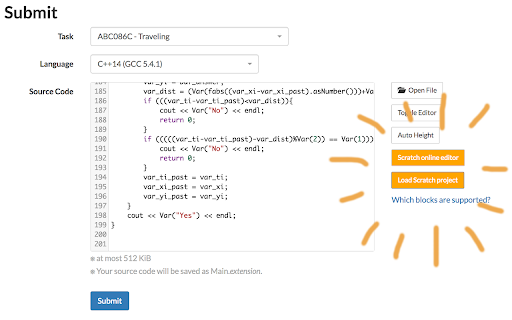
for Scratchers who want to compete in AtCoder (The description in English is provided below Japanese.) With this extension, you can compete in AtCoder with Scratch 3.0! (1) Go to a submission form of AtCoder, and click orange "Scratch 3.0 online editor" button to open the online editor. (2) Create your solution in Scratch online editor. If your solution is ready, download your Scratch project to a local file. ([File] -> [Save to your computer]) (3) Return to AtCoder and click the orange "Load Scratch project" button. Then select your Scratch project file you downloaded in (2). (4) Your Scratch project file will be instantly converted to C++ source, and displayed in the solution form. (5) Submit it! (Make sure that "C++14(GCC 5.4.1)" (or newer) is selected as the language.)

Scratch Always Load More
A very poorly written chrome extension to make Scratch always "load more".

Forkphorus Button for Scratch
Adds a 'View this project on forkphorus' button to Scratch project pages. Useful for people who have TurboWarp blocked by their school or Wi-Fi provider. This extension is not made by Garbomuffin and I am not affiliated to him.

Scratch Lesson Plans
A Chrome extension to guide students through Scratch lesson plans. Includes a variety of lesson plans for the block based coding website Scratch. Lesson plans range from all skill levels, with projects such as a platformer, soccer, and a dodging game! This extension allows you to learn how to make various games in Scratch.

Scratch Tab
Tab for temporary text space. Syncs for all new tabs Simple new tab extension that acts as a note pad. The data is saved locally and synced between all "new tab" pages.
