
gpmdlohnnmjfoojdcjojoimhkiifcbkl
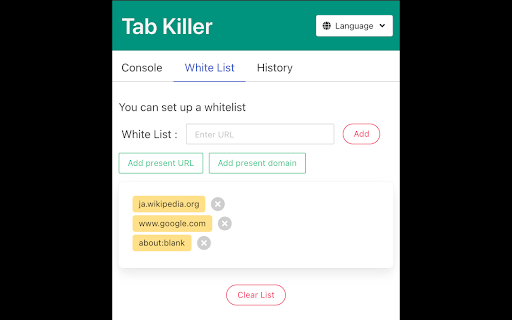
A chrome extension for closing duplicate tabs, and so on. This extension has the feature to organize tabs, such as closing duplicate tabs, and so on. You can use the following features. 1. Show the numbers of duplicate tabs on the extension's icon. 2. When you have the tabs that have the same URL, this extension leaves only one and closes the others. 3. Close all tabs whose URL is matched with the keyword you specified. 4. Close all tabs which have the domain you designated. 5. Rearrange tabs by URL. 6. Whitelist 7. History

Duplicate Tab Closer
A Chrome extension to identify and close duplicate tabs. Duplicate Tab Closer Effortlessly manage and close duplicate tabs to improve your browsing experience. What it does: Duplicate Tab Closer is a lightweight and efficient Chrome extension designed to help you automatically detect and close duplicate tabs with ease. The extension lists duplicate tabs in a clean and intuitive popup, allowing you to close individual duplicates or remove them all at once. Automatic Detection: Instantly find duplicate tabs, whether they’re in the same window or across multiple windows. Quick Close Buttons: Easily close specific duplicate tabs directly from the popup interface. One-Click Solution: Remove all duplicate tabs in one click to reduce clutter and free up system resources. Badge Alerts: Get notified with a badge count when duplicate tabs are detected. Customizable Look and Feel: Enjoy a clean, user-friendly interface with a responsive design. Why Install It? If you frequently work with multiple tabs or struggle to keep your browser organized, Duplicate Tab Closer helps you stay productive by eliminating unnecessary clutter. Whether you’re a developer, researcher, or multitasker, this extension optimizes your workflow by reducing the mental load of managing tabs and saving system memory. Take control of your tabs, increase your browsing efficiency, and enjoy a faster, cleaner browsing experience with Duplicate Tab Closer!

Close Duplicate Tabs
Find and close duplicate tabs fast, with optional auto-close and smart tab grouping. MAJOR UPDATE: Now with automatic tab grouping & automatic duplicate tab closing! Check options to enable settings! Too many duplicate tabs can quietly slow down your browsing and make it harder to stay organized. Close Duplicate Tabs helps you spot duplicate tabs quickly and clean them up in one click. Use the popup to review duplicates before closing them, or turn on automatic duplicate cleanup for a more hands-off workflow. The extension also supports a keyboard shortcut, tab-count hover summaries, optional automatic tab grouping, URL matching controls for # fragments and ? query strings, and an exclusion list for domains you do not want to deduplicate. - One-click duplicate cleanup - Optional auto-close for new duplicates - Popup review with per-URL manual close - Keyboard shortcut for closing all duplicates - Hover summary with tab count and duplicate count - Optional smart tab grouping by domain - Matching controls for # fragments and ? query strings - Exclusion list for domains to ignore - No data collection v3.2 * Using latest Chrome APIs * Auto Group Tabs based on their domain. * Auto close duplicate tabs so you save on memory. v2.5 * Top domains listed on hovering over the extension icon. v2.3 * Now see titles for duplicate tabs, not long URLs * Special case handling for websites that "replace" tabs behind the scenes. Short version: more accurate duplicate tracking. v2.0 * Options page, with list of upcoming capabilties * NEW: Reorder (sort) pages by URL v1.8: * Lists open tab count, and duplicate tab count * List duplicate URLs, and their counts * Groundwork for options v1.6: * Now identifies & closes duplicates across windows * More accessible colors for duplicate count badge

Duplicate Tabs Closer (Monika [Peuj])
Duplicate Tabs Closer detects and closes duplicate tabs.

Tab Killer
Close tabs with context menu options Right click and choose what to close: - duplicate tabs - tabs to the left or right - from the same or different domain or URL as the current one - from the current domain, but with a part of the URL path identical
