
gpifcdlpbfehjkkojfhmlfgplalikdjf

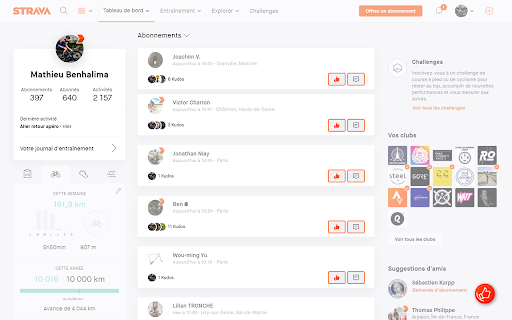
Automatically give kudos to your feed When you go to your feed, the extension will automatically give kudos to all the activities it sees. When you click on the button at the bottom right of the screen, the extension will load as much activity as possible to give them a kudos.

ZwiftUp! Auto/Mass Ride on!
If your thumbs are sore from giving all the thumbs up on Zwift and your throat is sore from shouting "Ride On!", this extension is here to help you out! Give thumbs up/ride on to everyone on the page with just one click! Patch Notes: 1.2 (19/07/2021) - Some minor changes on Zwift website broke the extension, updated to work again. - Internationalized the extension, it should now work on all the international versions of the Zwift page. - Updated to Manifest v3.

GCW and Strava Kudo All
Give kudos to your elite athletes friends in one click Kudo All for Garmin & Strava is a Safari extension that helps you give kudos faster on Garmin Connect Web and Strava. When you open Garmin Connect Web or Strava, the extension adds a "Kudo All" button to the page navigation area. One click gives kudos to all visible activity cards on the current screen, so you do not need to open and click each activity one by one. Where it works - Garmin Connect Web activity feed - Strava dashboard feed - Garmin global and China domains Key features - One-click kudos for all visible activities on screen - Supports Garmin Connect `/app/newsfeed` - Keeps compatibility with legacy `/modern/newsfeed` - Supports `connect.garmin.com`, `connect.garmin.cn`, and `connectus.garmin.cn` - Works on Strava dashboard pages - More reliable button injection during SPA navigation, filtering, and delayed page rendering Notes - The extension only gives kudos to activities currently visible on screen; scroll down and click again to continue - It does not automate unlimited background kudos - This app is not affiliated with Garmin or Strava This extension does not collect, store, or transmit your personal identity information. It does not read your passwords, and it does not send your kudos data to any developer-operated server.

Strava Helper
Some tweaks for Strava. Adds a "Give Kudos to All" button, removes clutter and provides UI tweaks. This Chrome extension aims to provide some tweaks for the Strava Website. Follow @strava_helper on Twitter for Updates! A button in the upper left of every Strava page can be used to give Kudos to all visible activities. It saves you a lot of time and your Strava friends get the litte dose of motivation they deserve! Removes all social media and premium clutter from the dashboard and activity pages, such as: “Find friends” “Upcoming events” “Discover more” “Follow suggestions” Promotional footer at the bottom “Shop” link “Get Premium” link “Get Premium” box on dashboard “Get Premium” boxes on profile page Social media dropdown menu in activity feed “Create target” link Social media buttons on activity detail page and Flyby page Zwift activities Peloton activities Achievement celebrations in feed Pins the top navigation to the top! Scroll and don’t get lost! Adds a link to VeloViewer to the main navigation bar Adds a deep link to the VeloViewer activity details page (next to the Flyby link)

Strava Auto Kudo
Auto give kudos for followed athletes recent activities. It searches user-feed back in time and looks for non-kudoed activities. Are you tired of giving kudos to all of your friends activities on Strava? This extension provides two ways to make giving kudos easy. 1. Automatic timer to check if new activities are present in your feed and give them kudos. 2. A manual "Kudo All" button appearing on Strava Dashboard which gives mass-kudo to your friends recent activities, at your command. You can customize how the extension works by setting its options in popup screen; * Choose either to work in automatic or manual mode * Set how far you want to go back in your feed * Set how frequently you want to check your feed * Added progress feedback for the "Kudo All!" button to user interface which shows currently executing operation step. * Added countdown timer (for automatic mode) to user interface which shows how much time is left for the next trigger.
