
gpgoifmbbkkckmanianlkndojbbgpphc


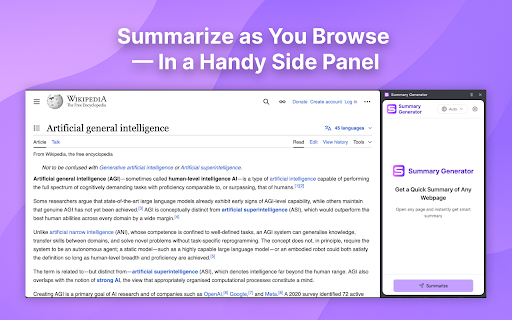
Use AI-Powered Summary generator: AI summarizer to summarize any web page, as article summarizer or universal web summarizing tool 🚀 Transform Any Web Page into a Concise Summary with AI! Transform how you consume online content with this advanced Chrome summarize tool. Designed as a smart AI summarizer, it distills any webpage into clear, structured summaries using cutting-edge technology. Whether you’re researching, studying, or browsing, get the essence of articles, blogs, or reports in seconds. ▶ AI-Driven Summarize Tool: Generate concise or detailed summaries instantly with a customizable AI summarizer. ▶ Language & Length Control: Select from multiple languages and adjust sumary depth—from brief overviews to comprehensive analyses. ▶ Clean Formatting: Enjoy neatly structured summaries with headings, bullet points, and highlighted key ideas. ▶ Export Flexibility: Summerizer allows you to copy to clipboard as plain text or Markdown for notes, reports, or presentations. ▶ One-Click Sidebar: Access the summarizing tool via a floating widget, ensuring seamless workflow without leaving your tab. 🔥 Save Time: Skip lengthy reads — extract core insights in moments. 🔥 Boost Productivity: Ideal for students, professionals, or researchers juggling information overload. 🔥 Adaptable Output: Tailor sumaries to match your needs, whether for quick reviews or deep dives. 🔥 Universal Accessibility: Simplify text in any language, enhancing comprehension for global users. – Students: Summarize textbooks, research papers, or articles for efficient studying. – Content Creators: Quickly grasp ideas for blogs, scripts, or social media posts. – Professionals: Extract key points from reports, emails, or industry updates during meetings. – Researchers: Condense sources into digestible snippets for literature reviews. – Casual Readers: Get TLDR ai versions of news, blogs, or tutorials without skimming. 1️⃣ Install the Extension: Add it to Chrome in seconds. 2️⃣ Open Any Webpage: Click the widget to activate the sidebar. 3️⃣ Customize Settings: Choose language and length. 4️⃣ Generate Summary: Let the AI summarizer process content instantly. 5️⃣ Copy & Go: Export your formatted summary and use it anywhere. ■ Academic Research: Simplify text of complex papers or articles into study-friendly notes. ■ Content Curation: Create summaries for newsletters, social media, or client briefs. ■ Language Learning: Break down foreign-language texts with translated summaries. ■ Professional Reports: Turn lengthy documents into executive briefs. ■ Personal Reading: Decide if a page is worth your time with a quick overview. ✨ Advanced AI Technology: Ensures accurate, context-aware summaries every time. ✨ Privacy-First: No data storage — your content remains secure. ✨ Browser Integration: Text Summarizer works natively in Chrome, no app switching needed. ✨ AI Text Simplifier: Converts jargon-heavy content into clear, concise language. ❓ How accurate are the sumaries? 💡 The AI summarizer prioritizes key points and context for reliable results. 1. Visit Chrome Web Store. 2. Search for “Summary Generator”. 3. Click “Add to Chrome.” 4. Pin the extension for instant access. 🌍 Multilingual Support Switch between languages effortlessly — perfect for non-native speakers or multilingual projects. Use the summary generator to simplify texts in your preferred language, enhancing clarity and saving time. ✍️ Customizable Export Options Need Markdown for a blog? Plain text for an email? The summarizing tool adapts to your workflow. Formatting stays intact, so you spend less time editing and more time doing. 📈 Optimize Your Workflow Today Ditch endless scrolling and information overload. This AI-powered summary generator is your shortcut to smarter browsing. Install now and experience the future of efficient reading! 🚀 Get Started in Seconds Click “Add to Chrome,” activate the widget, and transform any webpage into a brief and nicely structured resume. Ideal for anyone seeking to simplify text, shorten text, or unlock faster learning.

Web Highlights: PDF & Web Highlighter + Notes & AI Summary
Productivity Highlighter & Annotation Tool for Websites & PDFs with AI Summary - free, easy to use, no sign-up required. Stay organized online with Web Highlights — a powerful Chrome extension to highlight text on websites, annotate PDFs, take notes, manage bookmarks, and generate AI summaries of your content. Whether you're a student, blogger, developer, researcher, or lifelong learner, Web Highlights helps you stay productive, save, organize, and revisit what matters — all in one place. Use it as your personal text highlighter for Chrome with smart note-taking, PDF annotation, tagging, full-text search, and AI-powered content summarization. Choose offline use or sync everything to the cloud via the web app. 🟢 Highlight websites and PDFs (including local files) 🎨 Multiple highlighter colors ✍️ Take notes and connect them with your highlights 🤖 AI Summary - Generate smart summaries of your highlights and websites 💬 AI Chat - Our AI understands the full context of the website, so you can chat with it and ask questions. 🔖 Save pages as bookmarks or use as a read-it-later web clipper tool 🏷️ Tag your highlights & bookmarks for easy filtering 🎥 Youtube Highlighting - Highlight & annotate Youtube video transcripts 🔄 Sync across devices and access highlights anywhere * 💻 Web app & sidebar with an overview of all your highlights, bookmarks, and notes 📖 Reader mode for focused and distraction-free article reading & annotating 🗂️ Import all your existing Chrome bookmarks 🔍 Powerful full-text search to find anything instantly 📷 Highlight images and visual elements * 𝐓 Highlight in various formats (headings, paragraphs, etc.) * 🧠 Daily recap of your highlights for better retention ⚡ Use keyboard shortcuts for ultimate productivity 📄 Export to Notion, Obsidian, Capacities, and other popular note-taking tools 📑 Copy to HTML and Markdown 📁 Export to PDF and HTML files * 📱 Bookmark on mobile with our web app * ⏰ Set email reminders for specific pages * 📚 Import Kindle highlights easily 💾 Backup and download your research * 🔗 Share your highlights * 👥 Discover content from others ✅ It just works – Highlight text in multiple colors on any website or PDF with a simple click. ✅ Persistent highlights - Your highlights stay visible even after reloading the page. ✅ Works offline – No account required for basic use. ✅ Sync across devices - Create an account to access your highlights anywhere from the web app. ✅ Unlimited AI summaries – Unlike other tools, we don’t place any limits on AI features. ✅ Reader Mode – Enjoy clean, distraction-free reading and keep a simple copy of articles. ✅ Integrate with Notion, Capacities, Obsidian, and other note-taking tools. ✅ Export your research — PDF, HTML, Markdown, or clipboard. ✅ Perfect for online deep work & and efficient research management. ✅ Help children learn - We proudly support the Save the Children charity and other great causes. You can use Web Highlights completely free without an account. Highlight, bookmark, and take notes offline anytime. Create a free account to enable cloud sync and unlock all features with a 7-day trial. Afterward, continue using the free offline version with basic features or upgrade for seamless access across all devices. Check out the current pricing here: https://web-highlights.com/pricing. ➡️ Enable/disable the highlighter popup via the settings and highlight using keyboard shortcuts or by right-clicking text. ➡️ Customize keyboard shortcuts at chrome://extensions/shortcuts ➡️ Some websites may have limited compatibility. ➡️ Local PDF support requires access to file URLs (see PDF setup guide: https://web-highlights.com/blog/how-to-highlight-pdfs-using-web-highlights). ➡️ Right-click images to save them to your sidebar of highlights & notes. ➡️ Use as a web clipper – Click the bookmark icon or right-click any website to save pages and add tags like "ReadingList" for easy reference later. ➡️ Disable extension on specific websites: Click the power icon in the sidebar to disable the highlighter on a site. You can also configure a blacklisted domain list with patterns in the settings under "Excluded" domains. ➡️ Sort highlights manually: Highlights should appear in the same order as on the page. If not, use the drag & drop or arrows in your annotation sidebar to rearrange them as needed. ➡️ Customizable Sidebar: Change the sidebar width by dragging its edge, and align it on the left or right side of the page for a personalized experience. ➡️ Switch to Advanced Highlighter Mode in settings to organize highlights with headings, paragraphs, and more in the sidebar. ➡️ Multiple Colors: Choose from predefined standard and pastel shades or click the plus icon to add your own custom color. ➡️ Note Taking: Use standard keyboard shortcuts like CMD + B for bold, CMD + U for underline, etc., in the note-taking editor for efficient formatting. ➡️ Reader Mode: Click “Open in Reader” to view any article in a clean, distraction-free layout with customizable fonts, colors, and spacing. A copy of the article is saved so you can read and highlight it with full focus — even if the original changes or disappears. ➡️ Focus highlights on website: Click on a highlight in the sidebar, and the page will scroll directly to the highlighted section for quick access. ➡️ Color Mode: Switch between dark and light mode by clicking the sun/moon icon in the sidebar. ➡️ Your data is always private unless you choose to share it. ➡️ You may be exposed to affiliate links on sites you visit while using this extension, and you may be encouraged to click on them, but you are never required to do so. 🔐 YOUR PRIVACY MATTERS We believe your data belongs to you. ✔️ Your highlights, notes, and bookmarks are private by default ✔️ Nothing is ever sold or used to profile you ✔️ Secure sync and export, only accessible with your account We never use your data for advertising, lending, or unrelated purposes. By installing the extension or signing up with an account, you agree to Web Highlights Terms of Service and Privacy Policy which you can find here: https://web-highlights.com/legal/terms-of-service ❤️ This is a one-person project I’m building with love and late nights. I hope you enjoy using this tool as much as I do. Feel free to share your feedback with me:

Article Summarizer
Smart Article Summarizer is an efficient AI summary tool that helps you quickly summarize article and text into concise insights. 🖥️ Tired of reading lengthy texts? Want to get to the main points effortlessly? Our AI article summarizer transforms long content into concise, clear material. It analyzes the text and provides an article summary. 🔹 Increase Productivity: Process more material in less time, whether for work or personal reading. 🔹 Accurate Overviews: AI text summarizer ensures your brief captures the most important information. 🔹 User-Friendly: Tool is visually appealing, providing a pleasant experience while extracting key details. 🔹 Efficient: Click the extension, article summary generator will give your overview in seconds. 🔹 Enhance Decision-Making: Make informed decisions faster with concise, actionable insights. 🔹 Easy to Start: Just install the extension to AI summarize article and text efficiently and easily. 🔹 Save Time: Quickly identify relevant sections and focus on what matters most. 1️⃣ Install Chrome extension. 2️⃣ Open any web page. 3️⃣ Click extension button. 4️⃣ Get a concise, readable text or article summary instantly. 5️⃣ Enjoy it and easily generate a new one whenever you need! ➤ Faster Learning: Get key concepts quickly without reading everything. ➤ Streamlined Research: Save hours on research by summarizing articles quickly. ➤ Stay Updated: Condense the latest news to keep up with trends. ➤ Convenient: Summarize text and web page directly in your browser - no extra apps needed. ➤ Informed Choices: Get insights from reports, reviews, and more. 💠 Speed: Get main points in just seconds, saving you hours of reading. 💠 Accuracy: Website summarizer shortens info, understands context, and provides key overviews. 💠 AI-powered: Continuously improving the accuracy of the tool. 💠 Versatility: Use to efficiently summarize web page and text. 💠 TLDR Option: Get just essential points with TLDR feature. ⏱️ Our AI summary generator is ideal for anyone looking to save time. Its text summarization efficiently processes content and extracts the most important information, allowing you to focus on what truly matters. Whether for research or work, it keeps you informed without the time commitment. 🔸 Professionals & Business People: Stay updated with industry news, and reviews in less time. 🔸 Students & Researchers: Use summarize articles AI to save time on academic papers. 🔸 Writers & Bloggers: Gather valuable insights and ideas by condensing content. 🔸 Creators: Speed up the creation process with AI for summarizing articles. 🔸 Casual Readers: Get key points from news without reading the entire website. 🔸 Busy People: For anyone with a packed schedule, our app helps get concise overviews fast. ❓ How to summarize an article and text? 💡 Install extension, open webpage, and click the extension button in browser to instantly generate the content. ❓ Does the tool preserve main ideas of the text? 💡 Yes, it ensures that information retains the main ideas and key points without losing important context. ❓ What is AI that summarize article for me? 💡 It is a tool that uses artificial intelligence to condense long materials into shorter versions, highlighting main ideas. ❓ How accurate is content overview? 💡 Our article and website summary generator uses advanced algorithms to ensure accurate extracts of the main ideas from a webpage. ❓ Can the summerizer generate any type of content? 💡 Yes! Whether it's news, blogs, academic papers, or reviews, AI Article Summariser works on all types of web page text. ❓ Can I use this tool for research or studying? 💡 Yes! It is perfect for students, professionals, and anyone needing to quickly gather insights from lengthy text. ❓ Can ChatGPT summarize this article? 💡 Yes, artificial intelligence models like ChatGPT can do it, but our app is optimized for fast, efficient processing in your browser. ❓ Will Article and text summarizer work offline? 💡 No, app requires an internet connection to work, but it processes the content quickly and efficiently once you're online. ❓ Can I use this app on mobile? 💡 Currently, Article Summarizer AI tool is available for desktop use via Chrome, but you can access it anytime in your browser.

SummarizeMe
AI-powered tool to summarize text or webpage content with text-to-speech support. SummarizeMe is an AI-powered Chrome extension designed to help users quickly summarize text or webpage content with text-to-speech functionality. With just one click, you can convert lengthy text into a concise summary and listen to the key points using our built-in text-to-speech feature. Summarize text or webpage content instantly. Toggle between light and dark mode for better readability. Listen to the summarized text using the 'Read Aloud' feature. Works seamlessly across various web pages. This extension is perfect for students, professionals, or anyone looking to quickly extract the main points from an article or webpage. Improve your productivity and comprehension with SummarizeMe!

AI Image Generator - Create, Edit & Transform Any Image from Text or Photo
Turn any text or photo into stunning AI images with AI image generator: text to image, image to image, AI photo editor & download. 🎨 AI Image Generator — create stunning images from text or photo, right in your browser Turn your ideas into professional-grade visuals in seconds. With this AI image generator Chrome extension, anyone can generate image from text or transform a photo into something entirely new. No design skills, no expensive software needed. 🚀 How to get started 1️⃣ Install the AI image generator extension from the Chrome Web Store 2️⃣ Type a text prompt describing the image you want to create 3️⃣ Or upload any photo to transform it with image to image AI 4️⃣ Fine-tune the result with the built-in AI image editor 5️⃣ Download instantly. No watermarks, no hassle ✨ Key features of the AI image generator ➤ Text to image AI generator Describe anything you can imagine and include the style right in your prompt. Write ""a golden retriever in a sunny meadow, photorealistic"" or ""futuristic city skyline at night, digital art"". Our AI image generator tool turns your exact description into a stunning visual. Powered by Nano Banana Pro for top-quality results. ➤ Image to image AI Already have a photo? Upload it and let image to image AI transform the style, mood, or composition while keeping the essence of the original. The image to image generator gives your photos a completely new look in seconds. ➤ AI image editor Fine-tune any generated or uploaded image with the built-in AI image editing tools. Adjust, enhance, and perfect your visuals until they match your exact vision. ➤ Download with no watermarks Save any AI generated image to your device in one click. No watermarks on your exports. 🆓 FREE TO GET STARTED Try this AI image generator for free. No credit card required. Generate your first images today and upgrade when you're ready for more. - Designers who want to prototype ideas and generate assets fast - Marketers who need unique visuals for campaigns and social media in seconds - Content creators who never want to run out of original images for blogs or YouTube - Entrepreneurs building their brand with custom visuals without a design budget - Anyone who has an idea. If you can describe it, you can generate image from it 💡 How to write great prompts for AI image generation ▸ Be specific. Instead of ""a dog"" try ""a golden retriever in a sunny meadow, photorealistic"" ▸ Include the style in your text: ""oil painting"", ""3D render"", ""pencil sketch"", ""anime style"" ▸ Add lighting and mood: ""golden hour light"", ""dramatic shadows"", ""soft pastel tones"" ▸ For image to image: choose photos with clear subjects for best results ▸ Experiment freely. The AI image generator tool handles the rest 📱 Perfect for every use case Our AI image generator supports all major platforms and content needs: - Social media posts and ads for Instagram, Facebook, Twitter - Blog illustrations and YouTube thumbnails - Product mockups and brand visuals - Marketing campaigns and landing pages Whether you need a quick social media graphic or a detailed product visual, this AI image generator online delivers polished results every time. This ai image maker uses state-of-the-art machine learning to understand your prompt, compose the scene, apply the style, and render a complete image automatically. Just type or upload and the AI image generator tool handles the rest. That is the power of modern AI image generation in your browser. 📌 How does the AI image generator work? 💡 Type a text prompt including style, mood, and details, or upload a photo. The AI image generator creates an image using advanced machine learning. The whole process takes just seconds. 📌 How do I set the style of my image? 💡 Include the style in your text prompt. Write ""photorealistic"", ""watercolor"", ""3D render"", ""anime"" or any description you like. The AI image generator tool reads your full prompt and matches your creative vision. 📌 Can I edit an image after generating it? 💡 Yes. The built-in AI image editor lets you fine-tune any generated or uploaded image. Adjust, enhance, and perfect your visuals without leaving the extension. 📌 Does image to image AI preserve my original photo? 💡 The image to image generator keeps the core composition of your photo while applying a new style, mood, or look based on your prompt. 📌 Is there a watermark on generated images? 💡 No watermarks. Every image you create and download is clean and ready to use. 🎉 Start creating AI images today Install the AI image generator extension, type your first prompt, and see your idea turn into a stunning visual in seconds.
