
gommdpnnocdkkfheojjhappkacbccgbm
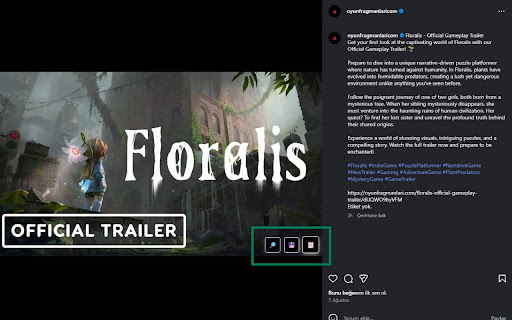
An extension to open Instagram images in large view and download them easily. This extension allows users to view Instagram images in full size by opening them in a new tab. With a single click, it enables users to enlarge and download images quickly and easily.

Exta: Pro downloader for Instagram
Download Instagram Stories, Photos, Videos & Reels in one click. Fast, secure & easy-to-use Instagram downloader extension Download Instagram Stories, Photos, Videos & Reels in One Click! The most powerful and easy-to-use Instagram downloader for Chrome. Save any photo, video, Story, Reel, or IGTV in high quality. No watermark, no login, 100% free! 📌 Key Features & Benefits: • 📷 Download Instagram Photos & Videos – Save Instagram content directly to your device in HD & 4K quality. • 🎥 One-Click Instagram Reels Downloader – Quickly grab and download Reels from any Instagram account. • 📌 Save Instagram Stories Before They Disappear – Never lose important moments again! Download Stories with just one click. • 📂 Mass Download Support – Download multiple posts, videos, and Stories at once as a ZIP file. Save content from an entire profile instantly. • 🚀 Fast & Secure Downloader – No login required, completely private and ad-free. No tracking, no hidden fees! • 🔄 Supports Multiple Formats – Download Instagram content in MP4, JPEG, ZIP, and other formats for offline access. 🎯 Why You Need This Instagram Downloader? Instagram does not allow direct downloads of Stories, Reels, and videos. Our extension makes it simple to save any Instagram content to your computer in seconds. Whether you’re a content creator, marketer, or just want to store your favorite Instagram moments, this tool makes it quick and effortless. 🖱️ How It Works? • Open Instagram and navigate to the photo, video, Story, or Reel you want to download. • Click the Exta Downloader button in the Instagram navigation menu. • Select: Download single post (for individual downloads) or Download all Stories/posts (for mass downloads). • The file is instantly saved to your device in HD or 4K quality. 💡 Why Choose This Instagram Downloader Over Others? • 🔥 Faster than any other Instagram downloader – Save content in just seconds! • 🔒 No login required – Works directly in your browser without needing your Instagram account. • 📷 Supports HD & 4K downloads – Download photos and videos in their original quality. • ❌ No watermark & no ads – Get clean, high-quality media with no branding. • 📂 Bulk & batch downloads – Save an entire Story series or multiple posts with one click. • 💯 100% free & safe – We do not track, store, or collect any data from your downloads. 📌 Start Downloading Now! Don’t let your favorite Instagram content disappear! Install Exta Downloader now and start saving Instagram Stories, Photos, Videos, and Reels instantly. Works for public & private accounts (from users you follow). 🚀 Click "Add to Chrome" and start downloading today! 🚀 Exta: Pro Downloader for Instagram may occasionally open a separate tab with promotional content to help keep the extension free. No personal data is used for advertising, and browsing history is never sold or shared. Promotional content can be disabled at any time in the extension settings.

IG Profile Viewer
the Chrome extension that makes viewing Instagram profile pictures easier and more convenient! the Chrome extension that makes viewing Instagram profile pictures easier and more convenient! With IG Profile Viewer, you can view Instagram profile pictures in full size without needing to download the image or use external tools. Supported Platforms Our extension currently supports the following platforms - Instagram - TikTok Stay tuned for more platforms in the future!

Bulk Image Downloader - ImgHunt
A modern image downloader extension. Find and download images from any web pages. 🖼️ Smart Image Downloader - Your Ultimate Browser Image Assistant A powerful and intuitive Chrome extension that helps you efficiently discover, manage, and download images from any webpage. Perfect for designers, developers, content creators, and anyone who needs to work with web images! Key Features: ✨ Smart Image Detection: Automatically finds all images on a webpage, including background images and SVG graphics 🎯 Advanced Filtering: Filter images by type, size, and dimensions ⚡ Batch Operations: Select and download multiple images at once 🔄 Format Conversion: Convert images between JPG, PNG, WEBP, and SVG formats 📏 Size Customization: Resize images with preset or custom dimensions Perfect for: • Designers collecting visual inspiration • Developers saving design assets • Content creators gathering media resources • Researchers archiving visual data • Anyone who needs to save web images efficiently Privacy & Security: • All processing happens locally in your browser • No data collection or tracking • No external server dependencies Simple to use, yet powerful in functionality. Install now to transform how you work with web images!

EasyLoad: Instagram Uploader & Scheduler
Upload and schedule Instagram photos, videos, stories, and carousel posts from desktop with filters, stickers and custom edits EasyLoad is an Instagram uploader and scheduler for desktop. Upload photos, videos, stories, and carousel posts to Instagram from your browser, edit content before publishing, and schedule posts for automatic publishing. Use EasyLoad to prepare and publish Instagram content directly from your computer: • Upload photos to Instagram from desktop • Upload videos to Instagram from desktop • Create Instagram feed posts • Upload Instagram stories • Publish carousel posts with multiple photos • Prepare content without moving files to your phone EasyLoad works as an Instagram scheduler for planned publishing. Choose your content, set the date and time, and schedule Instagram posts for auto-publishing. Scheduling can be used for: • Feed posts • Stories • Photo and video posts • Carousel posts • Repeating posts with auto-repeat Edit photos and videos before publishing Prepare Instagram content inside your desktop workflow before upload. EasyLoad gives you editing tools for photos, videos, stories, and carousel posts. You can: • Add text to photos and videos • Add stickers to photos and videos • Apply filters and custom edits • Trim videos before publishing • Add custom audio to videos • Preview content before publishing • Add captions and post details • Tag people and mention users • Add collaborators or co-authors • Insert links where supported For creators, brands, and social media work EasyLoad is useful for creators, small businesses, bloggers, shops, agencies, and social media managers who prepare Instagram content on a computer and need a faster way to upload, edit, schedule, and publish posts. Use it as a desktop Instagram publishing tool for regular posting, campaign planning, story publishing, carousel uploads, video editing, custom audio, auto-repeat publishing, and scheduled Instagram content. Independent extension EasyLoad is an independent browser extension and is not affiliated with, endorsed by, or officially connected with Instagram or Meta. Users are responsible for following Instagram’s terms and uploading only content they have the right to use.
