
gojlijimdlgjlliggedhakpefimkedmb

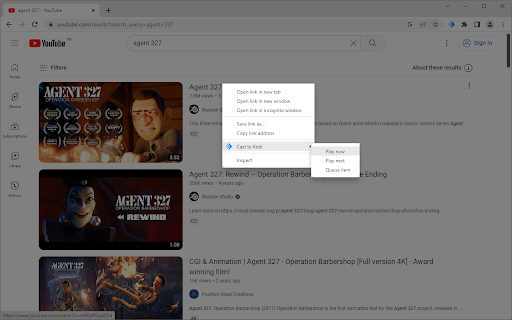


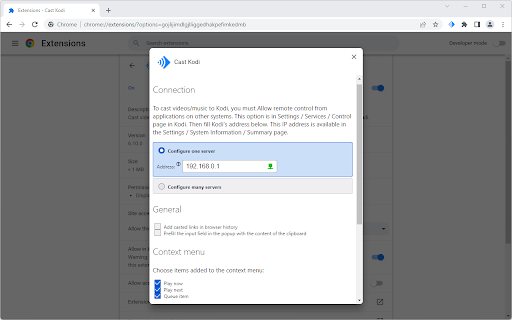
Cast videos and music from more than 50 sites (YouTube, Twitch, Vimeo, SoundCloud, torrent, …) to Kodi. Cast Kodi also analyzes the pages for videos, music or external platforms integrations. For example, if a page displays a YouTube video, this video will be sent to Kodi. To cast videos / music, three items can be added on context menu of link / page / selection of videos or audio: Play now to Kodi, Play next to Kodi and Queue item to Kodi. A remote (accessible with toolbar button) is also present to cast current tab to Kodi and to: pause, go to next element, adjust the volume, … To connect the extension to Kodi, you must Allow remote control from applications on other systems. This option is in Settings / Services / Control page in Kodi. You must also retrieve Kodi's IP address. This information is displayed in Settings / System information / Summary page. Then enter this IP address in Cast Kodi Options.

Lampa Cast
Lampa Cast – это удобное расширение, которое помогает находить ссылки на видео и мгновенно открывать их в приложении Lampa. Lampa Cast - это незаменимое расширение для любителей кино и сериалов, которые хотят максимально удобно и быстро находить интересующие их видео на сайтах. Это расширение автоматически обнаруживает ссылки на видео на сайтах и предлагает открыть их в приложении Lampa, где вы сможете насладиться просмотром в высоком качестве на вашем смарт-телевизоре. С Lampa Cast вы больше не будете тратить время на поиск нужного видео на сайтах - расширение сделает это за вас. Просто откройте ссылку в приложении Lampa и наслаждайтесь просмотром в удобное для вас время. Наслаждайтесь вашими любимыми фильмами и сериалами вместе с Lampa и Lampa Cast!

HelloScreen Screen Sharing for Chrome
Instant, multi-cursor screen sharing for Chrome. ⚡ Superfast screen sharing for anyone who sells over the phone. Salespeople rely on HelloScreen to show, not just tell. No Zoom setup, no back-and-forth — just a simple way to add real-time visuals to your calls. ✅ Share your screen in seconds Click "Share Tab" and send a single link. Your customer opens it on any device with no installs or friction. 👀 Make your calls more engaging Explaining next steps, pricing, or a product demo? Show your screen in real-time so customers get the clarity they need to move forward. 🔒 Secure and high-quality Only share the tab you choose — no risk of exposing other screens. HelloScreen delivers a crisp, lag-free viewing experience. 📈 Faster decisions, fewer follow-ups Sales teams use HelloScreen to gain trust faster, reduce follow-ups, and convert 2x more customers — without adding complexity. 💡 Built for sales teams, trusted by thousands of businesses. HelloScreen is brought to you by Upscope, a leader in screen sharing and co-browsing technology. Try it today and see the difference on your sales calls.

Remote Control for TV
Remote control your Roku smart TV from Chrome; enhance your Roku experience, so intuitive and simple to use! Remote Control for TV is a practical web extension for you to remote control your Roku smart TV from your Chrome over WiFi. When your TV and this web app are under the same WiFi network, you can control the TV from a browser. Features of the TV remote extension app: 👉Volume up/down, Mute on/off on your TV with this universal Roku TV remote. 👉Channels up/down and select your favorite channels from list selection. 👉Control playback of your content with Play/Pause/FastForward/Rewind buttons 👉""Home"" button on the top of Roku remote extension app to return to the home menu with just one tap. 👉Press ""Back"" button on the upper left side of this remote control to go back to the previous page. 👉Tap ""OK"" to confirm your choice, just like operating on a real TV remote control. How does this App work? Step 1. Add this web app to your Chrome extension and launch it. Step 2. On your Roku TV, go to Settings > Network > About to find the network IP address, the IP address information appears on the right side of the screen. Step 3. Enter the IP address on the web app, then click "Connect". after connecting, you can control your TV now. Note: To find the network IP address on Roku TV, you can refer to this guide: https://www.boostvision.tv/find-roku-ip-address-without-remote.html Troubleshoot: -This extension app can only connect if you are on the same IP address/WiFi as your Roku TV device. -Re-adding this remote app and rebooting the smart TV will solve most of the connection issues. NOTE: This Remote Control for TV extension app is not an official product of Roku, Inc.

Roku TV for Chrome
Roku TV for Chrome Browser extension brightness Control for roku.com is a Chrome extension that allows you to easily adjust the brightness of the roku.com website using a simple slider, enhancing viewing comfort and reducing eye strain Added in the update: a banner that will display after the trial version of the extension expires. To continue using all features, simply enter the access code.
