
gnpdappailpafbhkefjcidiodkneecpp
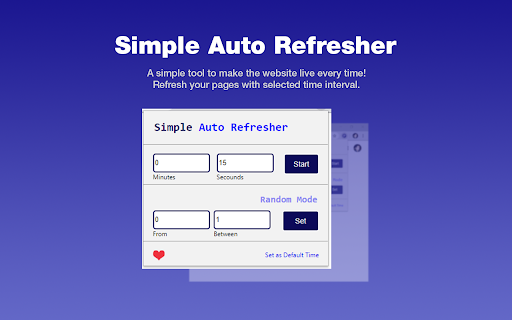

A simple tool to make the website live every time! Refresh your pages with selected time interval. This simple tool will help you to auto-refresh and auto-reload any website with selected time intervals in just one single click. Simple Auto Refresher is the most user-friendly auto refresher extension on the chrome web store market which has premium features. No setup required. Just try it out and you will know! Key features: - Shows real-time count-down timer on the extension icon bar. - Easily input time interval then start auto-refresh with the selected time interval. - Select the random timer range. - Premium random time generation feature. - Save default time for the next setup.

Super Simple Auto Refresh
Multi reload pages and search text by random interval or by ready presets Super Simple Auto Refresh is a simple and easy-to-use Chrome extension that allows you to automatically reload and refresh webpages. With customizable time intervals, it's the simplest way to stay updated without manually refreshing the page. Often need to auto-refresh or auto-reload a web page to look for updates? Tired of clicking the F5 button to auto-reload or auto-refresh a web page? Let Super Simple Auto Refresh do the dirty work. Finally, an extension that is super simple to use and super easy to set up for you to auto-refresh and auto-reload a website! With Super Simple Auto Refresh, you just need to pick an auto-refresh or auto-reload time interval or random interval to start auto-refreshing the website. You can also define a customized auto-refresh and auto-reload time interval too! It has real-time icon updates for the countdown timer during the auto-refresh process. It is a simple Chrome extension that auto-refreshes and auto-reloads a web page automatically on a given time interval. There are lots of extensions that do the same thing, but Super Simple Auto Refresh is the most straightforward and easiest to use for auto-refresh and auto-reload while still allowing users for customization! You can have separate auto-refresh or auto-reload timers running for all of your tabs to auto-reload and auto-refresh. Set your auto-reload and auto-refresh time by clicking the auto-refresh icon in the Chrome toolbar, setting the auto-refresh and auto-reload seconds, and hitting start. You can stop the auto-refresh and auto-refresh timer at any time by hitting the stop button.

Fiverr Quick View
Fiverr Quick View - It allows you to sort search results, extract keywords, and view important metrics like favorites and ratings. Fiverr Quick View is a toolkit that improves your Fiverr gigs management and research. And see further details about your buyer requests Features: ★ Data is stored locally in your browser, no external database or service needed! ★ Sort search results by rating or sales (rated best sellers) ★ Extracting the best and most used keywords ★ Show the number of favorites, orders and also rating ★ Create more personalized messages (using their usernames) ★ See buyer's country and past feedbacks after navigating to their profiles and more ... Your trust is important to us! Fiver Quick View is not storing any kind of information outside your local browser/machine nor is tracking you or your researches! Disclaimer: This is not an official plugin of Fiverr. There may be unexpected changes to the platform, which may cause the plugin to fail.

FivData - Freelancer Assistant
Toolkit for Fiverr Freelancers to increase productivity, discover analytics, ranking and AI services for gigs. FivData offers a comprehensive suite of features designed to optimise your experience on the platform. These include keyword analytics, gig SEO tools, and a gig rank checker, all aimed at enhancing your seller dashboard. Additionally, FivData provides advanced functionalities such as dark mode and notification reminders to help you stay organised and efficient. For an even broader range of services, visit the official website at https://fivdata.com, where you can access premium tools tailored to elevate your performance. Features of the Extension - Fiverr Keyword Analytics FivData Chrome Extension works with FivData Website to provide insights on keywords which can be used for improve your Gig SEO. - Fiverr Gig Rank Checker FivData Chrome Extension works with FivData Website to browse through Fiverr and get your ranking for the keywords. - Dark Mode FivData is now powered with Dark Mode theme which switch your Fiverr website dark mode ready. - Notification & Unread Message Reminder (On Page & Offpage) If you are keep logged in to your account, this tool checks notifications periodically and notify you if there are any unread notifications or messages. This works without the website is opened in the browser. - Hide My Balance Enabling "Hide My Balance" will blurred out your balance from the webpage. This is useful when you do screen sharing. - Search Bar for Keyword Analytics & Buttons You can visit FivData website to get keyword analytics. Also you can click on "Get Keyword Analytics" button to get the searched keyword analytics. If you have any issue regarding this tool, contact us via Email : info@fivdata.com Facebook : www.facebook.com/fivdata We highly appreciate your suggestions and reviews! Note : This is NOT an official product of Fiverr International Ltd and has no affiliation with Fiverr International Ltd. This product is intended to be merely a productivity and informational tool. Registered trademarks and service marks are the property of their respective owners.

Page Auto Refresh
Auto refresh web pages with multiple smart timers Page Auto Refresh is an tool that allows you to refresh the page automatically 🌀 The main features are: 👉 Set up several refresh timers for different pages; 👉 No slowdowns of your device; 👉 Page Auto Refresh is compatible with any website. To avoid unexpected behavior the timers will be cleared if you restart the browser. Page Auto Refresh is easy to use, so you will immediately master and start using it 🔥 Download now and enjoy!
