
gnnpfeiomjneaamihojhenkdcomiajib

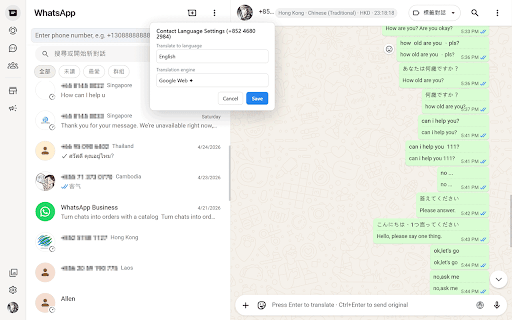

WhatsApp Translator Pro — the most powerful WhatsApp Web translation extension built for professionals who communicate across languages. Stop juggling between Google Translate and your WhatsApp chat. WhatsApp Translator Pro brings seamless, real-time translation directly into WhatsApp Web. Whether you're closing deals with international clients or chatting with friends abroad, you finally have a tool that keeps up. 🔄 Real-Time Message Translation Receive messages in any language? They're automatically translated the moment they arrive. No copying, no pasting, no context switching. Just read and respond. ⌨️ Type in Your Language, Send in Theirs Compose your message naturally — in Chinese, English, or any language you prefer. One click translates it into the recipient's language before sending. The smoothest compose-to-send translation flow on the market. 📡 Auto-Send Translated Messages Enable auto-send and your translated message goes out automatically. Save seconds on every reply — and seconds compound into serious productivity gains over a full workday. 🌍 200+ Languages, One Click Away From English and Spanish to Arabic, Russian, Japanese, and Portuguese — all major languages are covered. The extension intelligently detects the sender's language so you don't have to guess. 🌐 Smart Country & Language Detection Based on phone number prefixes, WhatsApp Translator Pro automatically identifies your contact's country and language. It shows you this info right in the chat header, so you always know who you're talking to. 💬 Quick Phrase Templates Save your most-used responses — greetings, business phrases, follow-up messages — and insert them instantly. No more typing the same thing over and over. (Cloud sync available with Pro) 🤖 Multiple AI Translation Engines Choose between Google Translate for speed, DeepSeek AI for nuance, or Volcengine for specialized content. Switch engines anytime based on your needs. 🔒 Privacy-First Design Your messages are transmitted only to the selected translation engine for processing — nothing is stored on our servers. We don't read your chats. ⚡ Zero Configuration Install the extension, open WhatsApp Web, and it just works. No API keys, no setup wizards, no complicated onboarding. 💎 Go Pro for Full Power - Unlimited translations - All AI engines included - Quick phrase cloud sync across devices - Priority support 📋 Works exclusively on WhatsApp Web (web.whatsapp.com). Does not access your mobile WhatsApp. Made for: International business professionals | Remote teams | Global friends & families | Customer support agents

Click To Send
ClickToSend is a lightweight dispatching tool that connects directly to your load boards, letting you send emails to brokers and calculate your rate without leaving load board in one click. Simple, fast, and built to save brokers and dispatchers time.

RawVamp: Dark Aesthetic Photo Editor & Free Image Darkener
Instantly darken images using the ultimate dark aesthetic photo editor for Y2K glitch, grunge filters, shadow overlays and PFPs. As the ultimate lightweight alternative to complex desktop software, RawVamp is a free image darkener and dark aesthetic photo editor that lets you edit photos in browser instantly. Transform ordinary web images into cursed artifacts, apply an authentic grunge filter, and craft the ultimate Y2K aesthetic without ever leaving your current tab. 🌑 RawVamp is the ultimate dark aesthetic photo editor to instantly darken images and apply a grunge filter to create the perfect dark aesthetic pfp directly in your active browser tab. ⛓️ We reject the sterile perfection of modern photography. Whether you need to darken photo online, design a unique scenecore pfp, or explore a vintage goth aesthetic, our engine provides the perfect canvas. 🦇 EXTENSION SUPERPOWERS (SEAMLESS WORKFLOW): • Right-Click to Corrupt: Find an inspiring image on Pinterest, Tumblr, or X? Just right-click -> "Edit in RawVamp". The side panel opens instantly. No need to download files to your desktop. • Capture Tabs (Webcore Scraper): Want to turn a website's interface into glitch art? Use the Glitch Tab feature to capture your active page and apply heavy digital decay. • Drag & Drop Portal: Open the side panel and simply drag any image from the web into the drop zone. 🩸 THE AESTHETIC ARSENAL (100+ FILTERS): • Professional Image Darkener: Need to make image darker or dim photo lighting? Use our engine to decrease exposure while preserving micro-contrast. Add a natural shadow overlay to create moody dark mode pictures instantly. • Glitch Art & VHS Decay: True RGB color shifting and pixel sorting to simulate broken monitors. Apply a genuine CRT filter online, severe data corruption, and VHS error effects. • Negative & Evil Photo Filters: Use our smart invert logic to apply a negative photo filter or generate a truly evil photo aesthetic for high-contrast noir styling. • Black & White Converter: Need to turn photo black and white instantly? Use our dedicated monochrome engine for pure gothcore and emo photo editor styling. • Ultimate Aesthetic PFP Maker: Generate the perfect avatar. Whether you need a nostalgic Y2K PFP, a chaotic dreamcore PFP, or a clean black PFP aesthetic, our engine delivers. • Cyber Halftone & Dithering: Turn photos into retro webcore filter graphics and brutalist art using our built-in 1-bit photo filter. • Cursed Generator: Don't know what to choose? Let the algorithm roll the dice and generate a completely random, chaotic dark aesthetic edit. ⚙️ PROFESSIONAL TOOLKIT: • Batch Processing: Sync your dark aesthetic across multiple photos and export them as a ZIP archive in one click. • Lossless 4K Export: Download your artifacts in standard JPG, next-gen WEBP, or completely lossless PNG format up to 8192px. • Smart Session Recovery: Closed the browser by accident? Your unsaved glitch photo effects are safely cached locally. 1. Import: Right-click any web image or capture your current tab to open the picture darkener. 2. Corrupt: Lower the exposure to dim photo details, add a heavy shadow overlay, or invoke our curated grunge effect online presets. 3. Export: Instantly download your high-res dark mode picture with zero cloud uploads. 🪦 THE PHILOSOPHY OF DECAY: All of life is a brutal ring, and the hardest opponent is the one in the mirror. If we do not control our emotions, our fears will consume us. RawVamp is an aesthetic conduit for your soul, helping you express your inner chaos without feeling alone in the void. Break the templates. Like Marilyn Manson tearing down societal norms or Ozzy Osbourne finding poetry in the macabre, your canvas should identify your true self. Physical paintings weep and bleed due to the raw touch of the artist—our darkening filter brings that exact weeping effect to your digital photography. ⚖️ THE AESTHETIC COMPASS (FAQ): ❓ How to darken an image online without losing quality? ➤ Unlike basic tools that wash out colors, RawVamp acts as a professional image darkener. You can make a picture darker safely in your browser while preserving deep shadows and high resolution. ❓ Webcore vs Dreamcore aesthetic: What’s the difference? ➤ Webcore focuses on dial-up nostalgia, heavy pixelation, and halftones. Dreamcore utilizes soft blurring, liminal spaces, and eerie VHS static. RawVamp provides specialized tools for both. ❓ Can I use this to make a scenecore PFP? ➤ Absolutely. Capture any image, apply TV static effects, add a darkening filter, and crop it to a 1:1 square. It is the perfect tool for your scenecore pfp or black pfp aesthetic identity. ❓ Is this the best Photoshop alternative for grunge effects? ➤ Yes. Why be weighed down by bloated software and heavy subscriptions? RawVamp gives you visceral power directly in your browser to apply a grunge effect online instantly. ❓ Is this dark aesthetic photo editor free to use? ➤ The core engine is completely free. VIP and Platinum upgrades unlock 4K Ultra-HD exports, Max Batch processing, custom grain control, and all 100+ pro presets for professional creators. 🛡️ 100% PRIVATE & SECURE (ZERO CLOUD UPLOADS): Your art belongs to you. RawVamp uses pure Client-Side Rendering (WebGL/Canvas API). All image processing happens 100% locally inside your Chrome browser using your device's memory. We do NOT upload your photos to any external servers. Absolute privacy. 🗝️ ACCESS TIERS: RawVamp is completely free to use for standard editing. For professional creators, we offer VIP and Platinum upgrades to unlock 4K Ultra-HD exports, Max Batch processing, custom grain control, and access to all 100+ pro presets. 🔗 OFFICIAL LINKS: • Web Engine: https://rawvamp.com • Extension Hub: https://rawvamp.com/browser-extension • Image Darkener: https://rawvamp.com/tools/darken-image • The Manifesto: https://rawvamp.com/manifesto • Support & FAQ: https://rawvamp.com/faq Ditch the heavy software and basic brightness sliders. Install the ultimate image darkener to apply an authentic shadow overlay, dim photos effortlessly, and craft your next dark aesthetic PFP directly in your active tab.

W3copilot
AI meeting transcription for Meet, Zoom & Teams. No bot. Live transcripts, notes, sync to your account. In-meeting panel + export. W3copilot turns your Google Meet, Zoom, and MS Teams (web) meetings into live, searchable transcripts inside Chrome. - Captures live speech – As participants talk, their words appear in a transcript panel beside the meeting. Speaker names are shown when the platform provides them (e.g. Google Meet, Zoom). - Works where you meet – Supports Google Meet, Zoom (browser), and Microsoft Teams (web / LightMeetings). One extension for all three. - Minimal setup – On Meet and Zoom, the extension enables captions in the background. You don’t have to press CC or change meeting settings. On Teams, you turn on “Live captions” once in the meeting; W3copilot then displays that feed in its panel. - Sync to your account – Sign in with your W3copilot account (via the extension popup). Transcripts are sent to the cloud so you can open them later on w3copilot.com, get AI summaries, action items, and a single place for all your meeting content. - Export and copy – Export the full transcript as plain text or JSON, or copy sections from the panel. Useful for sharing with teammates or feeding into other tools. 1. Install the extension and (optionally) sign in from the popup. 2. Join a meeting on Meet, Zoom, or Teams in Chrome. 3. Open the W3copilot transcript panel on the side. Transcripts appear as people speak. 4. Use the panel controls to export, copy, or rely on synced transcripts in your W3copilot dashboard. Privacy and data - Transcripts are processed according to the W3copilot privacy policy. Signing in means data is synced to your account; you can use the extension without signing in for local-only capture and export.

AltVision
AltVision: AI-Powered Alt Text Generator for Chrome AltVision is an innovative Chrome extension designed to empower content creators, accessibility professionals, and UX designers in enhancing web accessibility. By leveraging advanced AI technology, AltVision helps identify and generate high-quality alternative texts for images, making web content more inclusive and user-friendly. Alt Text Detection: - Find and highlight images that need attention and are lacking alternative text. Context-Aware: - Create descriptive and accurate alternative texts for images using state-of-the-art AI - Utilize a context feature that considers surrounding text and page content for more relevant alt text generation - Available in English and Swedish, with potential for future language expansions *Note: Daily usage limits may apply to ensure optimal performance and fair usage.* Empower your online experience with AltVision – Where AI meets accessibility innovation!
