
gnnmgnpkkiekhlejbekcholfoickmlba


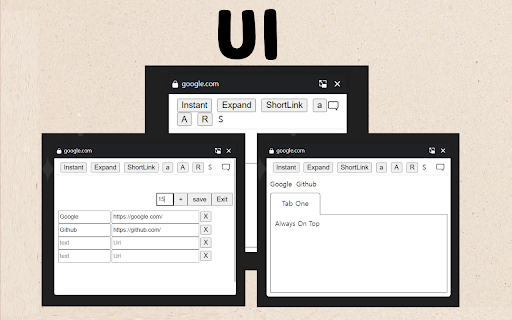

1. Functions You can always use a memo pop-up window with the features above. 2. Functions It is recommended for those who move a lot, such as Word, Excel, and web pages. 1) You can always bring up a notepad from above. It's always up there no matter what program you turn on. 2) You can adjust the size of the notepad and the size of the handwriting. 3) You can add a link to visit your favorite page immediately. 4) You can click the 'Instant' menu to create additional pop-up notepads. 5) You can open and turn off the notepad with just the keyboard by setting the shortcut key. 6) Shortcuts have been added to the menu that appears when you right-click. 7) If you use the whale browser, you can also use the 'Always Above' function on the notepad that you have floated as Instant. (If you press the top left pin shape in the Instant window, the function always applies to the top.) 3. How to use the full screen 1) Press Instant to open Notepad in a new window. 2) Press F11 to open the notepad on full screen. When used as a full screen, it can be used as a whiteboard. 4. How to open not-browser programs (ex.Excel) right on top of it all the time 1) chrome://extensions/shortcuts 2) Set to 'Global' and 'All' in the shortcut setting. 3) You can also use shortcuts in other programs to open Notepad. 5. Precautions 1) It is available on most web pages, but sometimes it is not. In this case, you can open a notepad by opening another web page. 2) Because it uses the PIP, the webpage that opened the notepad must be fixed. * Please refer to the following for future updates, information, and inquiries. https://utilzip.com

Notepad for Google Chrome
A quick side‑panel notepad that autosaves locally. Open a note/scratchpad directly in your browser. The humble sticky note has survived every digital revolution because jotting down ideas quickly is invaluable. Yet in a world where most information flows through a web browser—code snippets on Stack Overflow, order numbers in Shopify, quotes from academic journals—reaching for a separate desktop app or physical pad creates friction that breaks focus. 1. Zero Context-Switching Overhead Every time you press Alt + N (or click the toolbar icon) the side-panel notepad slides into view beside the current tab. No app hunting, window-tiling, or copy-and-paste dance—just cursor-to-text in

PageMo - Sticky notes & Memo in any page
Add sticky notes on any page, move the sticky notes to any position on page. View all sticky notes in the extension options. You can add sticky notes to any web page and move the sticky notes to anywhere on the page. Even if you restart the web page, the added memo will be displayed. You can set the fort size, marker, background color, etc. In the editor that edits the memo. You can check the added sticky notes list in the extension options. ■ Sticky notes display - Move notes by dragging and dropping. - If you hover your mouse over the lower right corner of the memo, the size adjustment icon will be displayed and you can adjust the memo size. ■ Sticky notes list display page - When you press the menu "Show Notes List" of the Pegemo extension, the sticky notes list page is displayed. - A list of added memos is displayed on the option page of the Pegemo extension. - The added sticky notes and the target site are displayed on the sticky notes list page. - You can delete sticky notes with the trash can icon and delete sticky notes for each site. - You can access the target site of the added sticky notes from the list.

Anywhere stickers - simple sticky notes
Attach sticky notes to any page * Nice look and feel. * Synchronizes across your logged-in browsers. * Easy to use. * Nothing excessive, only what you need to remember a pair of words.

Sticky Snippets · Note-it Aside · Customer Service, Sales & IT Support
Save snippets, reuse replies — one click from any tab. For customer service, sales, and IT support teams. Note-it Aside is a Chrome side panel extension for sticky notes, text snippets, canned responses, reusable templates, tasks, page capture, and page summaries. It is built for people who work in web apps all day and need fast access to the text they save and reuse most. Use it to save quick replies, internal notes, checklists, troubleshooting steps, product copy, selected text, and other frequently pasted text. Instead of switching between tabs, documents, and chats, open the side panel and keep your notes beside the page you are already working on. When you explicitly use note capture or summary features, the extension can read selected text or readable page content from the current page so you can save it to notes or generate a summary. No sign-up is required, and your data stays local by default unless you choose an optional feature such as cloud backup, folder sharing, or Instant Transmit. Best for - Customer support and customer service teams - IT support and operations teams - Sales and business development teams - E-commerce admins and back-office workflows - Anyone who repeats the same text in browser-based tools - One-click copy from the Chrome side panel - Folders to organize notes and templates by workflow - Notes, templates, and tasks in one place - Reusable text templates with inline placeholders, dropdown choices, date and time tokens, and linked variables from other notes in the same folder - Note styling with colors, font size, and bold text - Drag-and-drop sorting for notes and folders - Save selected text from any webpage with the context menu - Insert saved notes, snippets, and templates from the browser right-click menu - Capture readable page content into notes from the current tab - Generate AI page summaries on supported Chrome versions and compatible pages - Cloud backup to Google Drive or Dropbox - Read-only folder sharing by link, with import into Note-it Aside - Import and export backup files - Instant Transmit to mobile with a QR code - Interface available in 50+ languages - No account required; local-first storage by default Regular note apps are built for long-form writing. Note-it Aside is built for fast browser work: reusable replies, text snippets, reference notes, and lightweight task tracking beside the page you are already on. - Templates: a new note type for reusable parameterized text. Type a body with {name} style placeholders and fill them in inline, right under the textarea. No dialogs, no mode switch. - Placeholder choices: use {name:dear customer} for a text field with a default, or {level:pleasure|honor|responsibility} for a dropdown. {date} and {time} resolve automatically. - Linked variables: any plain note in the same folder with a title becomes a named variable inside your templates. Edit the source note once and every template that references it updates instantly. - Live preview and one-click copy: the rendered output updates as you change field values, and the existing copy button copies the filled-in text. - Share templates with folders: templates travel with folder sharing and render the exact same inline fields on the public web link. - Template gallery: browse free ready-to-use templates at https://noteitaside.com/templates. - Templates are included at no cost.
