
gnncjalmnfmdilagegplkkckngolohof
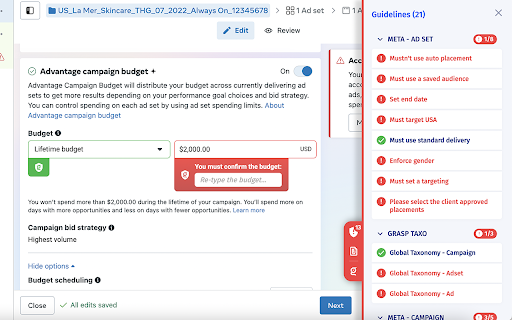


Natively integrated with major ad buying interface, Grasp minimizes media buying errors. Grasp is the one and only preventive QA solution dedicated to digital media buying processes. Natively integrated with major digital media buying platforms on Social (Facebook, etc), Search (Google Ads, etc) and Programmatic (DV360, etc), Grasp effectively prevents media buying errors. Grasp enforces predefined media buying guidelines directly during campaign setup, and reflags any mistakes before a campaign is created. We can QA various campaign setup elements, such as: Grasp extension is powered by the Grasp platform (https://app.grasp.gg). Contact the Grasp team (contact@grasp.gg) to gain access to the platform and to start using the extension today.

Michael's Upgrade for TrakED
Upgraded features for TrakED in the THS. (This extension is not an official product of the THS or Intersystems TrakCare software.) Upgraded features for Trak ED in the LGH. Features: - Re-enable spell check in the triage page - Use the enter key when logging in - Handover sheet for ED Main Floor and EMU - ED Main Floor filters and persistent sort - Triage Summary print out - Filter and count results of an enquiry - Count patients currently breaching length of stay targets -- This extension is not an official product of the LGH or InterSystems Trak software.

Omnibug
Omnibug is a browser extension to decode and display outgoing digital marketing tool requests. Omnibug is a Chrome extension built to ease developing with, debugging, and providing quality assurance to today's analytics, UX/CRO tools, and many other marketing technologies. These tags include the Google Marketing Cloud (including Google Analytics, Google Tag Manager, Doubleclick, and Google Ads), the Adobe Experience Cloud (including Adobe Analytics, Adobe Launch, Adobe Target, Web SDK), Tealium iQ, and many more! Events sent to these MarTech platforms are captured and decoded into a human-readable format, which can be filtered and/or exported. You can view all of our release notes at https://omnibug.io/help/changelog/ and a list of providers we support at https://omnibug.io/help/supported-tags/

X Pixel Helper
Displays an icon if there is a X website tag on a given page The X Pixel Helper is a tool that helps you verify whether your X Pixel has been implemented correctly on your website. It looks for website tag fires in the background and provides real-time feedback on implementation. The number on the extension icon indicates the number of active website tags, and when clicked, expands to show details on the website tags found as well as any implementation warnings. November 2024 Update: We launched an improved version of X Pixel Helper that includes more actionable insights, improved error detection, clearer pixel naming, and enhanced pixel load time accuracy. Learn more about X Pixel Helper here: https://business.x.com/en/help/campaign-measurement-and-analytics/pixel-helper

Teads Pixel Helper
This extension will allow user / Teads customers to verify the proper setup and firing of Teads pixel on an advertiser website. A Teads pixel is necessary when a customer is running a performance campaign with Teads. Proper pixel setup is key as it allows for an optimization on event tracked.
