
gnemaookpcekfeidmgocagofgijpoced
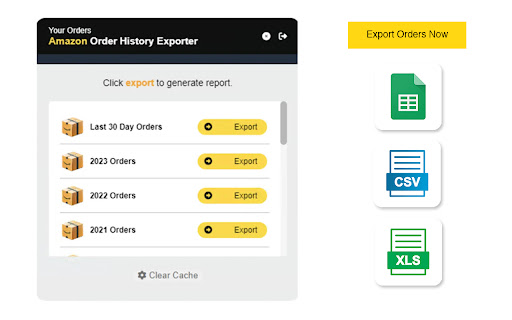

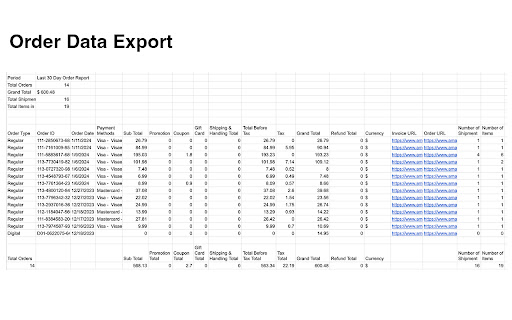
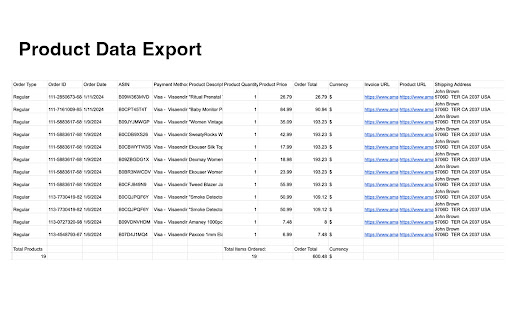
Export your online purchase history (Amazon, Walmart, and more) to Excel or Google Sheets in one click. OrderPro helps you download your order history from online stores directly into spreadsheets. Whether you’re a business owner tracking expenses, a shopper organizing receipts, or someone who just wants better visibility of their spending, OrderPro has you covered. Supported Stores Currently supports Amazon, eBay, Walmart, Instacart and more. See the full updated list here: https://www.orderproanalytics.com/#platforms Key Features • Export order history with a single click • Works across multiple stores in one place • Creates clear, organized spreadsheets • Product Summary Report – Line item report by product/SKU • Order Summary Report – Breakdown by order number Use Cases • Track spending by store or date • Organize receipts for tax or accounting • Keep a backup of all online purchases • Simplify business expense reporting Data Insights Visualize your order history with charts and graphs. Try the demo: https://www.orderproanalytics.com/analytics/demo Support For questions, issues or feature requests, visit https://www.orderproanalytics.com

RetailData Exporter - Bulk Export to CSV/Excel
You need retail product data. But getting it out is painful. Copying product names, prices, and ratings one by one. Scrolling through hundreds of search results. Clicking into each listing just to grab stock status and seller info. If you've ever tried to collect retail data at scale, you know the drill - hours of repetitive clicking for a dataset that should take minutes. RetailData Exporter fixes this. One extension, all the public data you need, exported in seconds. Major retail platforms don't offer a public data export. There's no "download all products" button. That leaves resellers, researchers, and analysts stuck with two options: manual copy-paste or expensive third-party tools. - Product details are scattered across search results, category pages, and departments - Pricing, stock status, and seller info require clicking into each listing - Reviews and ratings are buried behind multiple clicks - There's no native way to compare products across multiple searches Most people end up with incomplete spreadsheets and wasted afternoons. This extension solves that by intercepting the data already loaded in your browser and letting you export it cleanly. WHAT THIS EXTENSION DOES RetailData Exporter runs entirely in your browser. It captures public data as pages load - no external servers, no API keys, no accounts required. Here's what you can extract: Product Listings - Titles, prices, ratings, review counts, seller names, stock status, shipping info, and thumbnail images. Product Details - Full metadata including descriptions, specifications, brand info, UPC codes, and all available variants. Reviews - Review text, ratings, timestamps, reviewer details, verified purchase indicators, and helpfulness votes. Seller Profiles - Seller names, ratings, item counts, and fulfillment methods. 1. Install the extension and navigate to any supported retail page 2. Click the extension icon to open the exporter panel 3. Select what data you want to collect 4. Hit export - the extension collects data as you scroll or auto-paginates for you 5. Save to CSV, Excel, JSON, or HTML Table Price Monitoring: You sell competing products and need to track competitor pricing. Export listings in your category and compare prices, ratings, and seller info. Product Research: You're a reseller looking for profitable items. Export products with prices, ratings, and review counts to identify opportunities. Review Analysis: You want to understand product quality before bulk ordering. Export reviews to identify common complaints and quality issues. Market Research: You're studying retail pricing strategies. Collect structured data across multiple categories and analyze patterns. WHAT THIS EXTENSION DOES NOT DO - Does not access private accounts or purchase history - Does not store your data on external servers - Does not place orders or interact with sellers on your behalf - Does not require login credentials or API keys All processing happens locally. No scraped data leaves your browser. Permissions used: - Storage - Saves settings locally - Tabs - Opens pages for batch processing - Downloads - Saves exported files to your computer Currently works with Walmart (walmart.com, walmart.ca, walmart.com.mx). This extension provides tools for extracting publicly available data. Users are responsible for ensuring their use complies with applicable terms of service and local regulations. Walmart is a registered trademark of Walmart Inc. This extension is an independent tool and is not affiliated with, endorsed by, authorized, maintained, or sponsored by Walmart Inc.

Amazon Order History Report Exporter
Download your Amazon order history as a clean CSV report for taxes, budgeting, bookkeeping, and purchase tracking. Export Amazon order history to CSV with accurate multi-page export. Download your Amazon orders or shipments as CSV using Amazon’s own Orders page filters. The extension walks page by page in the background until no new orders are found, making exports more reliable for larger order histories. Features: • Export Amazon Orders to CSV • Export Shipments to CSV • Works with Amazon year/time filters • Accurate multi-page background export • Optional invoice link column when Amazon provides it • Optional totals row • Incremental export to skip previously exported orders • Live progress updates and stop control • View exported data in-page after completion How to use: 1. Open an Amazon tab 2. Open the extension 3. Click Open Orders if needed 4. Choose a time range on Amazon’s Orders page 5. Choose Orders or Shipments 6. Click Start Useful for: • personal expense tracking • bookkeeping • tax prep • order history backup • shipment tracking exports Not affiliated with or endorsed by Amazon.

Amazon Order History Exporter
🚀 Amazon Order History Exporter The fastest way to export your Amazon orders to CSV and Excel. Stop manually copying your order history. With one click, Amazon Order History Exporter automatically scrolls through your account and generates a clean, organized spreadsheet for your taxes, bookkeeping, or personal budgeting. 🛠️ HOW TO USE Login to your Amazon account. Click the Start Export button provided by the extension. Wait for the process to finish and download your CSV file. ✨ KEY FEATURES One-Click Export: Instantly start the process from your orders page. Auto-Pagination: Sit back while the tool automatically navigates through all your order pages. Comprehensive Data: Captures order dates, totals, order numbers, and item names. Live Tracking: See progress in real-time with built-in error logging. 100% Private: Your data never leaves your computer. 🔒 PRIVACY & PERMISSIONS We take your data security seriously. This extension runs locally in your browser. No Data Collection: We do not send your order history to any external servers. Permissions: We only use storage (to save progress), downloads (to give you the file), and scripting (to read the order data on Amazon domains only).

Temu order 2 Excel
Generate an Excel table with the same content based on the order page of www.temu.com The plug-in reads the information on the Temu buyer's order page, just after 1 Click, generates and downloads an Excel table.
