
gndcbndejfodldbldgjlbceailbadmni
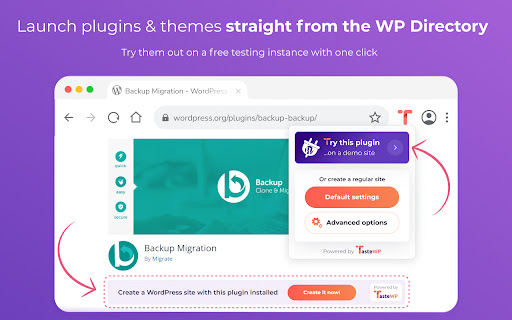
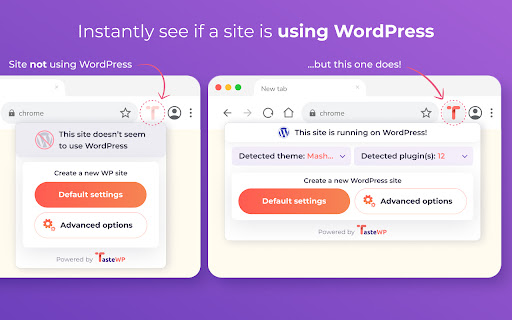


Spin up free WordPress instances for testing themes, plugins, or just playing around with WordPress! Use this extension to: - Quickly spot if a site is using WordPress or not - See which plugins & themes a site is using - Try out the used plugins & themes with one click Also, when you're on the plugin or theme page in the WordPress directory (e.g. https://wordpress.org/plugins/akismet), you'll see a new option to spin up a WordPress instance with that plugin or theme already installed. You can also use this extension to quickly spin up a WordPress site for playing around, similarly as you can do directly on https://tastewp.com.

InspectWP - WordPress Theme & Plugin Detector
InspectWP is a website or WordPress analysis tool, including WordPress theme and plugin detector. InspectWP is a free website or WordPress analysis tool in combination with a WordPress theme and plugin detector. The WordPress Theme/Plugin Detector can detect the installed WordPress themes and WordPress plugins on the website you are currently viewing. In addition, InspectWP can function as a XML Sitemap Detector, Tool Detector, Google Fonts Detector, IP Address Detector, GDPR Check, Security Check and basic SEO check.

Scan WP - WordPress Theme and Plugin Detector
Have you ever been on a really great WordPress site and want to know how it was built? What theme they used? What plugins give it… Have you ever been on a really great WordPress site and want to know how it was built? What theme they used? What plugins give it such functionality? Well, all you have to do now, is install this extension and we will detect the Wordpress themes and plugins the site you are on uses. After you install the extension, an orange Wordpress logo will be added to your browser. So, go to a site that was built with Wordpress and just press that logo. Within a few seconds you will know everything there is to know about the theme and plugins. You can also go to our Wordpress theme detector website and get additional information regarding the domain such as strong keywords its ranked for, estimated traffic, main competitors for rankings and more.

WordPress Plugin & Theme Detector
WordPress Theme Detector and WordPress Plugin Detector — Detect what WordPress theme and plugins any website is using. The fastest WP theme detector, WP plugin checker, and WordPress scanner to find out if a site is WordPress. Is it WordPress? Is this site using WordPress? This free WordPress checker instantly tells you. When you visit a WordPress site, the icon turns blue. Not WordPress? The icon stays gray. Wondering what WordPress theme is this site using? Our WP theme detector reveals the exact theme instantly. Detect WordPress themes with detailed information: - Theme name and theme preview - Theme author and author website - Theme version (installed vs latest) - WordPress.org ratings and active installs - Required WordPress version and PHP version - Direct link to download the theme Supports parent themes and child themes detection. Find out what theme any WordPress website uses in one click. What plugins is this WordPress site using? Our WordPress plugin detector scans and identifies installed plugins using multiple detection methods: - Plugin name and plugin icon - Plugin author and contributors - Plugin version and last updated - Active installations and ratings - Required WordPress and PHP versions - Links to WordPress.org plugin page Detect WordPress plugins with high accuracy using REST API scanning, asset analysis, and namespace detection. Detect what hosting a WordPress site uses. Identify hosting providers like WP Engine, Kinsta, SiteGround, Bluehost, Cloudways, and AWS. Detect CDN services including Cloudflare, CloudFront, Fastly, and StackPath. Check WordPress version, PHP version, and server type (Nginx, Apache, LiteSpeed). Detect caching plugins like WP Rocket, LiteSpeed Cache, W3 Total Cache, and WP Super Cache. Identify SEO plugins and page builders. Download your WordPress site analysis as JSON or Markdown. Perfect for WordPress theme research, plugin audits, and competitor analysis. - WordPress developers researching theme and plugin stacks - Web designers looking for theme inspiration - Agencies auditing WordPress client sites - Security researchers checking WordPress vulnerabilities - Marketers analyzing competitor WordPress sites - One-click WordPress detection - No account or signup required - Fast — detection runs on remote server, not your browser - Lightweight — won't slow down browsing - Privacy-focused — no tracking - 100% free WordPress theme and plugin detector Is this site WordPress? What theme is this? What plugins are they using? Get answers instantly with the most accurate WordPress theme detector and WordPress plugin detector available. Built by WordPress developers for the WordPress community. Detect WordPress themes and plugins as you browse.

WordPress Theme and Plugin Detector
WordPress Theme and Plugin Detector detects all the installed WordPress Themes and WordPress Plugins on the Websites you visit 🟩 When you visit a website USING with WordPress, the badge will turn GREEN. 🟥 When you visit a website NOT USING with WordPress, the badge will turn RED. Click on the icon and open the popup. If the current page uses WordPress, WP Detector Chrome Extension will display the WordPress theme that it uses. If the website is using more than one theme (for example child themes), it will also display it. WP Detector Chrome Extension will also display all the WordPress plugins installed in the website. You can click on any of the Theme and Plugin cards and you will be redirected to their WordPress.org theme / plugin repository page or official websites to know more information about them. The extension won’t consume your browser resources, since the computation to detect themes and plugins is performed in a remote server to which the extension communicates via API. If you are not sure about installing this extension, you can test it first in our website: wp-detector.com If you would like to detect WordPress themes and Plugins as you browse, look no further: this the fastest and more accurate WordPress Theme and Plugin Detector in the market! For more information about the extension privacy policy, please visit: https://wp-detector.com/extension-privacy-policy
