
gncbffnejajebniepdoabjhjeahbknap
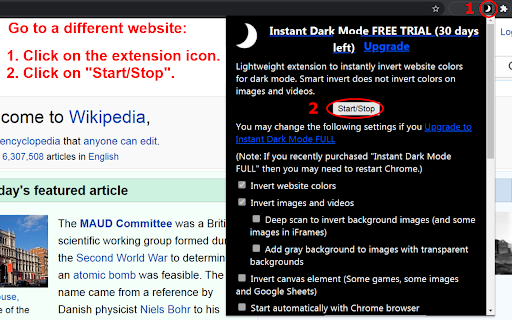
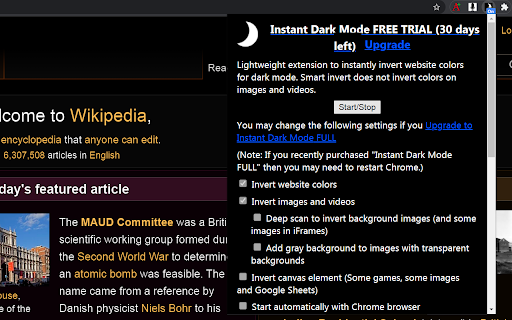

Lightweight extension to instantly invert website colors for dark mode. Smart invert does not invert colors on images and videos. Lightweight extension to instantly invert website colors for dark mode. It uses a smart invert that does not invert colors on most images and videos. 1. Go to any website that is not a chrome:// page, a new tab or the Chrome Web Store 2. Click on the Instant Dark Mode extension icon 🌙 3. Click on "Start/Stop" NOTE: If you do not see the extension icon on the Chrome toolbar then click on the "Extensions" icon 🧩 that looks like a jigsaw puzzle piece on the Chrome toolbar. Look for 🌙"Instant Dark Mode" extension and then click on the pin icon 📌 next to it. NOTE: Chrome extensions are not allowed and will not work on special chrome:// pages or the new tab or Chrome Web Store. Options Available For Purchase: * Invert website colors * Invert images and videos * Deep scan to invert background images (and some images in iFrames) * Add gray background to images with transparent backgrounds * Invert canvas element (Some games, some images and Google Sheets) * Start automatically with Chrome browser * Enable keyboard shortcut Start/Stop. (Default Alt+i). Change shortcut key at: chrome://extensions/shortcuts * Detect if website already has dark mode and do not invert * Darken background colors that do not invert well Notes: You may want to use "Invert images and videos" by itself to make image colors look normal if you are using an OS inverter such as Windows Magnifier or MAC OS Accessibility > Display > Invert Colors. Adding a gray background to images with transparent backgrounds makes it easier to see black icons on some websites like Gmail. In the extension pop-up there is a link at the bottom to try "Speech Recognition Anywhere" Chrome Extension. 9/8/2021 - Version 0.9.3 +Fixed some license issues. +No longer puts gray translucent background under Youtube video controls if "Add gray background to images with transparent backgrounds" is selected but will now add the gray background to input type="image". 8/16/2021 - Version 0.9.2 - If "Detect if website already has dark mode and do not invert" was checked and a few websites were visited such as webmd.com then the extension incorrectly detected that it already had dark mode. This seems to have been fixed. The extension also might be able to detect if a website already has dark mode more quickly now. Keyboard shortcut will now also start/stop on all tabs instead of just the current tab. 6/2/2021 - Version 0.9.1 - Changed extension link to go to Chrome Web Store Listing. Changed support link to go to dark mode extension support FAQ. Changed so that background-image is removed from body tag if there is one otherwise when (re)inverting images the css will add the invert filter to the body tag again. Always adding css to documentElement and not document.head because some websites were not adding it to document.head. 5/31/2021 - Version 0.9.0 - Instant Dark Mode Extension added to Chrome Web Store

Smart Dark Mode
Does not use heavy codes. It doesn't break the web design. Detects only bright sites and invert them to dark sites. - All elements are displayed normally. - The script is light. - Dark pages do not convert. - Easy to add/remove filters.

Dark Reader for Chrome
A classic Dark theme for every website. Switch any web pages to dark mode or night shift mode in one click. Dark Reader - Dark Mode and Night Shift is a fast, lite and simple extension that automatically turns the colors of your browser content to warmer or darker. This eye-care extension enables night mode by creating dark themes for websites on the fly. Dark Reader inverts bright colors, making them high contrast and easy to read at night. What will you get from Dark Mode extension: 1) An easy way to create dark mode on every website. In addition, you can customize your dark theme visual from Brightness, Contrast, to Saturation. 2) A night shift mode which changes the website's color to warmer, making it much more pleasing to watch. You can choose to use either dark theme or night shift mode, or both. Turning on reading mode protect your eyes from reading for hours. You can manually choose the shift from color presets, to pick up the most comfortable and calm atmosphere for your eyes during the night sessions or thru the all day long. Social networks, mainstream sites, and all other new tabs will be in dark mode with Dark Theme extension. No needs to open every website settings one by one - just one add-on makes every website in dark mode. Note: Remember to disable any similar dark theme or night shift mode extension to prevent compatibility issues. We really hope that our Dark Reader will be useful to you! We look forward to your feedback and ratings! Also write your suggestions for improving the functionality.

Invert Color
Inverted colors on any page. > I've been using a Chrome extension called "Invert!" for years. It always inverted colors with one click. But recently, Chrome says it's no longer supported. I missed it so much — and it was hard to find a substitute. Most are either slow, apply weird color filters, run at low resolution, or require multiple clicks just to work. This extension does one thing, and does it well: It inverts the colors of any webpage — instantly, with just one click. ✅ Fast ✅ Lightweight ✅ Private (does nothing besides apply the effect) Perfect for night browsing, high-contrast needs, or just saving your eyes.

Dark Mode for Chrome
Dark mode for all websites. Use dark theme for night and daily browsing with dark reader. Night shift mode. Dark Mode and Dark Reader makes all the websites you browse into dark/night mode so that you can browse the internet without straining your eyes. It is an extremely useful chrome extension for those who use internet especially at night. The Dark theme extension. Works with all websites! You need to refresh all the tabs, which were opened BEFORE the dark reader was installed. You can also restart the Chrome to refresh all the tabs at once. Otherwise, dark mode and night shift mode will work only with the newly opened tabs. If the website has built-in night theme, you can control it directly from extension and if it doesn't like Gmail, Google Docs, Office Online, GitHub and millions others, we will convert the colors to provide you with smooth transition on dark mode. What will you get from Dark Reader extension: 1. An easy way to create dark mode on every website. In addition, you can customize your black theme visual from Brightness, Contrast, to Saturation. 2. A Night Shift mode which changes the website's color to warmer, making it much more pleasing to watch. You can choose to use either dark theme or night shift mode, or both. You can also quickly activate these modes with simple keyboard shortcuts. 3. You can set up schedule for each dark theme and night shift mode, and decide when you want to auto-activate dark theme. Also Dark for YouTube extension converts YouTube theme to a highly customizable dark charcoal/blue theme. This extension is built on top of the default YouTube theme, so it is very light-weighted compare to using themes injected by stylish or stylus extensions Note: Remember to disable any similar Night Theme extension to prevent compatibility issues! We hope you enjoy it.
