
gmnojllagfhklidhdbcimjaecjjfnfdp
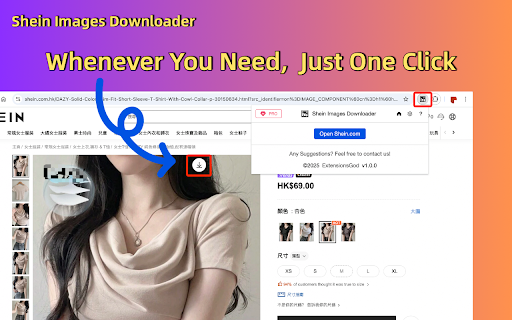

One-click batch or individual download of Shein product high-resolution images, fast and convenient. Stop wasting hours manually saving images! Our enhanced tool empowers you to: ✅ One-click to get all images from any Shein product page ✅ Bulk saving of images in seconds - no more saving one by one ✅ Preserve Original Quality - Get images exactly as displayed (No compressed files) ✅ 100% Private - Zero servers involved, Shein-compliant ✅ Install now and streamline your image-scraping process! Perfect For: 🛒 Sellers creating cross-platform listings 📊 Marketing teams designing print/web campaigns 📦 Suppliers building visual product databases 🔍 Researchers analyzing packaging trends Download and bulk save product images can be done quickly with our tool, without any need for coding. Simply follow these steps: - Click "Add to Chrome" to install the extension. - Open any product on Shein.com. - Click the “download icon” on the top right of the product listings images. - All the product pics should be displayed on the popup window. You can save them one by one individually or as a bundled zip file. Is it free? Yes, it's free! You can access the basic features or upgrade to get more features. - All data is processed in your local computer, it is never passing through our web server, no one knows what you exported. Feedback and Support: - If you have any questions or need support, please contact us here: help@extensionsgod.com - Shein and all related marks are trademarks of Shein.com, Inc. or its affiliates. This independent project was developed by ExtensionGod and has no relationship with Shein Inc.

Shein Images Downloader - Download Images, Videos & Excel Export
Scrape, extract, and gather high-resolution Shein product images and videos instantly. Bulk image scraper with Excel export. The ultimate Chrome extension to scrape, extract, and gather Shein images and download product photos effortlessly. Extract images from Shein, gather high-quality product pictures, and scrape Shein videos from any product page with one click—no coding required. Perfect for sellers, designers, dropshippers, and researchers who need to extract product images and gather Shein content fast. ✓ Image Scraper & Extractor: Scrape and extract images from Shein product pages automatically ✓ High-Resolution Downloads: Download all product images in original quality ✓ Video Scraper: Scrape and download Shein product videos ✓ Bulk Image Gatherer: Gather and scrape multiple images, download as organized ZIP files ✓ Excel Export: Export scraped and extracted product data (SKU, color, name, URLs) to Excel ✓ All Image Types: Extract main images, variants, and description pictures ✓ One-Click Extraction: Simple interface to extract and scrape product images, no coding needed ✓ Batch Processing: Gather images in bulk for efficient workflow 1. Open any Shein product page 2. Click the Shein Images Extractor extension icon 3. Extract individual images or use "Gather All" for bulk download 4. Download extracted images as ZIP files or individually 5. Export gathered product data to Excel for easy organization 6. All extracted files saved directly to your computer PERFECT FOR: • Sellers & Dropshippers: Extract and scrape product images to build catalogs quickly • Designers: Gather images for inspiration and reference materials • Researchers: Extract and analyze product image data and trends • Content Creators: Scrape high-quality product visuals for content • E-commerce Stores: Bulk extract images for inventory management • Marketing Teams: Gather product photos for campaigns and analysis Get started extracting and scraping Shein images with essential features for free. Upgrade for advanced extraction functionality and bulk gathering when you need it. • Extract Product Images: Gather all product photos from Shein listings • Bulk Image Extraction: Extract multiple product images simultaneously • Image Gatherer Tool: Gather images from Shein with automated extraction • Product Photo Extractor: Extract high-quality product photography • Variant Image Gatherer: Scrape all color and style variant images • Description Image Extractor: Extract detailed product description photos • Video Content Gatherer: Extract and download product videos • Metadata Extraction: Gather image URLs, names, and product details Your data stays completely on your device—never transmitted to our servers. We prioritize your privacy and data security. Shein is a trademark of Shein Inc. This extension is an independent tool and is not affiliated with, endorsed by, or sponsored by Shein Inc. Need help? Contact us at webstarue@gmail.com for fast assistance!

Bulk Image Downloader
Bulk download images from multiple tabs in one click. Supports AVIF, WebP & AI-generated images. Filter by resolution and file type. The fastest way to bulk download images from any website. Save photos from one page or multiple tabs at once — with powerful filters for resolution, file type, and more. Perfect for designers, photographers, researchers, and AI artists who need to save images quickly and efficiently. 🔥 **NEW: AI-Friendly Image Support** — Seamlessly download AI-generated images (data:image/jpeg, data:image/png, data:image/webp) from tools like Midjourney, DALL·E, Stable Diffusion, and more. 🔥 **Modern Format Support** — Full support for next-gen image formats including AVIF, WebP, SVG, and all traditional formats (JPEG, PNG, GIF, BMP). Key Features: ✔ Bulk download images from multiple tabs — choose from: all tabs, current tab, left of current tab, or right of current tab ✔ Preview all images found on the page, including linked images ✔ Filter images by width, height, and file type ✔ Sort images by resolution or tab index ✔ Download selected images to your local folder with one click ✔ Right-click context menu to save any image directly to Downloads, just like Safari ✔ Clean, modern UI for a smooth browsing and downloading experience Simply press the "Download" button, and all selected images are saved to your default Chrome download directory. No extra configuration needed. Versions: 1.1.0 1. Added support for modern image formats: AVIF, WebP, and more 2. Added support for data URI images (data:image/jpeg, data:image/png, etc.) — great for saving AI-generated images 3. Improved UI with a cleaner, more intuitive design 4. Fixed a bug in the "Save Image to Downloads" context menu feature 1.0.3 1. The picture is selected by default 2. Image filtering rules are automatically saved

Bulk Image Downloader - HImage
Through this browser extension, you can capture and download images in bulk from web pages, helping to automate your workflow. Features: 1. Supports filtering images based on their size, shape, and format. 2. Allows filtering images from specific domains to avoid unwanted interference. 3. Supports searching for similar images using "Google Lens." 4. Automatically converts downloaded images to the specified format if you specify an image output format (JPG, PNG, WEBP). 5. Provides a tab mode that allows you to switch to a wider interface if you find the extension's pop-up window too narrow. It displays and processes captured images in a broader interface. 6. Supports batch renaming. 7. Supports capturing most web image formats, such as JPG, WEBP, PNG, GIF, SVG, ICO, AVIF, BMP. 8. The images to be downloaded will be packaged into a zip file, keeping everything organized.

Lazada Image Saver - Download Product Images
Download all Lazada high-definition product images in batches with one click Are you still frustrated by manually right-clicking and saving Lazada product images one by one? Say goodbye to the hassle! Lazada Image Saver is the ultimate solution you've been looking for. Designed for e-commerce sellers, designers, and all Lazada users, it allows you to download high-definition product images in bulk with just one click. This lightweight, powerful, and user-friendly browser extension will revolutionize the way you get high-definition product images from Lazada, significantly boosting your productivity. 🌟 Core Features and Unique Benefits We understand your time is valuable. That's why we've eliminated unnecessary features and complex settings to provide you with the purest, most efficient downloading experience. ✅ One-Click Batch Download With just one click, you can preview and save all the main and variant images from your Lazada product page right in the extension window. Whether you're downloading a single image or saving a batch, it's a breeze. ✅ Highest Image Quality Guaranteed Our intelligent scraping technology automatically parses and downloads the highest resolution original images, ensuring every image you get is crystal clear and ready for use in marketing, design, or print projects. ✅ Smart Folder Organization Downloaded images will be automatically saved in a folder named "Lazada Downloads/Product Title," keeping your assets organized and clutter-free. ✅ Ultra-Simple User Interface No complicated panels, no tedious settings. All operations are performed in a refreshing, intuitive pop-up window. Install and use right away, with no learning curve. ✅ Security and Privacy Prioritized We respect your data privacy. All image parsing and downloading processes are performed locally on your computer; none of your information passes through our servers. Install the extension: Click the "Add to Chrome" button to add the assistant to your browser. Open a product page: Visit any Lazada product detail page you're interested in. One-click download: Click the extension icon in the top-right corner of your browser. In the pop-up window, select and download the image you need. It's that simple! Ready to boost your efficiency? Whether you need to add new products to your online store, create marketing posters, or simply save your favorite designs, the Lazada Image Saver is your best choice. Install now and experience unprecedented convenience! Technical Support and Feedback: If you have any questions or feature suggestions, please feel free to contact us via email: 8123202@gmail.com Disclaimer: This plugin is independently developed and is not affiliated with Lazada.
