
gmlcgnaebohmgjellodajdnnfnmhlcll
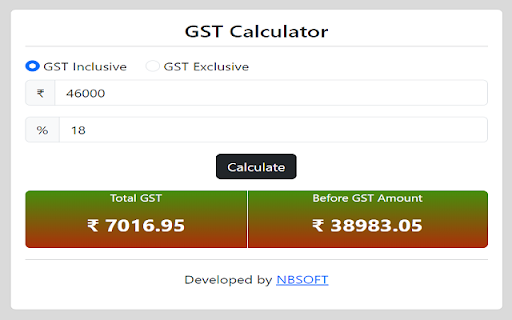
Indian GST Calculator. It is used to calculate GST (Goods Service Tax) amount and also it is calculate pre and post GST Amount.

GST Assistant
GST Extension to quickly download GST returns from GST Portal An extension to download your GST returns at a single click from the GST Portal. You just have to login to the GST portal, open the extension and you have access to all your files at a single click. Tech4CA extension allows to download following returns from GST portal: Instead of generating and downloading 12 separate monthly files (24 clicks), the entire financial-year data can now be generated and downloaded in just two clicks.

PSSO form filler
Automatically fills text, select, and selectpicker fields. The "PSSO Form Filler" is a designed to automate the process of filling out web forms with text, dropdowns, and selectpickers. Whether you’re dealing with repetitive forms or large-scale web data entry, PSSO simplifies your task by allowing you to save and reuse groups of data across different web pages. Key Features: Automatic Form Filling: Fill text, select, and selectpicker fields based on predefined groups of data. Dynamic Date Handling: Use dynamic date values such as: #today: Automatically insert today's date. #dayofmonth: Insert the first day of the current month. #lastdaymonth: Insert the last day of the current month. #datetime: Insert the current date and time in the format "DD/MM/YYYY HH ". URL-Free Application: With #none, you can apply selected form groups on the active tab without any URL restrictions. Group Management: Easily create, edit, rename, and delete groups of form data for reuse across various web pages. Import and Export Groups: Save all your groups to a file and import them later to restore your data or share with others. Custom Delays: Ensure fields are fully loaded before applying values using the délai option for select fields. Group Creation from Form: Manually create a new group from the popup by entering the group name and form fields, offering more flexibility in setting up groups. Creating a New Record: Open the "Options" page via the PSSO Form Filler icon. Enter details such as the group name, URL, form field CSS selector, field type (e.g., Text or Selectpicker), and the values. Save the record for future use. Filling Forms on a Web Page: Navigate to the target webpage. Open PSSO Form Filler, select the saved group, and hit "Fill" to automatically populate the form. Using Dynamic Dates: When creating or editing records, use special values like #today, #dayofmonth, #lastdaymonth, and #datetime to dynamically insert the date and time. URL-Free Form Filling: Use #none in the URL field to apply form data to any page without checking the URL. Managing Groups: Edit, rename, or delete existing groups directly from the options page, and refresh the group list to apply changes immediately. Importing and Exporting Groups: Use the export function to save your groups to a file and restore them later with the import feature. Creating a New Group from a Form: Manually create a group from the popup by entering the group name, URL, and form fields, providing an easier way to set up groups. Tips for Selecting CSS Selectors: To ensure accurate form filling, you need the correct CSS selectors for each form element. Here’s how to easily retrieve them: Use Browser Developer Tools: Right-click on a form field, select "Inspect," and copy the CSS selector from the Developer Tools panel. Use Helpful Extensions: Tools like FFT - Form Field Tracker or other CSS selector extensions can help you find and verify selectors quickly and easily. By following these steps, you can effortlessly automate repetitive form filling tasks and save valuable time with PSSO Form Filler. Version Updates: Version 1.71 : Fixed code for "Refresh all tabs" button. Version 1.7 : Added a search bar in options, allowing you to filter your records by group name. Added a refresh button in the popup to refresh all open tabs. Fixed "Unchecked runtime.lastError: Cannot access a chrome:// URL" error that occurred when using the extensions on browser system pages (chrome://extensions/, edge://extensions/) Version 1.6 : Added support for autocomplete fields. The extension can now handle fields that require the user to select from a list of suggestions before submission. Version 1.5 : Added the ability to export and import groups. Introduced the option to rename a group and modify its associated URL. Implemented a feature to create a new group from the popup, allowing users to define the group name and form fields manually. Version 1.4 : Added the #none feature for URL-free form filling. Introduced #datetime for automatic date and time insertion. Improved display on the "Options" page with tooltips for long text values. Version 1.3 : Added the délai feature to delay form filling until certain fields are fully loaded. Version 1.2 : Added #dayofmonth and #lastdaymonth for first and last day of the current month insertion. Enabled direct page opening via the "Open Page" option. Version 1.1 : Added the #today feature for current date insertion. Version 1.0 : Initial release with support for automatic form filling.

gst.xlsdeal.com Bridge
gst.xlsdeal.com Bridge is a Chrome extension that helps users securely fetch their own GST data from the official gst.gov.in portal and generate structured reports on gst.xlsdeal.com. The extension works only after the user logs in manually to gst.gov.in using their own credentials and provides consent to fetch data. Supported Data: GSTR-1 GSTR-1A GSTR-2A GSTR-2B GSTR-3B GSTR-9 GSTR-9C GSTIN profile and registration details How It Works: User logs in to gst.gov.in by give credential to xlsdeal.com, this will help to login to gst site there after your permission. Users can view, analyze, and download reports Reports & Downloads: Annual GST compilation Return-wise comparison reports Reconciliation summaries Excel and PDF downloads (where available) Privacy & Security: No GST credentials are stored in the extension, credentials are store in xlsdeal No background access without user action Data access is limited to user-requested operations only This extension helps eliminate manual GST data downloads, reduces errors, and saves time for businesses and tax professionals.

GST Calculator
Easily calculate GST with this simple tool, perfect for quick and accurate tax computations. ✨ SIMPLIFY YOUR GST CALCULATIONS! ✨ Say goodbye to manual errors and tedious tax computations. With the GST Calculator Chrome Extension, you can calculate Goods and Services Tax (GST) quickly and accurately without leaving your browser. 🔹 FEATURES YOU'LL LOVE: 💡 Easy & Fast: Perform GST-inclusive or GST-exclusive calculations in seconds. 🔧 Custom Rates: Use standard rates or input your own for specific needs. 🎯 Accurate Results: No guesswork—get precise calculations every time. 🚀 Seamless Use: Designed for business owners, accountants, and everyday users. 📈 BOOST PRODUCTIVITY: Why switch between tabs or use separate tools? Calculate directly in Chrome and save time! 🔗 GET STARTED TODAY: Install the GST Calculator and simplify your tax processes with ease. ✨ GST made simple, efficient, and hassle-free! ✨
