
gmjkhhheaknfaekapfiedhohdilpmgci

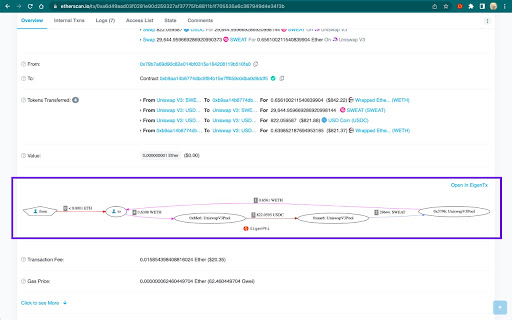
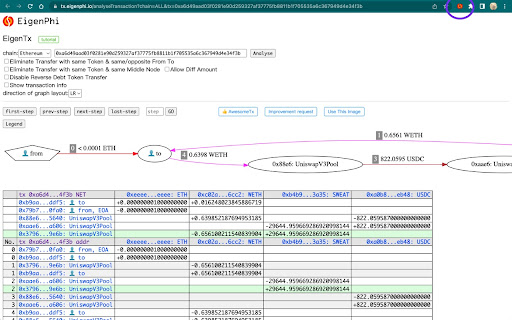
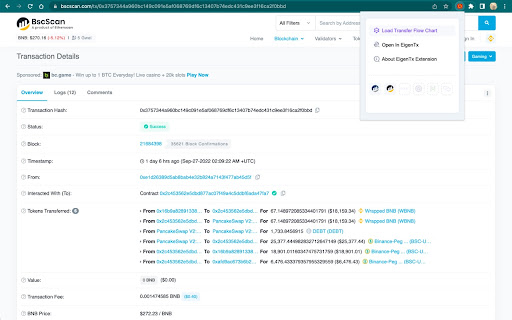
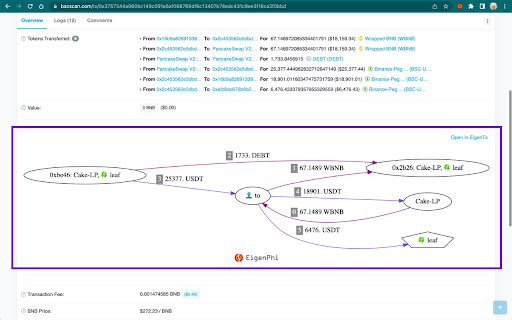
Transaction visualization tool for various chains, which generates token flow chart to give you more insights into the transaction EigenTx is a public-facing on-chain transaction visualization tool on various blockchains. EigenTx aims to help you quickly understand the transfer flow details of any on-chain transactions. In version 1.5, the extension loads the description of the current transaction from the EigenPhi database. More information could help you identify and understand "arbitrage," "sandwich," and “liquidation" types of transactions. Start from version 1.4, the extension supports users to load detailed token flow graphs on etherscan (and many blockchain explorers, check details below) transaction pages based on any selected transaction, which will give you more insights into what the transaction does and how the transaction is operated. By clicking "Load Transfer Flow Chart", a chart will be loaded automatically under "value section" of the transaction page, which visualizes the "tokens transferred" section. - Ellipse stands for the address of blockchains; - Arrows between nodes stand for token transfers; - More legends, please visit https://tx.eigenphi.io/; - Each node and line can be clicked to view details; Also, if you want to check more information, you can be directed to the full analyze tool page by clicking "Open in EigenTx" to view more. We support explorers of blockchains, including : Ethereum, BSC, Avalanche, Polygon, Arbitrum, Optimism, Fantom and Cronos. EigenTx is an open-sourced project, view the source code in GitHub repository by clicking the "About EigenTx Extension" button. You can find our Privacy Policy Terms at https://github.com/eigenphi/EigenTx-extension/blob/main/PrivacyPolicy.md If you need any help, please contact us via Twitter (https://twitter.com/eigenphi) .

IPFS Companion
Harness the power of IPFS in your browser IPFS Companion harnesses the power of your locally running Kubo IPFS node (either through the IPFS Desktop app or the command-line daemon) directly inside your favorite browser, enabling support for ipfs:// and ipns:// addresses, automatic IPFS gateway loading of websites and file paths, easy IPFS file import and sharing, and more. IPFS is a peer-to-peer hypermedia protocol designed to make the web faster, safer, more resilient, and more open. It enables the creation and dissemination of completely distributed sites and applications that don’t rely on centralized hosting and stay true to the original vision of an open, flat web. Visit https://ipfs.tech to learn more. - Automatically use IPFS to retrieve sites, files, and other resources already stored on IPFS (including redirecting DNSLink hostnames to IPNS names via your choice of gateway) - Support content-addressed IPFS paths (/ipfs/) and URIs (ipfs://) in your browser, and redirect them to the gateway of your choice - Share files from your browser by importing them to your local IPFS node via right-click or drag-and-drop, including the option to preload files at a public gateway - Check gateway info and Kubo RPC status with a single click, see how many peers Kubo RPC is connected to at a glance from your browser’s menu bar - Copy shareable links, snapshot links, IPNS/IPFS paths, and CIDs for IPFS-hosted sites - Common IPFS tasks — like pinning files and launching your IPFS Web UI dashboard — are available right in your browser - Options to toggle IPFS redirects globally or per website You’ll need to have a local IPFS node running on your computer to enjoy all IPFS Companion's features — either from your terminal (https://docs.ipfs.tech/install/command-line/) or using the friendly, free IPFS Desktop app (https://docs.ipfs.tech/install/ipfs-desktop/). Learn about IPFS and how it’s changing the Internet at https://ipfs.tech See the IPFS Companion privacy policy at https://github.com/ipfs/ipfs-companion/blob/main/PRIVACY-POLICY.md

Ready X
Ready X is the self-custody wallet for crypto natives. With 2M+ downloads, it’s been redesigned to be faster, smarter, more rewarding, and actually fun to use. Put your crypto to work. - Swap ETH, wBTC, USDC and more with ultra-low fees - Stake ETH, STRK, Bitcoin (BTC) to earn Staking rewards - Invest in DeFi protocols to earn yield and get Bitcoin (BTC) rewards - Buy tokens in seconds via card or bank transfer - Send crypto from exchanges easily - Full self-custody - your keys, your coins - Built-in 2FA with smart accounts - Fraud Protection on every transaction - Customer support from real humans - Ledger and multisig support for maximum security Our smart contracts are used by Binance, OKX, Kraken and more. - Use Ready X on desktop or mobile - Buy and trade NFTs - Experience smart wallet features like Paymaster and Multicall Download Ready X and see why 7 out of 10 Starknet users choose us.

Mask Network
The portal to the new & open Internet. Send encrypted message and decentralized Apps right on top of social networks. Encrypt your posts & chats on You-Know-Where. Allow only your friends to decrypt. Mask Network is a portal to the new, open internet. With Mask Network, you can send encrypted posts to your friends, participate in cryptocurrency lucky-draws, and share encrypted files on the platforms you are already using. Now #OwnYourData and enjoy financial autonomy across mainstream social network sites through Mask Network. All you need to do is to go through the set up guide and you can use it immediately! Mask Network is a free software and we are willing to take any code audit from anyone. We do not and will never store any of your personal data! More info on Mask.io

DefiLlama
DefiLlama Extension Wallet tags on Etherscan: Llamas have done their analysis and tagged tens of millions of addresses with behavioral or entity tags, allowing you to unmask the mysterious figures behind each crypto wallet, right inside your favorite blockchain explorers. Accurate pricing for exotic tokens on Etherscan: This extension wields the limitless llama power to show you accurate pricing of any tokens that are missing prices on Etherscan. It also re-calculates the token balances after refilling the missing prices. Phishing link warning: The cute llama icon on your browser extension tool bar is an unintrusive indicator that will turn red when you are visiting a suspicious website, or turn green when you are visiting a trusted website. Be safe with the llamas! Privacy: We do not track you in any way in the extension, and we only request access to Etherscan and similar blockchain explorers, in order to inject llama token prices and wallet tags. Twitter phishing detection: We detect reply tweets likely to be scams on twitter and mark them with a red background. Explanations for permissions requested: - Read and change data on all sites: Necessary to augment etherscan with wallet tags as we have to inject code on those pages, to add phishing detection on twitter. We request the permission for all sites so that we can easily add more as they are needed. - Read your browsing history: Necessary to read the current url where the user is in order to detect phishing domains and change extension icon to alert the user. Extension never reads browsing history but we have to request permission for it to be able to read current urls.
