
gmjbokljijbegndgfhbmobaniejnaali
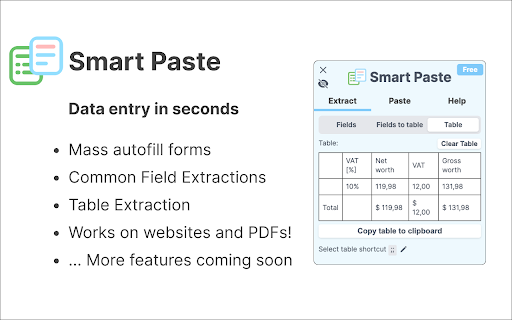
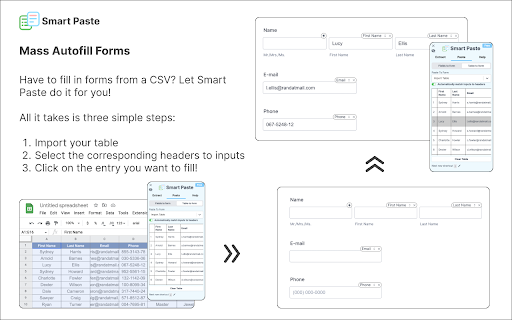


A browser extension to automate data entry tasks with form filling, text extraction and AI features Introducing Smart Paste - the ultimate tool for hassle-free data entry! With Smart Paste, you can save time and effort by automating repetitive tasks such as extracting common fields from websites and putting them into a table or extracting tables from PDFs and websites to Excel format. But that's not all! Smart Paste also has the ability to autofill forms from table data, making it even easier to get your work done quickly and efficiently. And if you need to fill out forms using data from different tabs on Chrome, Smart Paste has got you covered. Don't waste any more time on tedious data entry tasks. Download Smart Paste now and make your life easier! This application replaces the default Chrome pdf viewer with pdf.js to render PDF files, so we wanted to shout them out! If you have feedback or feature suggestions, email us at hello@smartpaste.io! We are also looking to give away a few discounted pro licenses if you're willing to hop on a 15-minute call here: calendly.com/smartpaste/15 Version Updates: Version 4.2.3: - Fix visibility for input pills Version 4.2.2: - Fix agree to download Version 4.2.1: - Add LLM feature beta using local mistral model Version 4.1.14: - Improved form filling (more input types) Version 4.1.13: - Horizontal movement - Smooth scrolling for form pasting - Form pasting is improved Version 4.1.12 - Fix ORIGIN check Version 4.1.11 - New pdf.js version, fixed pdfs that need auth - New sidebar vertical movement Version 4.1.10 - Fixes some PDF table copy for multiple lines Version 4.1.9 - Add login button from sidebar Version 4.1.8 - Usage analytics Version 4.1.7 - Fix filling PDF forms and don't clear inputs on exiting the extension Version 4.1.6 - Stop propagation when typing in the input fields - Consistent templates when DOM updates Version 4.1.5 - Fix field updates on change URL Version 4.1.4 - Fix login through website Version 4.1.3 - Smart Paste will no longer overwrite inputs where the user inputs data. It will only modify inputs it auto-fills. Version 4.1.2 - Fixed Extract consistency issue, Fields to Table data should be consistent across same URL Version 4.1.1 - Fixed bugs with the extension not closing, form filling pill UIs not appearing, and extract fields not updating when switching tabs. Version 4.1.0 - Added Hotkeys to extract tables, add fields to a table and fill forms from tables - Simplified the onboarding page - Added a toggle to disable suggested data sources when filling forms - Improved the auto data source suggestion logic - Many many bug fixes Version 4.0.1 - Added a new logo for better visibility in all backgrounds. - Added a minimize button so the sidebar won't cover input forms. - Fixed a bug where some input overlays won't follow the page when you scroll. Version 4 - Added a beautiful new sidebar UI to support all the new features. - Added auto form-filling from fields and tables - Added fields extraction - Added fields extraction to tables - Added ability to import tables from excel

Paste and Go Key
Adds a changeable keyboard shortcut that pastes the clipboard into the URL bar and loads it/searches for it. Adds a keyboard shortcut to paste the clipboard into the URL bar of the current tab or a new tab and loads it if it is a URL or otherwise searches for it. The search function is disabled by default and the search engine that is used can be changed in the settings. Notes: - The keyboard shortcut can be changed through the "Keyboard shortcuts" tab in the browser's Extensions page. - If the search URL is left blank then searches will be done using the browser's default search engine.

Paste It - Text Snippets
Paste text snippets from the toolbar, context menu or keyboard shortcuts ⭐ Quickly paste text snippets in your browser⭐ Open the extension options to set up to 16 text snippets and toggle any of three handy ways to paste: - Click the 'Paste It' toolbar button. - Use a keyboard shortcut (Alt+V by default, fully configurable) - Right-click to paste from the context menu. Paste It is safe, secure and free to use with no ads or tracking.

Copy Paste Input Fields
This Chrome extension allows you to copy values of all input fields from one page and paste them to another page. This Chrome extension allows you to copy values of all input fields from one page and paste them to another page. NOTE: Currently, the extension only supports copy/pasting of Input fields.

CopyPlus
Enables single-click copying of HTML form data from one web application to another with a set of custom field-to-field mappings. Do you hate wasting time entering the same data into multiple systems? We do too. That’s why we created CopyPlus. CopyPlus eliminates duplicate data entry by allowing you to single-click copy data from one web application to another. That means you can copy data from your CRM to your Billing system and from your Billing system into your ERP system. It’s that easy.
