
gmdmkobghhnhmipbpplibkgekdfaacjp
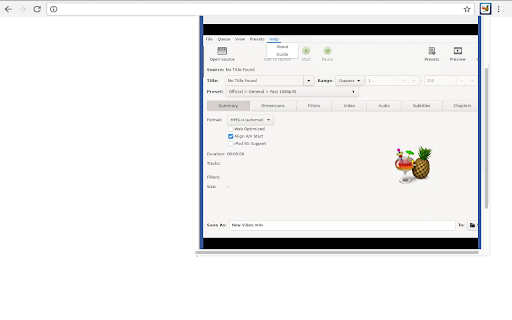
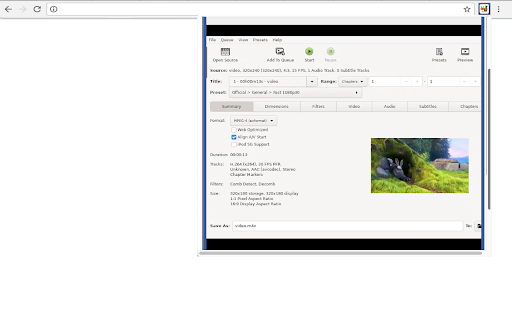

This extension allows users to use the Handbrake software program. Handbrake is a program for converting video from nearly any format to a selection of modern, widely supported codecs. HandBrake works with most common video files and formats, including ones created by consumer and professional video cameras. HandBrake leverages tools such as FFmpeg, x264, and x265 to create new MP4 or MKV video files from these Sources. With loads of pre-set formats available for almost any standard: Android, Apple, Playstation, Vimeo, YouTube, Windows, and Matroska, among others, this app is capable of reworking videos at up to 4K resolution and almost any aspect ratio you need. - How do I add subtitles in HandBrake? To add subtitles in HandBrake, you will first need to open the video you want to play. Once opened, click on settings > subtitles > import. Select the subtitle document you want to sync and finally click on 'start decoding'. - What output codecs are supported in HandBrake? HandBrake supports the most popular audio and video codecs, including those belonging to MP4, MOV, AVI and so on. Supported Input Sources: Handbrake can process most common multimedia files and any DVD or BluRay sources that do not contain any kind of copy protection. - File Containers like .MP4, .MKV and WebM - Video Encoders like AV1, H.265, … - Optional Hardware accelerated video encoding - Audio Encoders like AAC, MP3, … - Audio Pass-thru like FLAC, DTS, Opus, … - Title / chapter and range selection - Batch Scan and Queueing of encodes - Chapter Markers - Subtitles like VobSub or Closed Captions. - Constant Quality or Average Bitrate Video Encoding - Support for VFR and CFR - Video Filters: Deinterlacing, Decomb, Denoise and scaling - Live Static and Video Preview This extension also includes access to a file manager to upload and download videos managed by the app. This extension is the Handbrake online distribution so it is compliant with the Handbrake GPL.

Video Converter
Video Converter brings unmatched convenience to creative workflows. The add-on empowers users to refine, compress, or repurpose footage in seconds while safeguarding cinematic brilliance. Its intuitive interface bridges the gap between raw footage and polished output without steep technical demands. Whether you're tweaking a vlog or prepping a full-length documentary, every edit feels effortless and precise! ✨ 👉 The extension is designed for: ⏩ Students & Instructors 📖 – capture lectures and reshape lessons on demand ⏩ Marketing Teams 📈 – churn out platformready shorts for campaigns ⏩ Freelancers & Creators 💼 – harvest highlights for portfolios or teasers ⏩ Bloggers & Reviewers ✒️ – distill interviews into concise reference clips ⏩ SocialMedia Managers 🤳 – craft shareable snippets from live streams ⏩ Anyone chasing frictionfree conversion 🎉 – reformat footage in seconds 🔎 What can this extension do? ✅ Instantly convert any video to another format with high qulity ✅ Easily change the resolution to 480p, 720p, 1080p, or even 4K ✅ Smooth one-click conversion from mov to mp4 ✅ Create expressive animated clips with video to gif mode ✅ Compress and convert video to mp4 for fast sharing Rapid Installation ⚙️ • 🚀 Video Converter integrates from the webstore in under a minute • ✨ Jump into action without manuals or steep learning curves Guided Interface 🖥️ • 🍀 The layout highlights essential toggles for newcomers • 😎 Convert video to GIF workflow appears as a friendly demo template Quick Access Pin 📌 • 📌 Keep Video Converter fixed on the toolbar for immediate reach • ✅ Prevent overload by keeping core tasks one tap away Trial Playgrounds 🎬 • 🔍 Transform test clips to build confidence with settings • ⏱️ Develop swift habits that shave hours off larger edits Inline Pro Tips Overlay 🪄 • 💡 Hover hints reveal expert shortcuts as you explore • 🎓 Level up workflows without leaving the conversion screen Turbo Extraction ⚡ • 🌠 Harness Video Converter accelerated encoding for looming deadlines • 🐦 Convert twitter video to MP4 directly from a tweet link in one tap Universal Playback 🎞️ • 🎧 Enjoy broad compatibility across phones, tablets, and projectors • 📱 Keep files lightweight yet cinematic for mobile audiences HighFidelity Preservation 🎯 • 🎶 Retain color depth and bitrate precision during every shift • 🛡️ Safeguard metadata for professional archiving needs Smart Workspace 📂 • 💾 Rename, sort, and batchlabel clips inside a single hub • 🎯 Stay organized without juggling numerous windows Instant Thumbnail Forge 🖼️ • 📸 Autogenerate preview images in multiple sizes • 🏷️ Embed timecode stamps for fast storyboarding Seamless Reencoding 🔄 • 🚀 Accelerate remastering across obscure containers with Video Converter • 📼 The phrase video to video converter appears as a legacy expert preset HandsOff Automation 🤖 • 🧰 Script repetitive jobs with saved profiles and schedules • 💡 Focus on creativity while machinery handles the grind Preset Marketplace 🛒 • 🔀 Swap communitymade presets with a single click • 🌟 Rate and bookmark favorites for recurring jobs OneStop Dashboard 🕹️ • 🚦 Navigate Video Converter bitrate, resolution, and framerate in one pane • 🌈 Invoke any video converter preset to match tricky source media Portable Freedom 🎒 • 📲 Run tasks on classroom PCs, office stations, or mobile tablets • 🌐 Cloud sync ensures versions follow you everywhere Collaborative Flow 🤝 • 🏅 Share consistent settings files with teammates for identical outputs • 🔄 Reduce confusion in multieditor projects Fortified Privacy 🔒 • 🔑 Assets never leave local memory unless you request cloud backup • 🕵️ Trust zeroknowledge safeguards for sensitive footage EcoMode Scheduler 🌱 • 💤 Queue heavy conversions for offpeak hours • 📉 Reduce energy costs while maximizing speed International Standards 📏 • 💡 Export PAL or NTSC timelines to satisfy regional broadcasters • 📡 Embed correct color spaces for specific markets Subtitle Harmony 📝 • 🎭 Burn captions or keep them detached for flexible playback • 📜 Manage SRT, VTT, and ASS tracks with draganddrop convenience RegionSafe Encryption 🛡️ • 🔐 Protect interviews or premium courses against unauthorized access • 🚧 Apply watermarks for earlyrelease screeners AssemblyLine Mode 🛠️ • 🚂 Queue hundreds with Video Converter and monitor realtime dashboards • 🕑 Ask the engine to convert the video, autonaming each output by timestamp Adaptive Bitrate Sets 📶 • 📉 Generate multiple qualities for streaming ladders in a single run • 🏆 Provide perfect delivery regardless of viewer bandwidth Project Templates 📂 • 🗂️ Store parameter bundles tagged by client or series title • 🔄 Reapply them with a single click when new episodes arrive Live KPI Dashboard 📊 • ⏱️ Monitor throughput, queue length, and hardware load • 🛠️ Reallocate resources on the fly to avoid bottlenecks IndustryStandard Output 🏅 • 🎬 Video Converter profiles target consoles, phones, and smartTVs • 🔥 Select the fastlane video converter to MP4 option for nearinstant exports Codec Craftsmanship 🎛️ • 🧩 Choose H.264, H.265, or VP9 with intuitive radio buttons • 🎚️ Balance speed versus quality with visual graphs Embedded Chapters 📚 • 🔖 Insert interactive markers for long tutorials or webinars • ⏭️ Let audiences skip directly to highlights Smart Notifications 🔔 • 📨 Receive push alerts when a batch completes while phone is locked • 🏃 Resume work exactly where you paused without data loss Cloud Drop Points ☁️ • 🛫 Send outputs directly to Drive or Dropbox from handset • 📤 Share link previews without waiting for full upload Widget Quick Actions 📲 • 🏷️ Longpress the app icon to start popular tasks • 🔔 See progress counters without opening the app BrowserNative Tools 🧰 • 🕸️ Kick off sessions with Video Converter on shared kiosks—no installs • 💻 Leverage the online video converter online gateway for fireandforget tasks Session Continuity 🔄 • 🔗 Autosave every tweak so disconnections never kill progress • ⏮️ Restore tabs with history intact after power glitches Live Preview Windows 🪟 • 🖼️ Glide the playhead to inspect quality before committing bits • 🎯 Spotcheck color gradations framebyframe PermissionBased Sharing 📩 • 👫 Invite collaborators with onetime links and granular roles • 🛡️ Revoke access in a heartbeat once reviews conclude Session Handoff Tokens 🔑 • 🔄 Resume an unfinished job on another device securely • 🚀 No downloads—scan a QR and keep working ZeroBarrier Entry 🎫 • 💥 Enjoy perpetual access to Video Converter without subscriptions • 🆓 The suite doubles as free video converter software that rivals premium giants Transparent Licensing 📜 • 📃 Review clear terms that protect creators and businesses alike • ✅ Avoid vendorlock surprises when scaling operations EcoSmart Encoding 🌳 • 🍃 Choose lowpower presets to minimize carbon footprints • ♻️ Monitor energy savings in real time on the dashboard Format Integrity 🗜️ • 🛠️ Map every frame to exact bitparity during exports • 🔍 Master convert video format to MP4 routines for distributionready files OptIn Metadata ✏️ • 📑 Insert creator tags, episode IDs, or copyright watermarks • 📈 Enable automatic analytics hooks for performance insights FrameRate Alchemy ⏱️ • ⏫ Convert 24 fps footage to silky 60 fps for slowmotion repurposing • 🎞️ Preserve cadence with motionvector enhancement Optimized Presets ⚙️ • 🚀 Launch the MP4 video converter panel and pick devices from a curated list • 📲 Guarantee playback on legacy phones or 8K projectors alike ChapterSmart Timelines 🔖 • 📚 Autodetect scene changes and drop chapter markers • ⏭️ Let learners jump directly to quiz segments SurroundSync Sound 🔊 • 🎧 Merge multilanguage tracks with millisecond alignment • 🛡️ Apply loudness regulation for broadcast compliance Express Queue ⏩ • ⚡ Drop raw clips into basket and watch Video Converter video convert them while you storyboard • 🧭 Track ETA bars that adjust to CPU load in real time AutoCrop Wizard 🔍 • 🎬 AI senses letterboxing and crops precisely • 🎯 Maintain central focus without manual frame math Realtime Comparison 🔀 • 🪞 View before/after panels in sync for pixelperfect QA • 🏅 Approve or retry inside the same viewport OneClick Exports 🚚 • 📤 Pick destinations and let Video Converter convert video file to MP4 while uploading in parallel • 🔗 Copy sharelinks instantly for stakeholder review DualPath Creator 🎬 • 🎥 Swap between video and audio dashboards in one swipe • 🌀 Invoke GIF to video converter routine when needing motion backgrounds Layered FX Mixer ⚡ • 🚩 Stack LUTs, blur masks, and sound fades concurrently • 🔮 Preview compound results without baking each layer Cinematic Templates 🎞️ • 🏛️ Apply filmgrain or anamorphic mattes from the asset vault • 📽️ Achieve blockbuster vibes on social budgets Mirror Logic 🪞 • 📂 Run a video converter MP4 to MP4 pass to realign aging libraries • 🔐 Maintain checksum records for audit trails ColdStorage Sync ❄️ • 📦 Write directly to LTO or Glacier buckets from the UI • 🚀 Track retrieval costs before finalizing transfers DataDriven Metrics 📊 • 📈 View VMAF, SSIM, and PSNR charts after each encode • 🔍 Spot bottlenecks and refine parameters iteratively Hybrid Render Chains ⛓️ • 🖥️ Leverage CPU+GPU pipelines for exponential speed boosts • 💾 Autoshift to CPU only when VRAM runs short ScenarioPlaybooks 📚 • 📖 Import readymade recipes for gaming, lecture capture, or drone footage • 🎯 Guarantee bestfit outputs without deep tech knowledge CrowdRanked Filters 🥇 • 🏅 Browse leaderboards to pick the best free video converter tweak sets • ✨ Plug them in with a single tap—no coding needed OpenForum Support 💬 • 📣 Ask peers, staff, or powerusers for troubleshooting tips • 🙌 Upvote answers to surface proven solutions Recognition Badges 🏆 • 🎖️ Earn accolades for sharing scripts or translating docs • 📜 Display credentials on your profile within the portal Challenge Events Arena 🏟️ • 🏆 Compete in monthly encoding contests • 🎁 Win badge upgrades and feature vouchers ClipLab Studio 🎬 • 🖼️ Drag highlight reels in and convert video into GIF moments for promos • 🎉 Preview looping effects onthefly before export MomentMatcher AI 🤖 • 🔎 Autodetect emotional peaks for trailer punchins • 💡 Generate timestamp cues for social uploads BeatSync Toolkit 🥁 • 🎶 Align cuts to BPM automatically for music videos • ⚡ Trim flashes to snare hits with framelevel accuracy Resolution Wizard 🧙 • 🔮 Interactive sliders reveal how to convert your video into a different size without fuzz • 📊 Realtime bandwidth estimates adjust as you move handles AspectSafe Frames 🖼️ • ✨ Guard against pillarboxing with adaptive padding logic • 🎯 Maintain brandguide margins perfectly SnapExport Grid 🗺️ • 🧩 Batchout square, 4:5, and 9:16 versions in parallel • 🚀 Reduce delivery lag for multiplatform drops StepByStep Coach 👟 • 📝 Onscreen prompts show how to convert video to MP4 with foolproof flow • 💡 Links to quicktips hover beside each toggle for instant clarity WizardMode Lightning ⚡ • 🚀 Autodetect codecs and suggest top settings for novices • 🔄 Rollback button lets you undo an entire encode in a snap FeedbackLoop Beacons 📨 • 📊 Rate each output so AI learns your taste over time • 🏆 Personal profile ranks encodes by success score SuccessArchive Gallery 🎞️ • 🖼️ Thumbnail wall catalogs every completed MP4 chronologically • 🔍 Search by tag, date, or bitrate inside the app window MissionControl Dashboard 🚀 • 🕹️ Central hub summarizes current jobs, tips, and stats • 📘 Oneclick links jump to detailed howto articles Video Converter stands as the definitive ally for modern storytellers, students, and enterprises alike. From lightningfast edits to archival perfection, its evolving arsenal keeps you ahead of every creative curve—without sacrificing quality, privacy, or budget! 🚀

Video Converter
Convert videos to MP4, MKV, MOV, WEBM, AVI – all locally in your browser. Fast, private, and easy to use. No uploads, no data leaks. 🎬 Video Converter – fast, private, and local! Convert your videos directly in Chrome – no uploads, no waiting, no spying. Everything happens right on your device, so your files stay private and safe. 🔐 🎞️ Supported output formats: MP4, MKV, MOV, WEBM, AVI – pick the one you need! ⚙️ Two modes to fit your needs: - Fast Mode (Copy) – super quick if your video is already compatible. - Full Mode (Transcode) – converts everything for maximum compatibility. Don’t worry, the app chooses the best option for you – but you’re always in control. 🎧 Choose what you keep: Want just the video? Remove unwanted audio or subtitle tracks with a click. 🌗 Light and Dark themes – because your eyes deserve comfort too.

Video Compressor & Filesize Reducer
Reduce filesizes and minify MP4, WMV, MOV, VOB, AVI. With this Tool you can compress whole video files without quality loss. Minify file sizes of all video file formats (mp4, wmv, mov, vob, avi).

MKV to MP4
MKV to MP4 is your ultimate solution! Convert MKV a MP4 effortlessly with unwavering speed and reliability! 🔥 👉 The extension is designed for: ⏩ Students & Educators 🏫 – Capture valuable course content in a more flexible container ⏩ Office Personnel 🏢 – Streamline important meeting takeaways for broader distribution ⏩ Freelancers & Designers 🎨 – Transform multimedia assets for polished client presentations ⏩ Bloggers & Podcasters 🎤 – Convert interview footage or discussion panels for quick repurposing ⏩ Content Planners 📆 – Generate shareable snippets from promotional clips or highlight reels ⏩ Anyone craving easy transformation 🏆 – Adapt video containers in seconds 🔎 What can this extension do? ✅ Instantly convert MKV to MP4 with one-click simplicity ✅ Adjust resolution dimensions to easily change video dimension and reduce file size ✅ Maintain original audio quality, ensuring clear and crisp sound ✅ Preserve visual integrity, keeping every frame sharp and vibrant ✅ Reduce file size effectively, making files lighter without sacrificing quality Quick Installation Procedure 🌠 • ⚡ MKV converter to MP4 effortlessly integrates into your chosen browser, minimizing any learning curve • 🔑 Begin transformations instantly through a straightforward wizard that guides you from start to finish Intuitive Navigation Screen 🌱 • 🌼 Access the core dashboard, where distinct features are logically arranged • 🚀 Perfect for beginners testing out container alterations without confusion Optimal Placement 🔖 • 📌 Pin the tool so you can pull it up without scrolling or rummaging through menus • ✅ Keep your workflow clutter-free and your essential functions within easy reach Practice with Smaller Clips ⏲️ • 🎯 Test short segments to master the process before tackling extensive projects • 💡 Develop time-saving habits that streamline each subsequent conversion Blazing-Fast Conversion ⚡ • 💥 Enjoy swift turnaround each time you change MKV to MP4, especially helpful on tight deadlines • 💎 Experience minimal downtime while juggling diverse tasks Broad Compatibility Spectrum 🌎 • 📱 Count on steady performance across leading systems and browsers • 🛠️ Access the extension on multiple devices for consistent usage Pristine Quality Assurance 🎯 • 🎧 Notice minimal drops in clarity or definition—every frame retains its integrity • 🔍 Ideal for professional displays or carefully edited showcases Smooth File Management 🗂️ • 📁 Keep your newly processed assets systematically labeled and organized • 👀 Quickly scan your archive whenever referencing older or repeated conversions Academic & Training Uses 📚 • 🌟 Students often ask how to convert MKV to MP4 for simplifying portable study resources • ⏳ Turn recorded seminars into more widely supported containers for easy sharing Office & Corporate Solutions 💼 • 🤝 Consolidate crucial footage for leadership briefings or remote team discussions • 🏷️ Create a streamlined repository that colleagues can tap into without technical hurdles Audiovisual Content Boost 🎨 • 💡 Channel your creative energies into dynamic projects by focusing less on file complications • 🛩️ Extend your reach by making content accessible across multiple platforms Personal & Casual Conversion 🎉 • 🍀 Archive treasured highlights from events, ensuring future playback remains hassle-free • 🌐 Hand off recordings to friends or relatives with universal container compatibility Reliability & Speed 🏎️ • 🚀 Count on a robust process—once you select MKV for MP4 transformations, you’re good to go • 🔧 Even large files are handled with consistent performance Innovation-Driven Design 💡 • ⚙️ Expect periodic enhancements that refine the user experience • 🏆 Leverage forward-thinking solutions shaped by evolving user requests Reinforced Data Privacy 🔒 • 🕵️ From start to finish, rely on strict measures for safeguarding your content • 🔐 Convert sensitive media knowing each step is secured Comprehensive Guidance & Helpdesk 📖 • ✅ Access a curated FAQ and straightforward documentation • 📢 Unlock best practices for optimal processing and final output Accelerated Study Routines ✏️ • 💥 Turn lecture captures into a more common container with MKV to MP4 video converter for quick referencing • 🏫 Carry study materials on any device without worrying about specialized codecs Business-Grade Efficacy 📈 • 📝 Enhance slideshows or presentations by ensuring easy playback in standard players • 🤝 Collaborate more effectively—recipients can open files instantly with minimal fuss Creative Freedom 🎨 • 📸 Repurpose your raw recordings into widely recognizable shapes for multi-platform distribution • 🎉 Highlight your brand content by focusing on production quality rather than format constraints Simple Resource Archival 🗄️ • 🤩 Maintain an organized system of saved materials for future reference or editing • 🔎 Quickly retrieve past conversions for re-use in different projects Centralized Interface 🖱️ • 🌠 Monitor conversion queues with real-time updates, including MKV format to MP4 transformations • 📜 An integrated help center clarifies the most common steps and terminologies Group Conversions in One Go 🎇 • 🗓️ Line up multiple container files for simultaneous handling, perfect for large-scale undertakings • 🏆 Save precious time by avoiding repeated manual processes Cloud Integration Ready ☁️ • 🚩 Sync with leading cloud services, guaranteeing files remain accessible from various endpoints • 📲 Retain maximum flexibility whether you’re deskbound or on the move Upgraded Security Architecture 🏅 • 🔰 Advanced encryption ensures that private footage remains hidden from unauthorized access • 🛡️ Ideal for professionals handling confidential or proprietary content Academia & Coaching 🏫 • 🏆 Build streamlined tutorials using a MKV to MP4 format converter so all learners see the same output • 🎉 Reduce bandwidth strain by maintaining efficient yet clear visuals Corporate Environments 🏭 • 🗃️ Simplify department-wide file exchanges with minimal training • 💹 Encourage consistent results across diverse team roles Visual Artists & Media Specialists 🎬 • 🎨 Convert raw or unorthodox recordings into friendlier containers for post-production refinement • 💎 Deliver previews that clients can view on everyday players Writers & Editors ✒️ • 💼 Maintain an organized collection of references or interview sessions • 🌱 Expand your creative process by focusing on content curation rather than technical hurdles VIII. MKV to MP4: Tangible Returns for All Users 🏅🔑 Drag-and-Operate Ease 🎉 • 💥 With a few clicks, let the extension handle the underlying work—never worry about container complexities • 🏷️ Reap the benefits of a single hub for your MKV to MP4 adjustments Organized Workspace 🧭 • 🌼 Maintain a clear dashboard, with everything you need just a tap away • 🍀 Boost productivity by cutting down on environment switching Knowledge Database 📔 • 🔎 Explore in-depth tutorials, anecdotal success stories, and specialized tips • 🧩 Adopt proven methods that amplify each conversion’s outcome Streamlined File Sortation 🗂️ • 🌟 Rely on automatic labeling and tagging for faster retrieval • 🎯 Prevent clutter by designating one tidy location for all completed tasks Seamless Toolbar Integration 🚀 • ⚡ Enable direct transformations from your browser’s top bar—no extra software required • 🎁 Enjoy immediate reach to every core function Mobile-Responsive Options 📱 • 🤩 Begin conversions on portable devices for unstoppable progress • ⚙️ Ideal for quick adjustments while multitasking or traveling Cross-Platform Stability 🏆 • 💻 Maintains a consistent level of efficiency on various operating systems • 🌠 No specialized add-ons needed for dependable results Transparent Development Notes 💬 • 📡 Stay updated on improvements that target performance and reliability • 🚀 Receive clarity on each feature as soon as it’s introduced Instant Transformation 🏁 • 🌈 Generate high-grade container swaps the moment you need to MKV transfer to MP4, saving critical time • 🎇 Keep your schedule uncluttered with swift turnarounds Cooperative Consistency 🤝 • 🏅 Standardize formats across departments, allowing everyone to collaborate without format-related holdups • 🛠️ Increase efficiency through uniform containers and naming conventions Rigorous Safety Protocols 🔒 • 🌐 Trust that data encryption will protect sensitive corporate or personal assets • 🏰 Rest assured that your materials won’t leak during the handling process Reduced Manual Oversight 🪄 • ☄️ Automate repetitive tasks, especially beneficial for large-scale or daily conversions • 🎉 Focus more on content editing, marketing, or presentation while the tool does the heavy lifting “Can it manage lengthy recordings?” 🙋 • 🌿 Absolutely! Even voluminous files handle well when you .mkv to MP4 converter is employed • 🔭 Great for capturing entire workshops or extended event coverage “Is data protected?” 🔏 • 🏵️ Yes, there’s robust encryption woven into each phase of processing • 💓 The extension prioritizes confidentiality and user security “Any file size thresholds?” ⚖️ • 🌊 The architecture supports sizable inputs without bogging down • 🍀 Expect a consistent, dependable output under most everyday conditions “Is online usage hassle-free?” 🌐 • 🌟 Indeed! Upload content, choose your settings, and watch everything convert • 🎶 Ideal for swift tasks where no installation is preferred “Could my system slow down?” 🚦 • 🚀 The extension is optimized for minimal resource use • 🍀 Even multiple tasks in queue rarely strain modern hardware Automatic Layout Detection 🌠 • 🌸 Quick-scan technology identifies essential parameters, letting you concentrate on format MKV to MP4 with fewer manual steps • 🏷️ Alter track specifics or naming details without leaving the main panel Boundless Versatility 💫 • 💡 Suitable for both personal tasks and enterprise-level demands, ensuring a robust yet user-friendly environment • 🌍 Depend on powerful features for any workflow scale Active Community Presence 🗣️ • 🤗 Interact with other enthusiasts who trade helpful suggestions • 🎉 Expand your skill set by exploring recommended best practices or unique approaches XIII. MKV to MP4: Your Reliable Partner 🌟🏆 Versatile Media Handling 🚀 • 🎇 Merge various recording types and let the tool seamlessly convert .mkv to .mp4 • 🎉 Keep the essence of your clips intact while enhancing user accessibility Unified Process Flow 🤩 • 🏷️ Skip the chaos of installing multiple tools—one extension suffices to handle MKV file to MP4 transformations • 💼 Manage your environment with a single integrated approach Boost Group Output 🌠 • 💬 Let teams focus on relevant tasks without battling cryptic file constraints • 🍀 Engage colleagues with uniform results, no matter their technical background Higher Security Threshold 🛡️ • 🕵️ Tightly encrypted conversions keep sensitive recordings off the radar • ✅ Enjoy peace of mind in even the most confidential contexts Structured Repository 🎀 • 📂 Organize your final content through consistent naming and sorting • 🌸 Trace older versions or reworks with ease Efficient Labeling Strategy 🔖 • 🎯 Tag your content carefully while you convert MKV to MP4 free, ensuring quick retrieval later • 🍓 Save time in busy schedules by building a logical naming system Discover Keyboard Shortcuts 🚀 • ⏩ Learn built-in hotkeys for toggling specific preferences in a snap • 🎱 Perfect for power users who demand immediate reconfiguration Keep Pace with Updates 🌈 • 🌌 Enable auto-upgrades so you never miss important performance patches • 🌠 Ensure the extension’s reliability remains intact no matter how large your tasks become Universal Scalability 🏆 • 🏹 Handle anything from short snippets to extended conference recordings • 👏 Perfect for diverse workloads requiring consistent output Adaptive Enhancements 💻 • 💡 Expect version improvements that refine speed, stability, and security • 🗣️ User feedback drives progressive changes for a better interface Polished End Results 💎 • 🌸 Surpass typical converting MKV to MP4 expectations with vibrant clarity • 🤩 Ideal for public showcases or private archives Resilient Architecture 🏰 • ⚒️ Engineered to convertir MKV a MP4, day after day • 🌀 Rarely falters, even with simultaneous requests Comprehensive Protections 🎗️ • 🏆 Strict encryption algorithms guard your most sensitive media • 💬 Detailed logs ensure transparency at every step Broad Application Scope 💫 • 🏆 From single-person use to large organizations, it caters to every capacity • 🗒️ Equally helpful for short tests or extensive content curation Sustainable Innovation 🚀 • 🌐 Developments keep it aligned with global standards • 🎨 Expand your creative or professional repertoire confidently Acquire & Pin 🏷️ • 🍀 Locate MKV to MP4 in your browser’s store for seamless setup • 💼 Keep it pinned so you can trigger conversions at a moment’s notice Convert & Verify 🌠 • ⚡ Initiate a session by uploading your source material • 🤝 Inspect the final container to confirm performance meets your criteria Organize & Share 🌍 • 📤 Save locally or distribute via cloud-based drives • 🤗 Notify collaborators once your content is ready Watch for Upgrades 🆕 • 🚀 Keep an eye on new refinements that expand on current features • 🏅 Contribute suggestions to steer future improvements XIX. Roadmap for Expanding Potential 🎉🔭 Enhanced Platform Links 🌐 • 🏷️ Upcoming integrations with popular editing suites and streaming hubs • 📈 Simplify direct uploads to community channels Amplified Parallel Conversions 🔥 • 💡 Process even bigger volumes concurrently, benefiting enterprise-scale workflows • 🚛 Shave hours off your transformation timeline Real-Time Preview Mode 🎬 • 🕰️ Sample a few seconds of the updated container before finalizing • 🌟 Perfect for fine-tuning subtle audio or visual elements Strengthened Sharing Pathways 🔗 • ✨ Generate secure shareable links for feedback or team reviews • 🍰 Encourage collaborative exchanges without risking data leaks Experience the convenience and outstanding results offered by MKV to MP4. With its user-centered design, robust security, and steady performance, it’s no wonder so many opt for its reliable container transformations. Whether you’re repurposing a key presentation or compiling your cherished personal archives, MKV to MP4 stands as the all-in-one solution you’ll soon find indispensable! 🤩
