
gmaddeabdjpmjkghhhhfdkeemfcnknpl

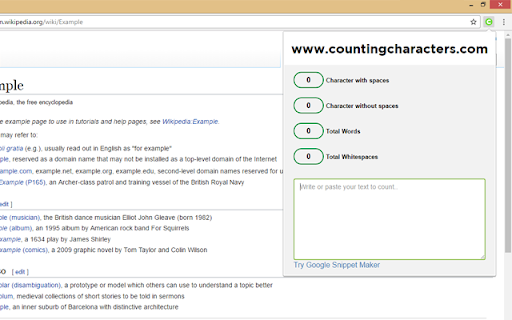

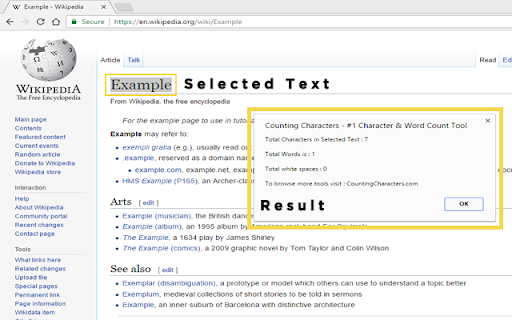
Counting Characters is a free character count online extension that gives you instant results(total characters, total characters without spaces, total white spaces and total words) of given text or selected text. (www.countingcharacters.com) New: Website Word Count - With our new feature, you can count the total words of the web page on one click. Why should you choose this extension(Counting Characters)? # This extension is free to use. # Also work in offline. # It gives you real-time results of given text. # Count characters and words by selecting text from the context(right-click) menu. # Case Converter # UPPERCASE Converter # Lowercase Converter # Titlecase Converter # Our extension is best for the writers and bloggers.

SEO META in 1 CLICK
Displays all meta data and main SEO information for the best SEO SEO META in 1 CLICK is a tool that displays all meta tags/data and main seo information clearly. By using this tool, we hope you can better manage and improve your SEO and visibility on Internet We focus on displaying: ✔ title and its length, ✔ description and its length, ✔ URL (and meta-canonical url too), ✔ meta-robots, ✔ displaying headers in order of their appearance in HTML (H1, H2, H3, H4, H5 and H6), ✔ number of images with and without ALT, ✔ the number of links (internal, unique, ...) ✔ Open Graph and twitter social data ✔ Robots.txt and sitemap.xml ✔ and much more... (See printscreens) You can also via ETERNAL TOOLS analyse your site and know how improve it (html, css, Google Rich Snippet, PageSpeed...)

Character Count Tool
Calculate how many words and characters are on a page. Simply highlight the text, right click, and click the Character Count icon! Want to do a quick word character count/character count for an essay you're writing/article you're reading? You can do so now by using the context menu. Simply highlight the text you want to count characters/words for and right click => Choose our extension from the context menu and it'll help you count the number of words you highlighted. Another way you can use our extension is by clicking on our extension icon => paste in the text you want to do a word count/character count for. Try using this free character count tool/word count tool today and let us know if you have any questions. Ensure you hit the word limits/essay assignment lengths by using our tool before you submit in your essays/homework to your teachers.

NoFollow
Outline nofollow links, detect nofollow and noindex meta tags on webpages. Features website filtering and custom CSS outline styles. :: Features ★ supports NOFOLLOW, UGC, and SPONSORED attribute values ★ supports search engine specific robot meta tags ★ disable or enable extension for defined websites v6.0.0 - switched to extension manifest V3 - added export and import - added keyboard shortcuts - removed "Remember minimised state" setting - now it always remembers minimised state across browser restarts - misc code improvements v5.3.3 - fixed visual issues in extension options for high pixel density screens v5.3.2 - trying a fix for errors on Mac OS v5.3.0 - ignore certain errors in logger - added CSP for better security v5.2.2 - fixed issue where extension would not mark links with image nested more than one level deep v5.2.0 - support for UGC and SPONSORED attribute values (there is no way to visually distinguish it from NOFOLLOW value at this time) - replaced facebook and twitter share links on options page v5.1.0 - improved the way injected script communicates with background script - fix: improved error logging v5.0.0 - new: added outline for links without nofollow attribute ("DoFollow" links) - new: added outline for external links - new: added "D" button next to each style input so you can easily restore default style value - new: inject content scripts to already opened browser tabs on extension start, this should improve user experience on extension install and update - change: updated minimum requirements to Chrome v39 - change: updated default outline styles (this will be noticed only by new users) - change: merged content scripts into one script, should use less resources now - change: made sure that extension doesn't try to load itself into pages from web store to avoid "no permission" errors - change: improved error logging - change: removed Google+ icon and updated Facebook and Twitter icons ===> Full changelog on the website

FatRank - SEO Rank Checker
Check your website's ranking position in Google search results across different countries * Please Note: This extension will use your Google local search settings and will include local listings as a rank position. To stop this make sure your location in Google search settings is set to your country i.e 'United States'. * Fat Rank is a FREE lightweight in browser keyword rank checker tool. Simply visit a website, click the Fat Rank icon, type in your keyword and it will tell you where that website ranks in Google and which page URL ranks. It is very practical and usable for both competitor research, prospecting and even simple quick ranking reports for your clients. Visit a website, click on the extension icon and type a keyword or key phrase and the extension will return the current Google ranking position for that domain and also provide you with the url of the page the keyword ranks for. It will search down to a ranking depth of 100. If the domain doesn't rank for a keyword within the top 100 positions, it will simply display 'Not found'. You can make multiple keyword / key phrase checks and these will all store within your session history tab where you can export via a CSV as report for your client. Beautifully simple, usable and practical tool designed for SEO's by SEO's. * Fat Rank is counting local results how do I stop this and check country wide? This extension will use your Google local search settings and will include local listings as a rank position. To stop this make sure your location in Google search settings is set to your country i.e 'United States'. * What does 'Not Found in Top 100 Results' mean? This means the website you are viewing does not rank within the top 100 results for the keyword you entered. We only check up to the 100th result for speed. * What does 'Try Again Later, Google is Blocking Searches' mean? Fat Rank uses your browser behind scenes to check a keyword ranking position. If you do too many keyword checks within a short period of time Google temporarily block search results. We recomend to leave the extension for a while and try again later.
