
glknmaideaikkmemifbfkhnomoknepka
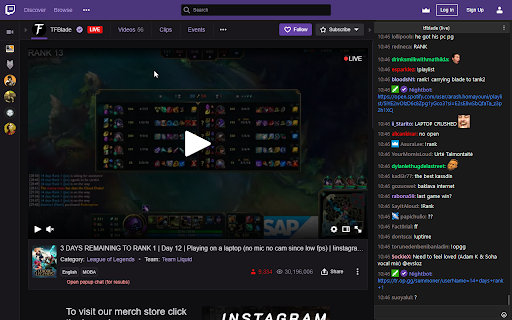
Replaces the chat on Twitch.tv with Chatterino. Overlay the Twitch.tv live chat with Chatterino, bringing the native performance and features of Chatterino to the website. Have the same experience chatting no matter if you are watching or are in offline chat. We use events and data provided by the browser to overlay a native Chatterino window over the browser. The information includes the channel in which the user is in, as well as the size of the chat. Changing the tab or closing a window causes the Chatterino application to hide/show the window. Chatterino tracks the position and z-level of the Browser window and moves itself accordingly. NOTE: - This extension only works on Windows. - We need to overlay a native window over the browser window which is tricky by design and may not work for you setup.

Previews (For Twitch & YouTube & Kick)
Live hover previews for Twitch & YouTube & Kick | A bunch of quality of life improvements for Twitch & YouTube & Kick Hover previews, sidebar favorites, multi-stream, FlashBang Defender, auto-refresh on errors, fast-forward and dozens more Quality-Of-Life features — all for Twitch & YouTube & Kick. Previews is a browser add-on for people who watch a lot of streaming content. Peek at any channel before you click. Pin your favorites to the top. Watch multiple streams at once. Stop the video from breaking. Snipe predictions. Catch up to the action with one click. Fast-Forward. Record streams. Maintained since 2020 and rated 4.8/5 stars! 🖱️ HOVER PREVIEWS Live video or image thumbnails appear when you hover over channels — in the side panel, directories, and clips. Adjustable size and audio. ⭐ SIDEBAR FAVORITES A dedicated Favorites list pinned to the top of your sidebar, just for the streamers you actually care about. Optional custom categories. Show offline favorites too if you want. 🔆 FLASHBANG DEFENDER For 2 AM moments when the streamer opens a white browser tab. One click dims the video so your eyes survive. 🔁 AUTO REFRESH ON PLAYER ERRORS Automatically refreshes the player on errors #1000, #2000, #3000, #4000, and #5000. No more dead streams. 🎚️ AUTO SET PLAYER QUALITY Forces the video to your selected quality on every page load and channel change, with a fallback if your first choice isn't available. 🛡️ PREVENT QUALITY DROPS IN BACKGROUND Stops the video from sliding to 160p when you switch tabs. Also kills 99% of #1000 and #2000 errors before they happen. 🚀 FAST-FORWARD One-click jump back to the live edge — perfect when the stream is delayed or the buffer pulled you behind. Shows in the player controls. ⌨️ KEYBOARD SEEK Use SHIFT + left/right arrow keys to seek 5 seconds back or forward through the live buffer. Shortcuts are customizable in settings. 🎤 VOICE TYPING IN CHAT Click the mic icon to dictate your messages — speech-to-text powered by AI. Multi-language support. 🎯 PREDICTIONS SNIPER A few seconds before each prediction closes, the sniper picks the option leading in votes — based on configurable rules for bet size, max points, vote-margin, and timing. 🎬 CLIP DOWNLOADER Download Twitch clips straight from the video controls. No third-party sites. 📺 MULTI-STREAM & MULTI-CHAT Watch and message across multiple channels at once on Twitch, YouTube, and Kick. Save layout presets. Switch between them on the fly. 🎞️ FULLSCREEN WITH CHAT OVERLAY Theater or fullscreen mode with a transparent or solid messaging overlay. Fully customizable. 📸 SCREENSHOT & RECORD Capture stills at the stream's native resolution, or record at 60fps. ⚡ AUTO CHANNEL POINTS CLICKER Clicks the bonus claim button for you. Works in background tabs too. PLUS many more: predictions notifications, leave raids automatically, raid to random favorite, incognito chat, clear chat, sidebar search, expand sidebar, YouTube + Kick channels in the side panel, streamer self-preview, hide platform overlays, mute videos that play in the background, layout presets, cloud sync for settings + favorites, playback speed controls, copy URL at current time, and more. WHY USERS LOVE IT ✓ 60,000+ active users ✓ 4.8/5 ★ rating ✓ Maintained since February 2020 ✓ Featured by the Chrome Web Store ✓ Recommended by the Mozilla Add-ons team ✓ Praised by Dexerto ✓ Translated into 7 languages: English, German, Spanish, French, Portuguese (Brazil), Japanese, Korean ✓ Actively maintained and updated regularly © MarkM. - If you are a content creator or a developer in the sphere, have a look at the Affiliates Program -> https://previews-app.com/affiliate

7TV
Improve your viewing experience with 7TV on Twitch & Kick with new features, emotes, vanity and performance. The 7TV Extension lets you see chat emotes in nearly a million channels across Twitch and Kick! Not only that, but also dozens of new features, performance improvements and vanity options to truly create your own experience.

Truffle
Enhance your livestream viewing experience Enhance your viewing experience on YouTube Live and Twitch! This extension adds familiar emotes to live chat, allows you to set your username and name color in chat, participate in predictions, cheer on other creators with raids, unlock rewards in the battle pass, and helps you find livestreams more easily. How to use: • Install and visit an enabled livestream to begin using the extension. • Chat settings can be configured in the settings menu by clicking on the extension icon in the YouTube header. • Name color and display name can be configured in the extension widget under the settings cog. • Turn on 'Experimental' mode to test out new features before they're ready for everyone. Note: The chat styles and theater mode are available for all channels but channel points and prediction are currently only available to a small subset of creators and we are actively rolling out to creators on our waitlist. If you'd like to get Truffle.TV for your livestream reach out here: https://truffle.vip Truffle (experimental mode) also gets you merch discounts on certain creators' stores, better rewards for being a Patron, and more :) Keep an eye on our Twitter for updates: https://twitter.com/trufflevip Formerly known as Mogul.TV and Truffle.TV

Twitch NoPixel Only
Automatic filtering and coloring for NoPixel streams on Twitch's GTA page! This extension is specifically aimed at NoPixel viewers on Twitch. It has three primary features: 1. Filtering GTAV streams to only show NoPixel activity — Includes both Twitch AND Facebook Gaming. 2. Automatically tagging/customizing NoPixel streams based on: a. the active character being played. b. the faction (if any) that the character belongs to. 3. Searching for specific characters or factions. *NEW*: GTAV Clips are now filtered too! View clips from a selected faction, e.g. Police, over a time period; search clips (title, character name, etc.); show character information; and more. Everything is automatic, you don't have to do anything. > "Does this only apply to the GTAV category on Twitch?" Yes. This extension will only affect the GTAV page linked above. Other Twitch pages will not be affected. > "How does the tagging work?" Each channel's title will be compared against their character data to best identify the active character. This includes checking the title for nicknames, partial-names, and faction names. The stream is then tagged with the character name, and the tag is coloured based on the character's faction (if one exists). The large majority of NP streamers put character indications in their title. However, even if they don't, it will tag the stream with a best-guess (based on who they usually play) surrounded by question-marks, e.g. "? Lang Buddha ?". > "How do you know if it's a NoPixel stream?" Firstly, this extension contains a large list of NP streamers (currently 1290) who are included by default. This list is updated frequently and fetched during runtime (list changes do not require updating the extension). If they're not in the list (new to NoPixel) then the stream title will be checked for terms such as "NoPixel", "NP". "No Pixel" etc. I've never had an issue with it missing a stream. There is also an option to include other RP servers such as TFRP and TRP. However, there is no individual tagging/customizing done for these servers; all of them are coloured pale-blue. > "What happens if it's a new NoPixel streamer, with nothing known about their character?" Even if they aren't in the vast—and growing—list of NoPixel streamers, they will still be included as long as there is some remote indication of NP in their title. If no info is known about their character but their title contains some indication of a faction, then the stream will be tagged generically based on that faction, e.g. "". If no info is known about their character nor is there any faction indication, they will be included with just the generic tag "NP". Once they appear in the known NP streamer list, the tag will change to their current character's name and faction color. Tip: Keeping the "Force English only" setting enabled will improve performance when scrolling into the lower-viewcount streams. You can contact me on discord at Vaeb#0001 if you have any questions or issues. - 8th February 2022: Added support for Facebook Gaming streams. - 22th January 2022: Refresh streams without refreshing the whole page. - 13th January 2022: Added button to refresh live-streams for the factions and search features. - 28th September 2021: Added support for NoPixel International (India). - 4th September 2021: Added box to search for any character/streamer instantly. - 10th June 2021: Rapid functionality to filter all NP streams by faction. - 6th June 2021: Added diagonal-tag-color for NoPixel Public streams.
